




Self Assessment Software Compared for Freelancers
January usually starts the same way for freelancers. You open your laptop meaning to “sort tax later”, find a pile of receipts in your inbox, a few in your camera roll, maybe some in WhatsApp, and realise your records live in six places. If you've been using HMRC's own online return, that mess was manageable because the job was mostly annual. You total things up, fill the boxes, submit, move on.
That model is ending for a big chunk of self-employed people and landlords.
Most unrepresented taxpayers already file online. HMRC figures cited by the Chartered Institute of Taxation show that 4.5 million unrepresented taxpayers, representing 97% of all unrepresented taxpayers, filed their 2023/24 Self Assessment returns by 31 January 2025 using HMRC's online service, while only 2.91% used third-party filing software. The same HMRC-derived figures also say the number using HMRC's own portal was almost one million higher than the corresponding figure in 2020, which shows how normal online filing has become in the UK tax system (Chartered Institute of Taxation summary of HMRC figures).
That's exactly why the next change matters. A lot of people are comfortable with digital filing, but they're comfortable with HMRC's filing flow, not with bookkeeping software.
Introduction Why Choosing Self Assessment Software Matters Now
The practical issue isn't whether you can submit a return online. You probably already do. The issue is whether your current setup can survive the move from a once-a-year form to a software-driven workflow that expects digital records, cleaner categorisation, and regular upkeep.
HMRC has already set the policy line. From 6 April 2026, self-employed people and landlords with qualifying income over £50,000 must keep digital records and use HMRC-recognised software for Making Tax Digital for Income Tax, with quarterly updates sent through compatible software. The tax return is still due by 31 January the following year (HMRC guidance on choosing MTD software).
If you're over that threshold, the old question, “What's the easiest way to file my tax return?” is the wrong question now. The right question is, “What software fits the way I keep records?”
The real decision freelancers need to make
Some people need a lightweight filing tool with just enough record-keeping to stay compliant. Others need proper bank reconciliation, receipt capture, and a cleaner process because they're already losing time every month chasing missing expenses.
Here's the blunt version:
- If your records are clean and simple, don't buy a bloated accounting stack just because a vendor says you need one.
- If your records are messy, cheap filing-only software won't solve the core problem. It just pushes the mess closer to the deadline.
- If you hate admin, choose based on capture and reconciliation first, not on tax form screens.
The biggest mistake I see is people buying software for submission, when their real bottleneck is collecting records consistently.
Why this choice has become more urgent
The market has already shifted hard towards digital completion. HMRC's 2024 to 2025 annual report shows 97.3% of Self Assessment returns were completed online, while 76.2% of HMRC customer interactions were handled through automated or digital self-serve channels (reported summary with HMRC figures).
So the software battle isn't about “can it submit online?” anymore. That's basic. What matters is whether the tool helps you stay organised without turning tax into a side job.
What Self Assessment Software Actually Does Today
Modern self assessment software isn't just a digital version of a tax form. Good software acts as the layer between your day-to-day business activity and the final submission. That means it should help you collect records, classify them, reconcile them, and turn them into something ready for tax.
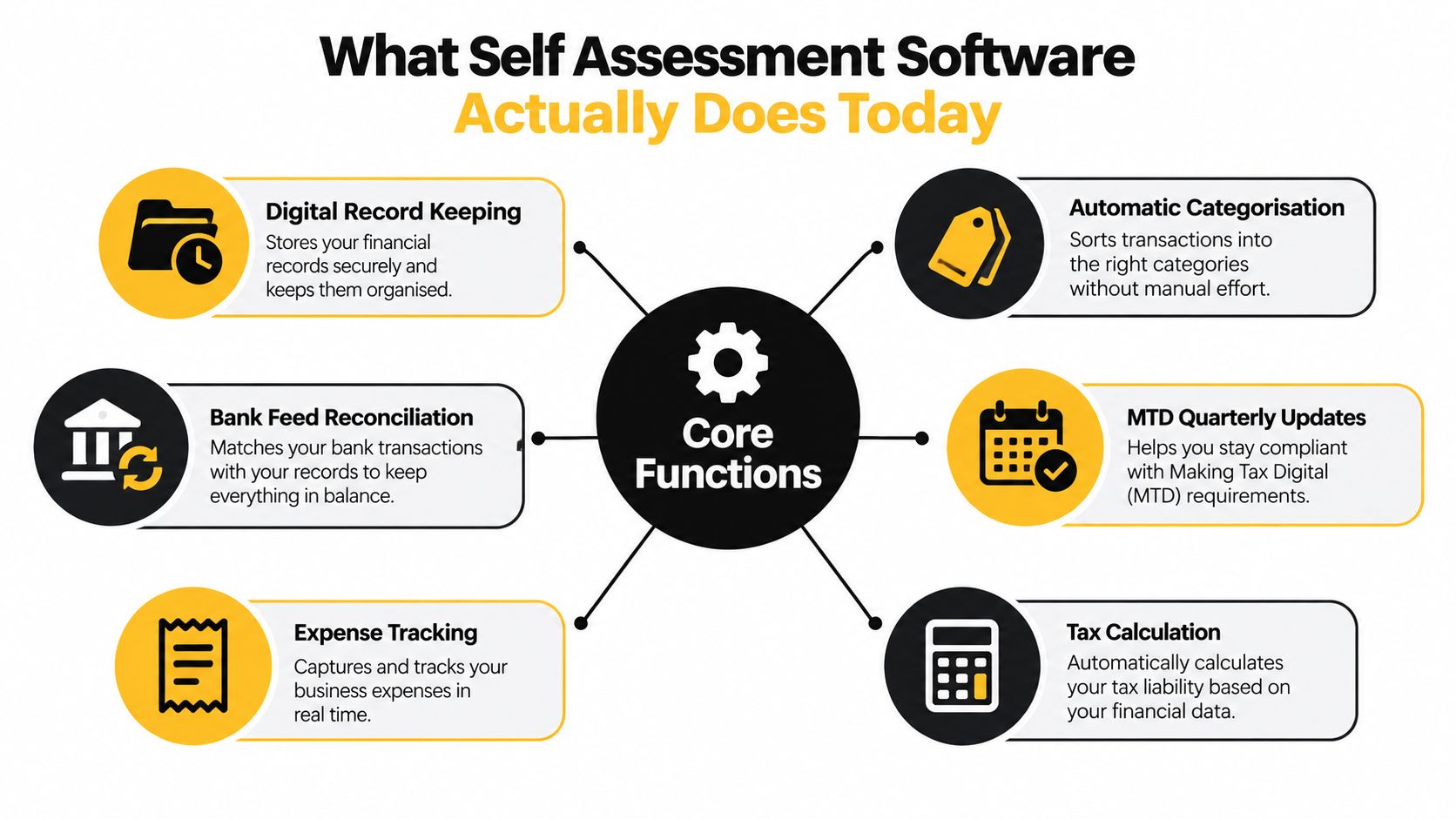
The six jobs that matter
At a practical level, most useful tools cover some mix of these functions:
- Digital record keeping so income and expenses live in one place
- Expense tracking so receipts don't disappear into email folders and photo galleries
- Automatic categorisation to reduce manual coding
- Bank feed reconciliation so transactions match reality
- Tax calculation support to estimate what's likely due
- MTD quarterly update capability for users who'll fall into scope
That last point is where HMRC's own portal and third-party software split apart. HMRC's online service has worked well for straightforward annual filing. But the free HMRC service isn't the same thing as software built for ongoing digital records and MTD-style submission.
Why preparation now matters more than submission
The market has already become heavily digital. The filing step is no longer the difficult part. The hard part is the work before filing. That includes pulling receipts together, checking categories, spotting duplicates, matching bank transactions, and fixing exceptions.
If you use Xero or QuickBooks already, self assessment software can either sit on top of that accounting data or operate as a simpler alternative for sole traders who don't want a full ledger-heavy system. That distinction matters. Some products are really tax tools with light bookkeeping attached. Others are bookkeeping systems that happen to produce tax outputs.
If a product saves you five minutes at submission but costs you hours a month in cleanup, it's the wrong product.
What to look for before you compare brands
Before you get distracted by feature lists, focus on these fundamentals:
- Capture. Can you get receipts and records into the system without friction?
- Clarity. Can you see what's missing, uncategorised, or unreconciled?
- Compatibility. Will it handle MTD requirements if you're moving into scope?
- Connections. Does it fit your accounting stack if you already use Xero or QuickBooks?
- Control. Can you review and correct entries easily when something odd comes through?
Security matters too, but for most freelancers the bigger day-to-day risk is poor process. People don't usually miss deadlines because they lacked a security feature. They miss them because records were scattered, delayed, or never reviewed.
How Leading Self Assessment Options Compare on What Matters
There are really three categories in this market. HMRC's own portal. Lightweight self assessment tools. Full bookkeeping platforms with tax capability. Comparing products inside the right category is more useful than pretending they all solve the same problem.
| Software Category | MTD ITSA Ready | Xero QuickBooks Integration | Best For |
|---|---|---|---|
| HMRC online service | No | No direct integration focus | Simple annual filing while still outside MTD scope |
| Lightweight filing tools | Yes on eligible products | Usually limited or selective | Freelancers and sole traders who want tax-first software |
| Full bookkeeping suites | Yes on eligible products | Stronger ecosystem fit | Users with regular transactions, reconciliations, or growth plans |
HMRC portal
HMRC's own filing route is still the easiest option for people with very simple affairs who are not yet forced into MTD-compatible software. It's familiar, free, and clear enough for straightforward annual submission.
Its weakness is obvious. It isn't where the system is heading.
Key differentiator: HMRC's portal is a filing service, not an operating system for your records.
If you're used to entering totals once a year and calling it done, the portal feels efficient. If you need digital record-keeping and recurring submissions, it becomes a dead end.
Lightweight filing tools
This group includes products like Taxfiler, GoSimpleTax, and TaxCalc Individual. They're useful when your business is simple, your transaction volume is manageable, and you want software that stays close to the tax job rather than turning into full bookkeeping.
These tools usually suit people who think in terms of “income, costs, tax due” rather than “chart of accounts, journals, reporting packs”. That's a good thing for many freelancers. Simpler interfaces often mean fewer mistakes.
The trade-off is depth. Once you need stronger bank reconciliation, broader automation, or a smoother handoff into a wider finance stack, some lightweight products start to feel narrow.
Full bookkeeping suites
QuickBooks Self-Employed sits closer to this end of the spectrum, and many users will also compare broader bookkeeping ecosystems depending on how their business runs. This category makes sense when tax is only one part of the admin burden.
If you invoice clients, chase payments, manage lots of expenses, or work with a bookkeeper or accountant every month, a fuller platform often pays for itself in reduced cleanup. That's especially true if you need connected processes rather than isolated tax prep.
For firms and developers assessing broader tax compliance use cases, the lesson is the same: the useful software isn't the one with the longest checklist. It's the one that reduces manual intervention across the compliance workflow.
Full bookkeeping software wins when reconciliation is your bottleneck, not tax form completion.
Support, automation, and trust
A software comparison that only lists features misses what buyers care about. The key filters are:
- Ease of correction when a category is wrong
- Confidence during review before you submit
- Support style if you get stuck
- Workflow fit with your existing habits
A sole trader who lives in email and bank feeds needs something different from an accountant handling multiple clients. Choose the category first. Then compare products inside it.
Pricing and Making Tax Digital Readiness Explained
Price matters, but not in the way most comparison pages frame it. The cheap option isn't automatically cheaper if it leaves you doing manual cleanup every quarter. The expensive option isn't good value if all you need is simple compliance.
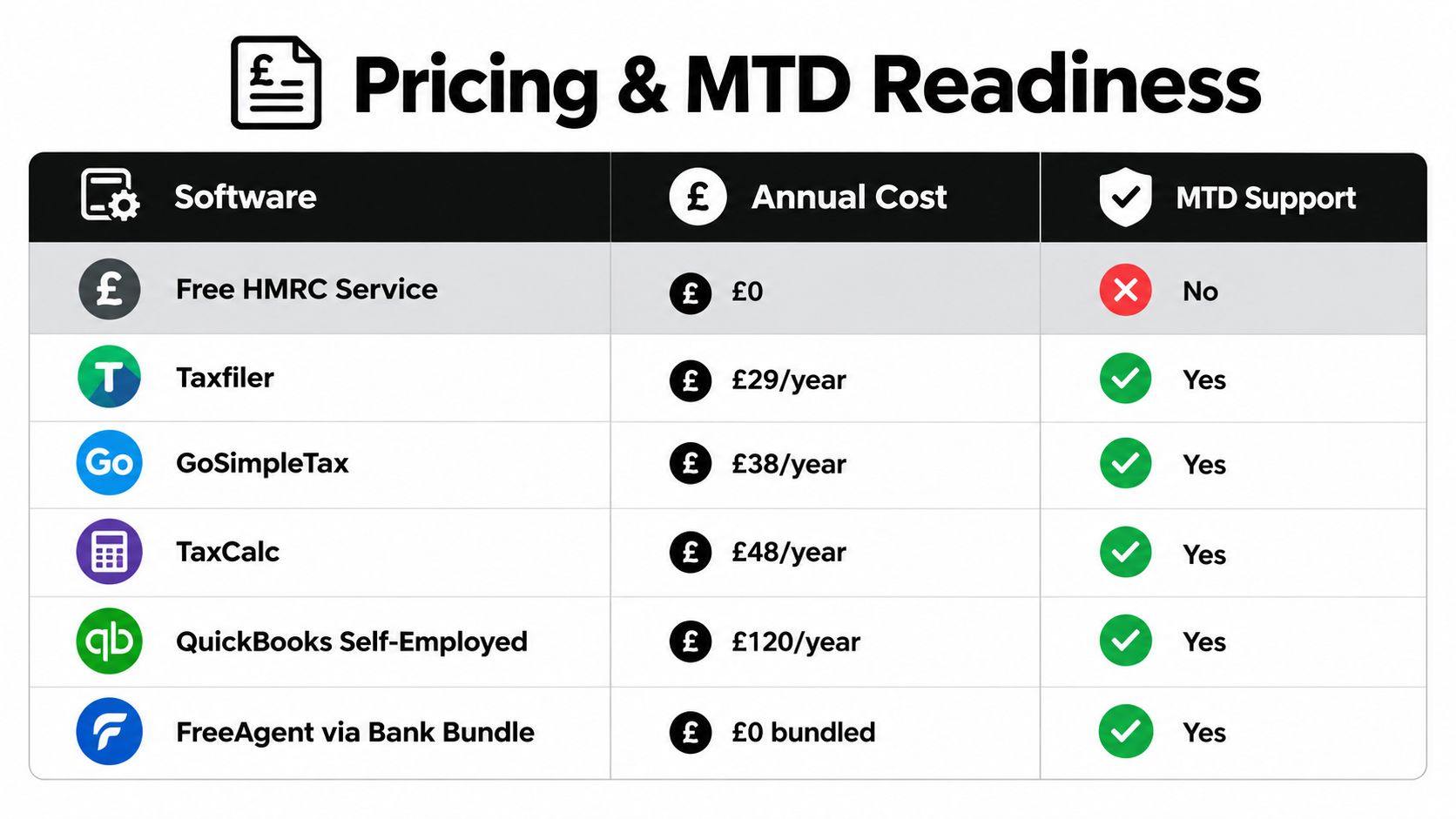
A published UK comparison benchmarked several products by annual cost, MTD ITSA readiness, and use case. It listed HMRC's online service at free but not MTD ITSA-ready, Taxfiler at £25/year, GoSimpleTax at £50 (£68 with rental), TaxCalc Individual at £59, QuickBooks Self-Employed at £96/year, and FreeAgent at £0 only via NatWest (software comparison summary).
Free is only free if your workflow stays simple
HMRC's free route has been attractive because the annual filing step costs nothing. But once you need MTD-compatible software, the comparison changes. You're no longer buying submission alone. You're buying a process for record-keeping and recurring updates.
That's why low annual prices on tools like Taxfiler, GoSimpleTax, or TaxCalc can make sense for simple users. They cover compliance at a modest cost without pushing you into a heavier accounting setup than you need.
If you're trying to understand the wider rule change first, read this overview of MTD for self assessment. Then come back to product choice with clearer criteria.
The threshold changes the value equation
The biggest pricing mistake is evaluating software as if it only helps in January. It doesn't. Under MTD, the value sits in the months before filing.
The policy direction is clear. Self Assessment taxpayers with qualifying income over £50,000 must use MTD for Income Tax from April 2026, and those over £30,000 from April 2027, with digital records and quarterly submissions through third-party software rather than HMRC's own online filing route (Public Accounts Committee report citing HMRC timetable).
That means the cost comparison is this:
- Low-cost tax software works if your books are already tidy
- Mid-range tools make sense if you need some automation but not a full finance stack
- Broader bookkeeping software earns its keep when transaction volume, invoicing, and reconciliations create regular admin drag
Hidden cost sits in your time
Software vendors love headline prices. Freelancers should care more about workflow drag.
Ask yourself three blunt questions:
- How many transactions need checking each month?
- How often do you lose receipts or hunt for missing ones?
- Will quarterly submission force you to stay current anyway?
If the answer to the second and third questions is “often” and “yes”, paying more for better process can be rational. If your affairs are simple, don't overbuy.
How to Choose the Right Self Assessment Software for Your Situation
The right choice usually becomes obvious once you stop comparing features and start comparing habits. Software succeeds or fails based on what you'll maintain.
Start with obligation, not branding
First, check whether you're likely to move into MTD scope soon. If you are, rule out any tool that only works as an annual filing shortcut. There's no point switching twice.
Then look at your current stack. If you already run Xero or QuickBooks properly, you probably don't need a standalone self assessment product that duplicates your records. You need a tax path that works cleanly from what you already maintain.
Use this decision matrix
| Your situation | What to prioritise | Likely fit |
|---|---|---|
| Very simple freelance income, low admin volume | Straightforward tax workflow, low cost | Lightweight filing tool |
| Growing sole trade with regular expenses | Bank feeds, categorisation, easy review | Bookkeeping-led setup |
| Landlord with mixed records and spreadsheets | Digital records, clean migration path | MTD-ready software with simple structure |
| Already using Xero or QuickBooks | Integration and minimal duplication | Software that works with existing accounting stack |
| Hate admin and delay paperwork | Fast capture, automation, reconciliation support | Workflow-led setup with strong document capture |
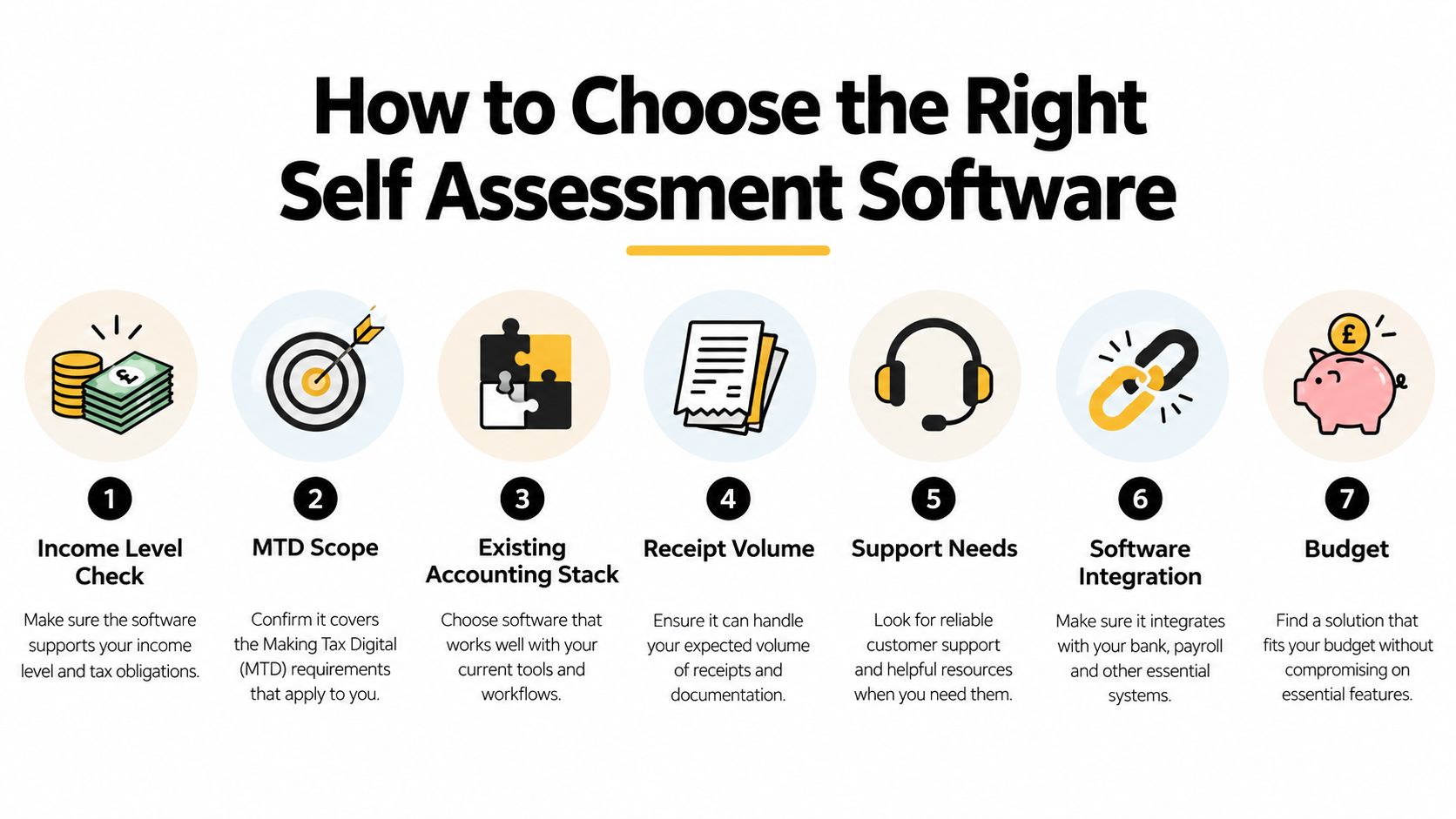
Here's the practical checklist I use with clients:
- Income level check. If you're near an MTD threshold, buy for the future state.
- Record volume. More transactions means reconciliation matters more than form design.
- Existing tools. Don't create duplicate books unless you enjoy fixing mismatches.
- Support needs. If you freeze when tax software throws an exception, prioritise usable support.
- Capture habits. If receipts arrive by email, phone, and messages, your software must accommodate that.
This walkthrough is worth watching if you want a visual explanation of what the selection process looks like in practice.
Buy for the routine you can keep, not the ideal process you'll abandon after two weeks.
One final filter
If you're deciding between two decent options, choose the one that makes monthly review easier. Quarterly rules punish backlog. Software that keeps you current wins, even if its tax screen looks less polished.
Recommended Self Assessment Software by User Type
The cleanest recommendation depends on the shape of your records, not your job title. A freelance designer and a self-employed electrician can both be sole traders, but their admin burden may be completely different.
Freelancers with simple affairs
If your setup is lean, use a lightweight self assessment tool. Taxfiler, GoSimpleTax, or TaxCalc Individual make sense when you mainly need a clear route from records to return without running a larger bookkeeping system.
Choose tax-first software when your business is simple enough that bookkeeping depth would go unused.
This is the right route for copywriters, consultants, or creatives with limited expense categories and predictable income.
Sole traders with growing admin
Once expense volume rises, the friction shifts. It's not the return. It's chasing receipts, matching transactions, and correcting categories. That's where bookkeeping-led software or connected capture tools become more useful.
If you already work in Xero or QuickBooks, keep the core books there and improve the intake process around them. If receipt collection is the weak point, tools such as Snyp can ingest documents from WhatsApp, email forwarding, or file upload, extract merchant, amount, date, tax, currency, and category, and sync the results into Xero or QuickBooks for review. That's often more practical than changing your tax software just to solve a records problem.
For broader admin stack decisions, this guide to bookkeeping software for freelancers is a useful companion read.
Landlords moving off spreadsheets
Landlords often underestimate the migration issue. Spreadsheet users who only want “something for tax” usually need software that handles digital records without forcing a full accounting overhaul.
Go for a product with a simple structure, decent import options, and MTD readiness. Avoid anything that assumes you want a full finance department in miniature.
Accountants and bookkeepers with multiple clients
For advisers managing many small clients, standardisation matters more than novelty. You need software your clients can use, plus a workflow that minimises exception chasing.
The best firm setup is the one that clients will comply with consistently, not the one with the cleverest dashboard.
In practice, that often means pairing a straightforward tax product with a disciplined capture and review process, especially for clients who aren't naturally organised.
Setting Up a Frictionless Workflow From Receipt to Submission
The software decision matters. The routine matters more. Most filing stress comes from delayed bookkeeping, not from tax calculations.
Build one capture habit
Pick one intake path and stick to it. If you receive receipts by email, forward them to a dedicated capture workflow. If you get paper receipts on the move, photograph them immediately. If your business runs through your phone, make mobile capture your default rather than promising yourself you'll tidy things up later.
If you need a practical system for receipt handling before tax season gets ugly, this guide on how to master receipt organization is worth reading.
Keep review light but regular
Don't wait for January. Review transactions monthly. Check uncategorised items, duplicates, missing documents, and odd supplier names. Small corrections are quick. A year's worth of corrections is miserable.
For emailed purchases, automated extraction helps a lot. If that's one of your weak spots, this walkthrough on how to read email receipt records into a cleaner workflow is directly relevant.
Treat exceptions as the real work
Automation handles the standard cases. Your job is to catch the exceptions. Personal spend mixed into business accounts, duplicate uploads, unclear VAT treatment, and misclassified subscriptions are where errors creep in.
Good self assessment software supports compliance. A good workflow prevents panic.
If you want fewer loose receipts, cleaner categories, and faster reconciliation before MTD deadlines start biting, Snyp gives you a practical way to capture documents from email, WhatsApp, or file upload and push structured expense data into Xero or QuickBooks. It fits the part of self assessment that most freelancers struggle with: keeping records current without turning admin into a weekly battle.