




How to Organise Receipts for Taxes: A UK Guide
It is the week before you sit down with your Self Assessment, and the receipts are still split between a coat pocket, a WhatsApp chat, and a faded till roll in the van. You remember the job. You do not remember whether that card payment was stock, a client visit, or a lunch you should not claim.
That scramble is what makes how to organize receipts for taxes a records problem, not a filing-week chore. Each slip has to form a chain someone else could follow: a readable image, a bank line, a business reason, and a category you have checked. A photo on its own is not that chain. If a line is unclear, it needs a flag, not a hopeful guess.
What HMRC Expects You to Keep and for How Long
These rules cover UK sole traders and landlords. If you file outside the UK, check your own tax authority's retention rules before copying this timetable.
HMRC's record-keeping guidance requires Self Assessment business records to be kept for at least 5 years after the 31 January submission deadline for the relevant tax year. Work the deletion date out per return: take that year's filing deadline, add five years, and keep everything supporting the return until then. HMRC accepts paper, digital files or bookkeeping software, provided the records are accurate, complete and readable.
| Record | What it proves | How long to keep |
|---|---|---|
| Receipts and till rolls | Proof of each business expense | At least 5 years after the 31 January deadline |
| Supplier invoices | Proof of purchase and any VAT charged | At least 5 years after the 31 January deadline |
| Bank and card statements | Links each payment to a receipt or invoice | At least 5 years after the 31 January deadline |
| Digital records (Making Tax Digital) | Amount, date and expense category | At least 5 years after the 31 January deadline |
Keeping the pile only until you press submit is not enough. HMRC may check records to confirm the correct amount of tax was paid, and inaccurate records can lead to penalties, interest, or additional tax. Retention is what turns each receipt from a photo on your phone into evidence that still stands up years later.
Make each record findable years later
A year-and-category folder is what makes the search possible long after the transaction itself is forgotten. Name folders by tax year and expense category, put the earliest deletion date in the folder name or a calendar entry, and file each slip alongside the bookkeeping entry or bank line it supports. When a payment is questioned, you produce the slip and the matching statement in minutes rather than digging through a shoebox.
The split between an invoice and a receipt matters in that folder. One is the supplier's request for payment, the other is proof that you paid, and a complete file usually holds both.
Practical rule: Put the earliest deletion date in the folder name, or in a calendar entry. Retention should not depend on memory.
If you are unsure whether a cost counts as a business record at all, an AI legal assistant for business owners can help you frame the question before you ask your accountant. I would still have a qualified adviser sign off anything that changes the return.
How to Capture and Check Every Receipt
A finished record is not a photograph. It is an image you can still read, with the date, amount, and category written down, matched to a bank or card line. HMRC's digital record guidance treats that as four stages: capture, validate, classify, and archive. The same guidance names receipts for goods and stock, bank statements, invoices, till rolls, and bank slips as acceptable proof. For Making Tax Digital for Income Tax, the digital record still needs the amount, the date, and the expense category, and you must keep the supporting documents as well.
The flow below is the capture half of that chain.
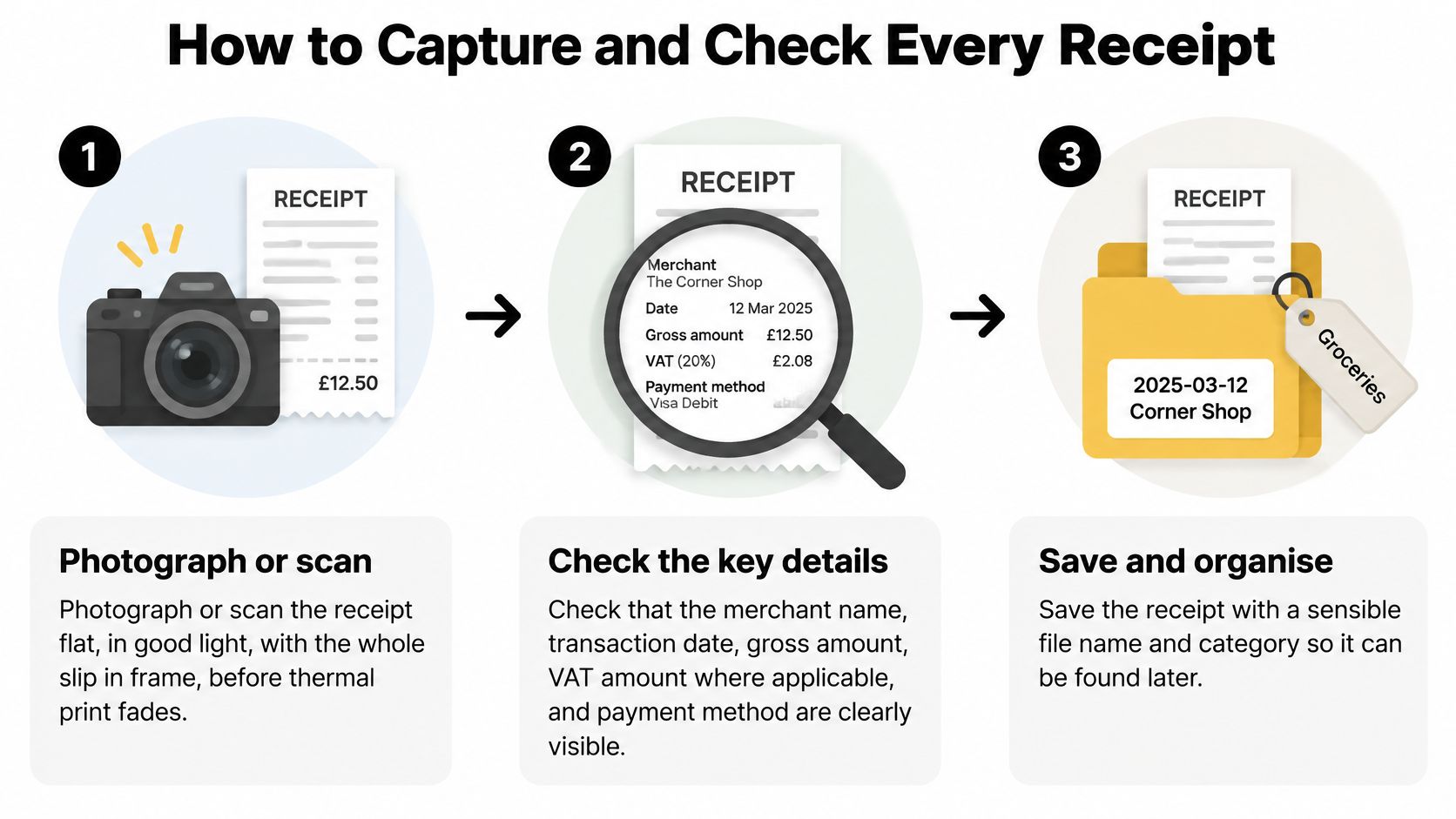
- Photograph or scan it the same day. Lay the slip flat, in good light, with the whole edge in frame. Thermal paper often fades within months, and a later photo of a blank slip proves nothing.
- Read it before you file it. Merchant, transaction date, gross amount, VAT where shown, currency, and business purpose all need to be legible. If the purpose is not obvious, add a short note. A crop that cuts off the VAT line is the usual miss.
- Keep the original file untouched. Save a copy if you need to brighten it. Do not overwrite the file you captured. An edited image is harder to defend than a dull original.
- Name it so a search works. Date, supplier, and amount in the file name beats "IMG_4082". You will not remember the camera roll name in four years.
- Send it to one capture inbox that day. Email, upload, or a messaging app is fine, as long as there is a single place. A receipt that stays in a phone gallery is easy to lose when you change phones.
- Match it to the bank or card line the same week. That link is what turns a picture into proof. Waiting until January means you are guessing which of three similar card payments it was.
Do not treat OCR or an automatic category as approval. Review VAT, mixed-use costs, mileage, subsistence, and capital purchases yourself. A monthly exception list for missing documents, duplicate amounts, personal spending, and lines that do not match the bank feed catches what the scan missed.
If you want a second view of a simple filing habit, Allied Tax Advisors explain how to organize your business receipts without turning the job into a software project. The test at the end is the same. Someone else could open the file and see the image, the date, the amount, the category, and the matched bank line.
Sort Each Expense Into the Right Category
Most errors show up here, not at the camera. The category decides how the cost is reported on the return. A clear photo of the wrong box is still the wrong box. Use the same categories in your capture tool and in Self Assessment, then check the awkward ones before you file. A fuller map of those boxes sits in this guide to UK expense categories.
| Expense | Self Assessment category | Check before filing |
|---|---|---|
| Stationery and software | Office costs | Confirm the purchase is used for the business |
| Phone and broadband bills | Office costs | Claim only the business share |
| Train, taxi and fuel for client visits | Travel costs | Note the journey purpose on the receipt |
| Vehicle mileage | Travel costs | Use one method per vehicle and keep the log for it |
| Client lunches and entertaining | Usually not allowable | Flag for manual review |
| Accountant and legal fees | Professional fees | Keep separate from other fees |
| Equipment over the small-item level | Capital item | Review manually, not as a routine expense |
| Stock and materials | Cost of goods | Keep the till roll or supplier invoice |
Phone, vehicle, and home-office costs are mixed-use. They need a business share, not a yes or no. Automated categorisation can suggest a box. It does not approve VAT, mixed-use, mileage, subsistence, or a capital purchase. You still read those.
Say a freelance designer buys a £240 monitor and a £12 software subscription on the same afternoon. The subscription is office costs, with a note that it is the design tool used on client work. The monitor is not a routine expense. It goes to a capital-item review, with a note of what it is and that it is used only for the business. Same day, same card, two decisions.
If you would not bet the return on the category, tag the receipt for month-end. Do not leave the argument until January.
Category mistakes are not only a UK habit. EndureGo's note on the GST treatment of business expenses shows the same split between everyday costs and items that need a manual share or a capital look. The labels differ. The discipline does not.
Photos, Lost Receipts and Card Statements
Scanning is not the same as having a record. A readable, unedited image or PDF can stand as evidence, and HMRC's first-time Making Tax Digital guidance treats scanning receipts and invoices as one way to create digital records of the amount, date, and category. The image still has to stay accurate and readable for the whole retention period. A phone gallery or a messaging thread is not an archive. Apps get cleared. Phones get replaced.
The chain you should be able to show
You want four things linked, not four things stored somewhere.
- The image or PDF. Readable, and not overwritten by an edit.
- The bank or card line. Same amount, same date, or a note if they differ.
- The business purpose. A few words, written while you remember the job.
- The VAT detail. The amount on the slip, or a note that none was shown.
A blurry photo, missing VAT, or a mixed personal and business buy still needs a person to look at it. Capture is not categorisation.
When the paper is already gone
Lost receipt. Keep the card statement line, write what you bought and why, and flag it. Do not invent a slip.
Digital invoice. Download the PDF from the supplier portal. A login you might lose is not a copy.
Subscription. Save the monthly billing email, not just the renewal in your head.
Blurry image. Retake it the same week, while the merchant can still reprint it.
Mixed purchase. Write the business share and the personal share on the note. A single total hides the claim.
Mileage has no till slip at all, so the log is the evidence. The test is simple. If the file would not make sense to someone reading it in five years, it is not finished.
Making Tax Digital Thresholds and Timing
Receipts get more formal as Making Tax Digital for Income Tax phases in. The measure is your combined annual income from self-employment and property added together, rather than each source tested on its own. HMRC's digital record-keeping notice sets the £50,000 starting point for 6 April 2026 and the announced reductions after it.
| From 6 April | Qualifying income above | What changes |
|---|---|---|
| 2026 | £50,000 | Digital records and quarterly updates begin |
| 2027 | £30,000 | Announced reduction, catches more sole traders |
| 2028 | £20,000 | Announced reduction to the lowest planned level |
Only the 2026 date is fixed. The lower thresholds are announced plans, so work to them but check the timetable again each year. A fuller walk-through of who is caught when is in this note on the Making Tax Digital income threshold.
What the digital record has to hold
For an expense, the digital record needs the amount, the date the expense occurred, and the category using Self Assessment categories. You still keep original supporting records or copies, including invoices and bank statements, so a summary spreadsheet on its own is not enough. Anything you cannot yet place needs a review flag rather than a guessed category, because a guess still reaches HMRC inside the quarterly update. Those updates are summaries of income and expenses. They are not the tax return.
Say your combined income is £32,000. You sit outside the 2026 line and inside the announced 2027 one, so April 2027 is the switch to plan for if the timetable stands. Start the capture habit this year, while a missing date is still an inconvenience rather than a quarterly update you cannot finish.
Below the line that applies to you, paper or a spreadsheet can still be lawful. The costly version is a shoebox that has to become a digital record in the month the rule reaches you.
Run the Monthly Review and Start This Week
A folder of images is not an auditable record until you review it. The monthly pass closes the chain from photo to bank line to return, and it is how you avoid a weekend of reconstruction in March.
Kept up, the pass is short. Skipped for a quarter, it turns into forensic work.
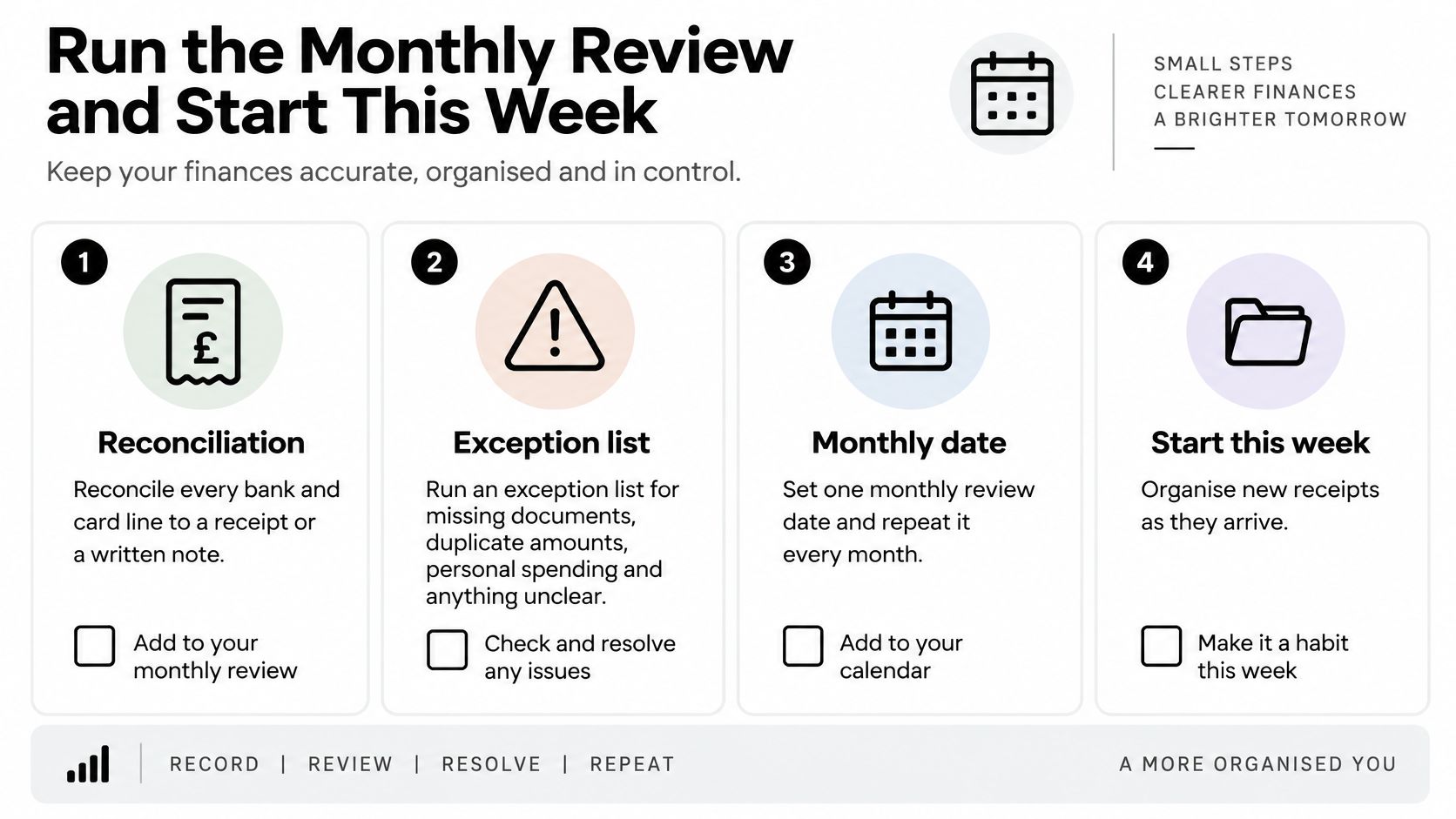
- Reconcile every bank and card line to a receipt or a written note. An unmatched line is either missing evidence or spending that was never the business's, and the fix differs for each.
- Run an exception list for missing documents, duplicate amounts, personal spending, and anything that does not match the feed. Duplicates are easy to spot by amount and date once you look for them.
- Clear every review tag. Decide the mixed-use share and the VAT question while the purchase is still recent enough to remember.
- Back up the year folder to a second place. One laptop is not a retention plan.
If quarterly updates are not your problem yet
You do not need an elaborate system on day one. HMRC's agent toolkit on understanding Making Tax Digital for Income Tax describes a phased start by income level, and a sole trader below the relevant line may keep using paper or spreadsheets. The trap is treating that as a reason to delay a simple digital habit, because the month the threshold reaches you is the worst time to learn a new routine.
A proportionate setup is enough.
- One capture inbox. Every new slip goes there the day you get it.
- Business and personal kept apart. Mixed buys get a note with the split, decided on the day.
- A monthly match to the bank. Twelve small checks beat one January session against a year of statements.
- Searchable source documents. The image or PDF stays attached to the entry it supports.
Digital records under that regime are about income and expenses. They are not a demand to scan every physical scrap, and the quarterly update is a summary rather than the return. Start before you are pushed.
Four moves for this week
Start with last month alone. Five years of old pockets can wait.
- Create a folder for the tax year, such as 2026-27, with a subfolder for each month.
- Forward or upload last month's receipts only.
- Work the exception list for that month, and tag anything you cannot decide rather than guessing.
- Put a recurring month-end reminder in the calendar.
Snyp can be that inbox. You snap or upload the receipt, the AI extracts the details, you review and confirm, and the approved data syncs to Xero or QuickBooks. Each receipt gets a review page with the original image alongside the extracted fields, so the uncertain items are flagged for you rather than automatically filed. Its categories follow UK expense categories and VAT rules out of the box, and a re-categorised vendor is remembered next time. VAT, mixed-use costs, and capital items still need your eyes, and the retention period applies whichever tool holds the file.
This short walk-through shows the same monthly rhythm, from the unsorted pile to a matched list.
I would start this week with one month of receipts and build forward. A finished month teaches the habit. A promised backlog does not.
Snyp turns a receipt photo, a forwarded email, or an upload into structured expense data you review before it syncs to Xero or QuickBooks, so the chain from slip to bank line is in place before tax time. If last month's receipts are still scattered, start there. Visit Snyp and send one month through the review step this week.