




What Is Intelligent Document Processing? How It Works
Intelligent document processing uses OCR, AI, machine learning and workflow rules to turn unstructured documents such as receipts, invoices and PDFs into structured, checked data. It goes after the roughly 37 hours a month that UK small and medium-sized firms spend on administrative tasks, replacing typing and re-keying with a short review of what the software has read.
It's the end of the month. There's a shoebox under the desk, forty photos of receipts on your phone, and a supplier invoice sitting in your inbox that you've opened three times without dealing with. You know roughly what the total is. You also know that typing it all in will take an evening you don't have.
Software is meant to remove that evening. The trouble is that many buyers were sold the wrong half of the promise, the scanning half, and never told about the checking half. That gap is where the confusion lives.
Intelligent Document Processing in Plain English
The benchmark to hold in your head is the most organised person in a small office. An envelope arrives with a receipt inside. They open it, read it, pick out the supplier, the date, the amount, the VAT and the currency, check that the line items add up, and file it in the right place. Nobody tells them where each detail sits on the page, and they don't need the next receipt to look like the last one. Intelligent document processing turns that judgement into software that never gets bored and never rushes in the final week of the quarter.
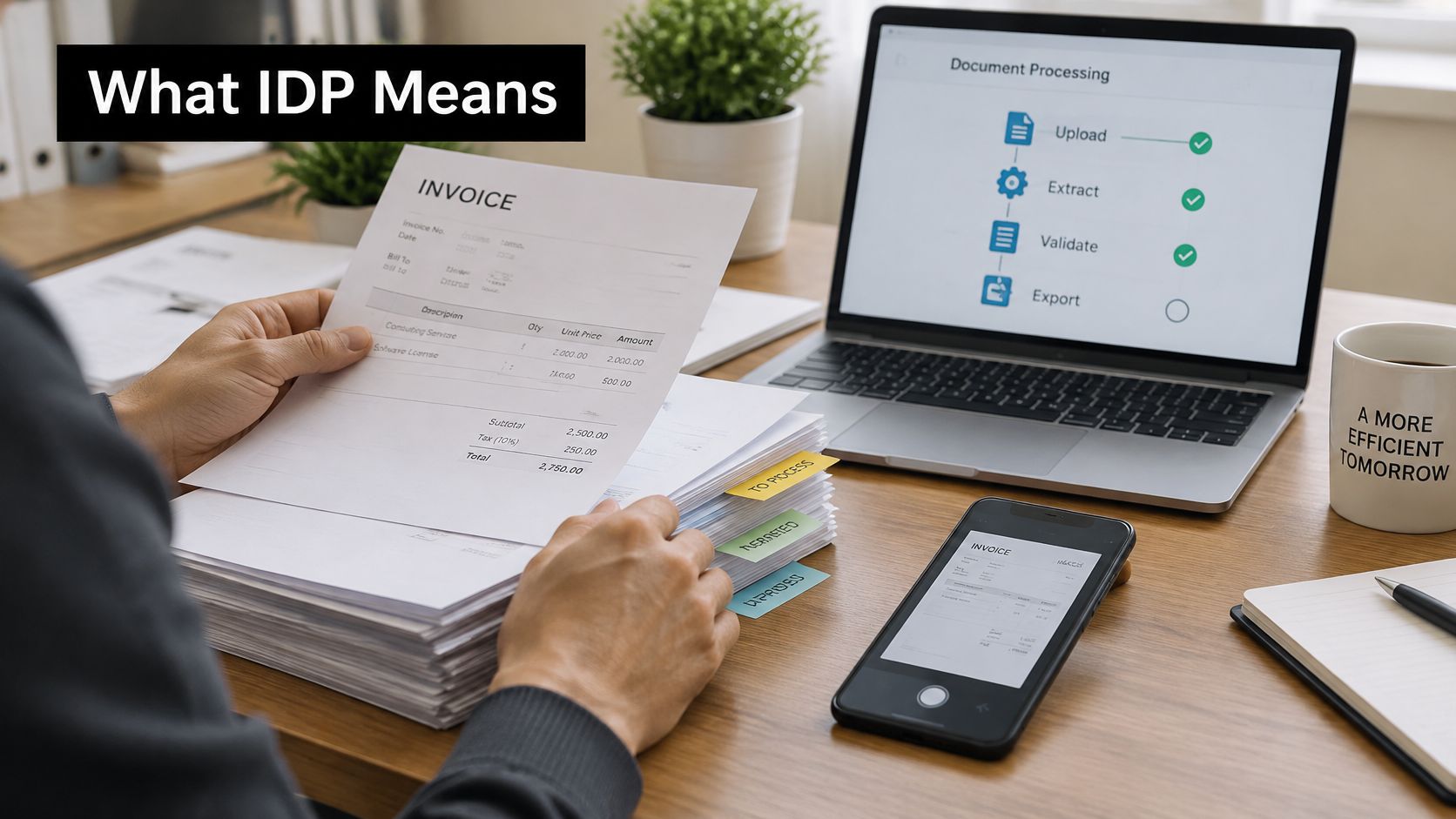
The scale of that job explains why the technology exists. An Institute of Chartered Accountants in England and Wales survey cited by the UK government's small business regulatory taskforce report estimated that small and medium-sized enterprises spend approximately 37 hours per month on administrative tasks, with the burden falling disproportionately on micro-sized firms. The same report notes that businesses dealing with regulation spent an average of 8.0 days per month on regulatory activity in 2024, up from 6.6 days in 2022.
What separates the pipeline from a scanner is everything that happens after the page is read. A scanner produces an image. A basic text-recognition tool produces a wall of text. A working IDP workflow captures the document, identifies the fields that matter, checks them against rules, and passes a structured record into your accounting system with the original attached.
The practical change: a receipt that used to need typing becomes a record you glance at, approve and forget.
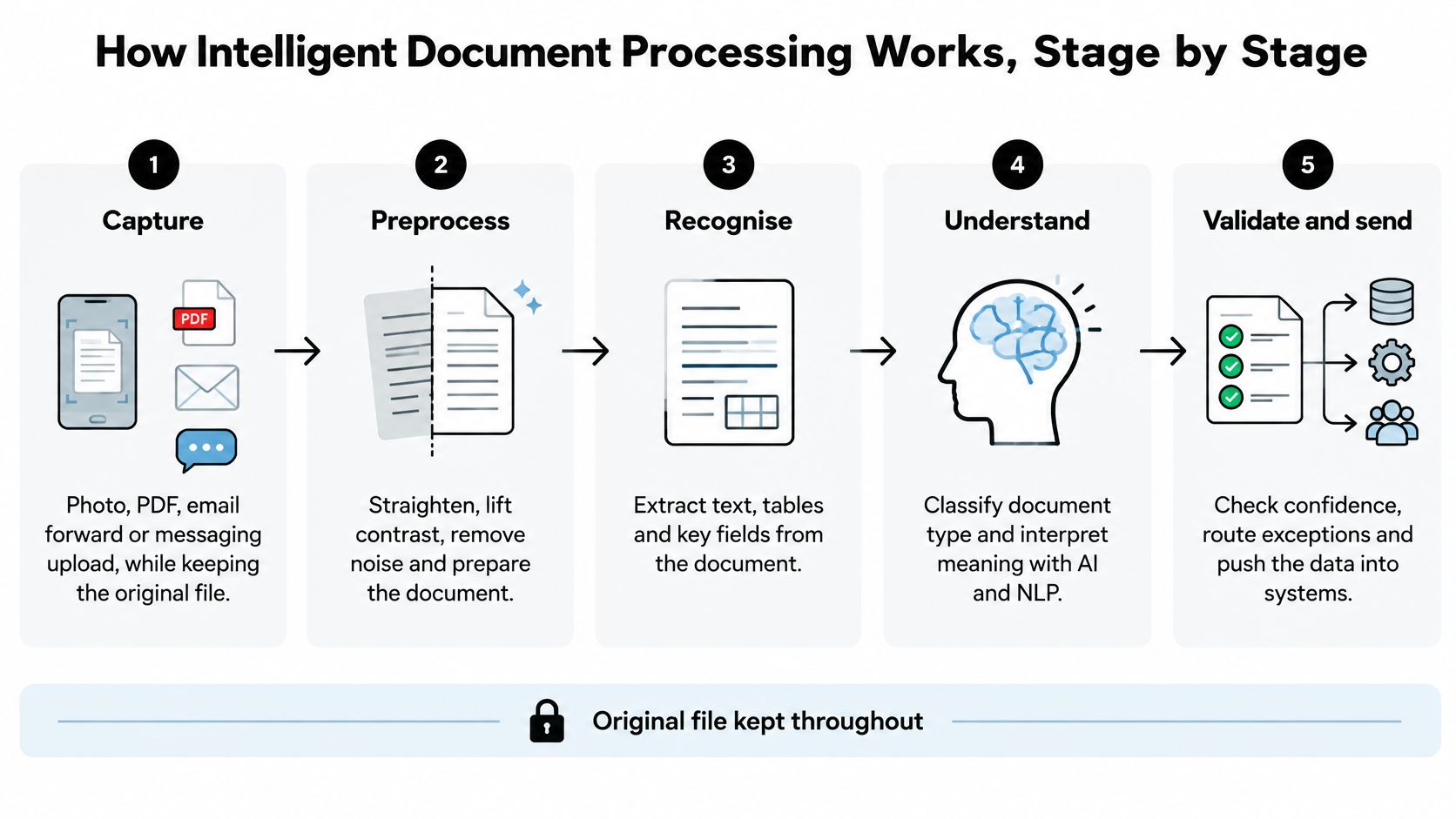
How Intelligent Document Processing Works, Stage by Stage
A working pipeline is less mysterious than the marketing suggests. Seven steps happen in order, and each one exists because the step before it can't be trusted on its own.
- Capture. A photo from your phone, a forwarded email, a PDF from a supplier portal, or a file dragged into a dashboard. The rule that matters here is that the original file is kept, unaltered, because it's your evidence if anyone asks.
- Preprocess. The software straightens a crooked photo, lifts contrast on a faded thermal till roll and reduces background noise. Unglamorous, and decisive: a long supermarket receipt photographed at an angle produces the wrong total if nobody cleans it up first.
- Classify. Before a single field is pulled out, the system decides what it's looking at: a till receipt, a professional invoice, a bank statement or a purchase order. Classification matters because the same layout cues mean different things on different documents.
- Extract. Fields come out: supplier, date, line items, VAT, currency and total. The description is then mapped to a category from your chart of accounts, so a train ticket lands in travel rather than in a catch-all.
- Validate. Rules check the arithmetic, the VAT rate, the required fields and duplicates. This is the step that separates a compliance pipeline from a clever reader.
- Score and review. Every field carries a confidence score. High-confidence fields pass straight through; low-confidence ones go to a person, who corrects them with the original image beside the extracted data.
- Sync. Approved records move into Xero or QuickBooks with the source document attached, so the ledger entry and the evidence travel together.
Where machine reading ends and the rules begin
The stages split into two kinds of work, and confusing them is where projects go wrong. Extraction is probabilistic: a model infers that this number is probably the total and that string is probably the merchant. Validation is deterministic: 20% VAT on a £50 net line is £10, and if the arithmetic doesn't hold, the record should stop rather than guess.
Corrections feed back into the system. Fix a supplier name or re-tag a category today and the next pass is cleaner, which is why month two usually looks better than month one.
What to look for on screen: the original document on one side, the extracted fields on the other, and a flag on anything the system wasn't sure about. If a tool can't show you where a number came from, it isn't ready for your books.
If you handle supplier invoices at volume, the capture side is worth studying properly, and this breakdown of invoice capture and validation workflows shows how each stage joins the next. Ours is deliberately short: you snap or upload the receipt, the AI extracts the details, you review and confirm, and the approved data syncs to Xero or QuickBooks.
How Intelligent Document Processing Differs from OCR and Manual Entry
| Criterion | Manual data entry | Basic OCR | Intelligent document processing |
|---|---|---|---|
| How the document is read | A person reads and types each field | Converts printed or handwritten pixels into text | Reads text, layout and context to find each field |
| Handling changing layouts | Works for any layout, but slowly | Usually needs fixed templates or zones | Learns varied layouts across suppliers without templates |
| Output | Typed entries in a spreadsheet or ledger | Raw text blocks that need manual sorting | Structured fields: supplier, date, VAT, currency, total |
| Validation | Only as good as the person checking | None built in | Arithmetic, VAT-rate, required-field and duplicate checks |
| Uncertain fields | Person decides, often without a record | Errors appear silently in the text | Low-confidence fields route to a reviewer |
| Audit trail | Depends on local habits | Rarely kept | Source image linked to each extracted field |
| Effort as volume grows | Hours added with each document | Setup repeated for each new layout | Effort per document falls once rules and corrections are set |
| Best fit | A handful of one-off documents | Fixed forms with stable layouts | Mixed receipts, invoices and statements across several channels |
The middle column is where most disappointment starts. OCR converts pixels into text, which is useful, but it leaves a person to work out which of the twelve numbers on the page is the total and which one is the VAT. Move to a supplier with a different invoice design and a template that worked last month reads the wrong line.
IDP adds layout analysis, document classification, field-level extraction and rules that check the result. That's the whole difference, and it shows up in what you receive: raw text to sort, or a record you can approve. Manual entry sits at the other extreme, and it's only as accurate as the person doing it on the day, after a long week, with a shoebox still to go. If your volumes are low and your suppliers few, a simpler tool may be enough; this comparison of OCR software for receipts and invoices covers that middle ground without flattering it.
Why the gap matters under Making Tax Digital
The distinction becomes a compliance question once HMRC is involved. HMRC's guidance on creating digital records sets out that digital records must include itemised financial information such as amounts and dates, and must be maintained in functional compatible software. For VAT-registered businesses, digital links are required when data moves between software systems: after entry, transfer, recapture or modification the information has to stay digital, and submissions must use an API.
That's the practical reason extraction without validation can create incorrect tax records. The figure looks plausible, nobody queries it, and it ends up in a return. Field-level confidence scores and an audit trail are what make automation reviewable rather than merely fast.
Practical rule: if every document arrives in one fixed layout, basic OCR with a template can be enough. If layouts vary across suppliers and channels, you need a pipeline that reads the layout and then checks the result.
Real Workflows Where Intelligent Document Processing Helps
Four ordinary situations show where the pipeline earns its keep. Each is an example of the same pattern applied to a different working week.

Example one, the freelancer on site. You finish a job, the supplier hands you a paper receipt, and you photograph it and forward it through WhatsApp before you drive to the next address. In the evening you open one dashboard and approve what's waiting. The change is fewer keystrokes and nothing left in a jacket pocket for three weeks. Freelancers who also send their own invoices usually want that side handled too, and tools such as these billing tools for freelance consultants cover the outbound half of the same admin.
Example two, the sole trader with a shoebox. A month of paper and a phone full of photos arrive in the same queue. Records come back categorised against your chart of accounts, so month end becomes a review rather than a reconstruction, and missing documents surface while you can still find them.
Example three, the bookkeeper with six client folders. Receipts arrive from different suppliers in different currencies, and the work is deciding which client's chart of accounts each one belongs to. A pipeline that proposes a category and flags the uncertain fields is faster than one that types accurately and leaves you to sort. The mechanics of an invoice processing system matter more here than the model underneath.
Example four, the growing company's finance team. Professional invoices arrive by email with long time-entry tables, and legal fees, accounting fees and consulting fees need separating before anything is posted. The system reads the table line by line, captures the VAT from the forwarded document and files each service under its own category.
The groundwork is already in place. The UK Business Data Survey 2025 to 2026 found that 86% of businesses handled digitised data, up from 77% in 2023 to 2024, and that 41% of those businesses used AI-based technologies. That AI measure covers many tools, so it doesn't mean 41% of UK firms run IDP. It means the electronic documents and connected systems IDP depends on are now normal.
Limits, Misconceptions and Edge Cases to Expect
The most common myth is that this is OCR with a better model bolted on. The recognition layer is the least interesting part. Three more assumptions cause trouble:
- "It reads everything perfectly." Blurry photos, handwriting, faded thermal receipts and cut-off totals still need a person. Confidence scores exist precisely because the model knows when it's unsure.
- "Once it's automated, nobody checks." Tax evidence still needs someone to confirm unusual amounts, one-off suppliers and anything flagged as an exception.
- "Digitising is the same as automating." A scanned PDF sitting in a folder is a picture of a document. Without extraction and sync, somebody still re-keys it.
The UK Government's AI Adoption Survey reported that only 16% of businesses were using at least one AI technology, while 80% were neither using AI nor planning to adopt it. Adoption is held back by integration, governance and workflow fit far more than by recognition quality, which is why a tool that fits your existing habits beats a better model that demands a new routine.
Edge cases decide whether the workflow holds up, so give each one a rule rather than a hope:
- Foreign-currency receipts keep their currency and the rate used, never converted.
- Credit notes link to the original invoice so the pair nets off correctly.
- Split card payments reconcile against one total, not three separate expenses.
- The same receipt photographed twice goes to duplicate review rather than into the ledger twice.
- Invoices with long time-entry tables are extracted line by line and the totals are checked against the stated amount.
Exceptions, not the typical case, decide whether the workflow saves you time. A pipeline that handles 90% cleanly and hides the other 10% is worse than a slower one that surfaces them, which is why measuring data accuracy needs to include correction time, not just field accuracy.
What to Check Before Choosing an IDP Tool
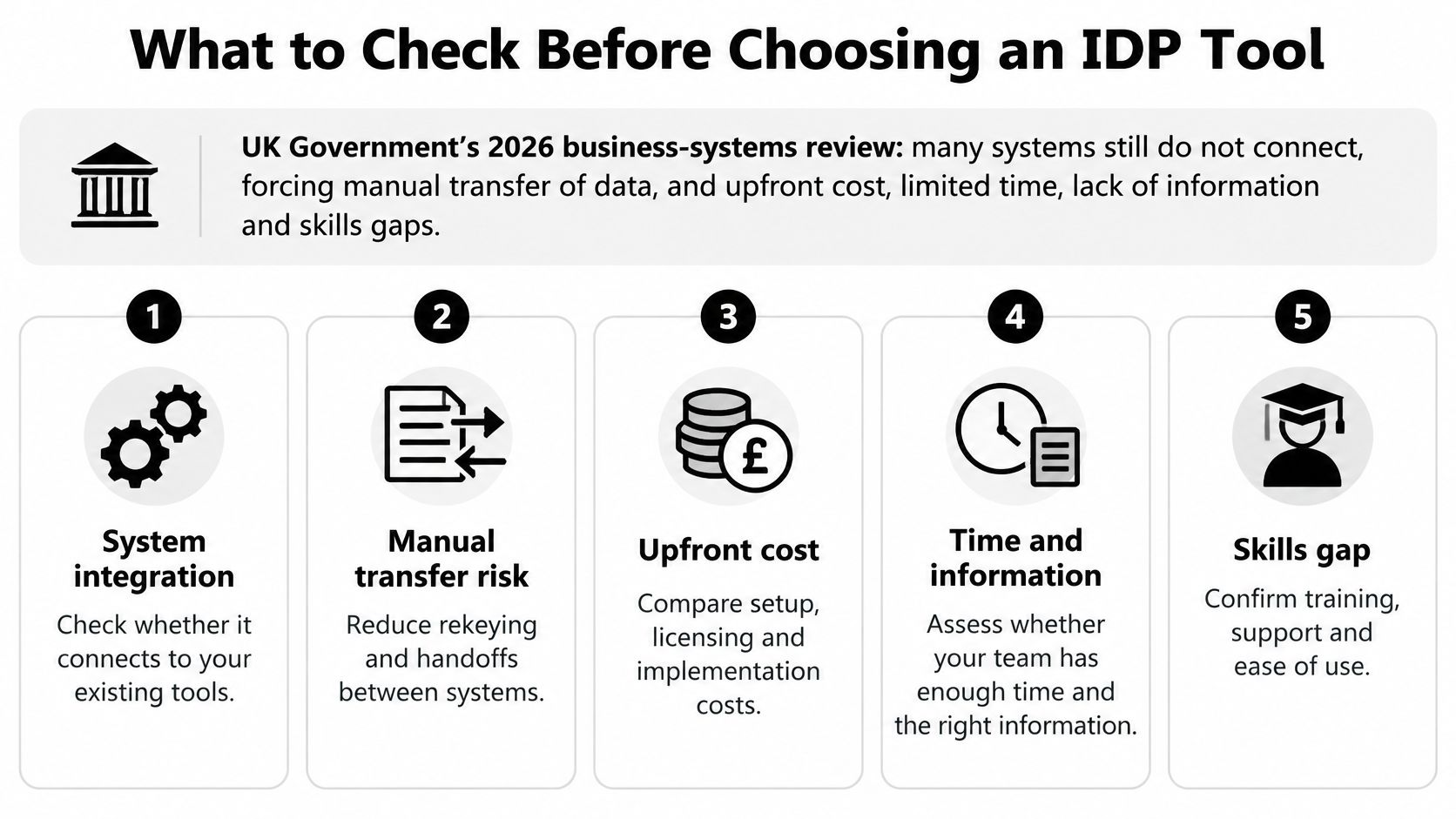
Choosing an IDP tool is less about the engine inside and more about the pipe it builds between your documents and your ledger. The 2026 business-systems review found that many business systems still do not connect, forcing manual transfer of data between them, and identified upfront cost, limited time, lack of information and skills gaps as barriers, particularly for small and micro businesses. The same review notes that integration can add complexity and continuing maintenance costs, with limited perceived value when the cost outweighs the benefit.
So judge a tool on the work it removes, not the model it uses. Many small firms already hold plenty of digital paperwork in inboxes and folders, yet digitised documents prove nothing about extraction quality, sensible checks or a reliable route into the accounts.
- Intake that matches your habits. Email forwarding, messaging or upload, whichever you already use daily. A channel you have to remember is a channel you'll abandon.
- Coverage of your actual documents. A long supermarket receipt and a professional services invoice with time entries and disbursements behave very differently, so test both.
- A direct link into your accounting software. Approved records land in Xero or QuickBooks without a second typing pass.
- The original beside every field. Each record should show the source image next to the extracted data, so you can check any number without hunting for the file.
- Flags for low confidence and duplicates. Silent errors are the expensive ones, because the ledger accepts a wrong figure as happily as a right one.
- An audit trail fit for Making Tax Digital. Digital records your accountant can follow from submission back to the receipt.
- Measured results, not character accuracy. Ask for field-level precision and recall, straight-through-processing rate, exception rate, correction time and successful digital transfer.
The checks in the middle of that list matter as much as the capture at the top. A misread VAT amount travels down the same pipe as a correct one, and without a review step and an audit trail it can end up inside a tax return, wrong, until somebody reconciles months later. For a freelancer or sole trader, the right tool is usually the one that demands the fewest changes to how you already work and is honest about the fields it isn't sure of.
Start With One Receipt Channel and Measure It
Pick the channel that already carries the most volume, usually email forwarding or a messaging app, and run a one-week test that includes a month end.
- Choose one channel. One only, so you can attribute the result.
- Collect 30 to 50 real documents. Include the awkward ones: blurry phone photos, a long supermarket receipt, a handwritten note, a foreign-currency bill. We process JPEG, PNG and PDF files, including blurry photos, long supermarket receipts and handwritten notes, with no templates to set up.
- Score every field. Mark each document as fully correct, partly correct or wrong, and name which field failed.
- Time the correction. Stopwatch, roughly, from opening the review to approving the record. This number decides everything.
- Compare with your current method. Take the same 30 to 50 documents and estimate the typing time, including the one you'd normally put off.
- Confirm the destination. The approved record should reach your accounting software with the source attached, no re-keying in between.
Keep the tallies on a single sheet: date, supplier, fields correct, correction time, duplicate caught. One week is enough because it covers ordinary days and the month-end pile, and a written record stops you from remembering the trial more kindly than it deserved.
The decision at the end of the week is narrower than whether to adopt AI. It's whether the measured time saved, with every field traceable to its source, justifies moving the next channel onto the same workflow.
Snyp captures receipts and invoices from WhatsApp, email forwarding or a direct upload, reads the vendor, date, line items, VAT and total, and gives each one a review page where the extracted data sits beside the original image. Once you approve it, the record syncs to Xero or QuickBooks, so the evidence and the ledger entry stay together. Try it on the worst receipts in your shoebox at Snyp and judge the accuracy on your own paperwork before you move a second channel across.