




Business Expense Management Done Right

Only 2.6% of expense claims were approved immediately in a 2025 analysis of 371,381 claims worth £60 million across 460 UK organisations. More than 27% took over 30 days, and 76% of rejected claims resulted from incomplete or unclear information rather than suspected fraud. The benchmark data points to a problem many finance teams recognise: business expense management is often less about stopping reckless spending and more about collecting usable information before a claim becomes someone else's problem.
Paper receipts, email attachments and spreadsheet submissions create the same failure pattern. An employee spends money, loses or delays the evidence, a manager asks for clarification, and finance re-keys information that should have been captured at the source. The answer isn't another layer of restrictive approval. It's a clean workflow that makes the correct action the easiest action.
Redefining Business Expense Management
Traditional expense management often starts with suspicion. Finance teams write detailed rules, employees submit claims, managers reject exceptions, and accountants attempt to reconstruct the supporting evidence later. That approach can control some spending, but it also treats every employee as a compliance risk and leaves documentation quality until the end of the process.
The UK benchmark tells a different story. If most rejected claims are rejected because the information is incomplete or unclear, then policy enforcement isn't addressing the main bottleneck. The process is failing earlier, when someone should have captured the receipt, business purpose, location, tax details or transaction context.
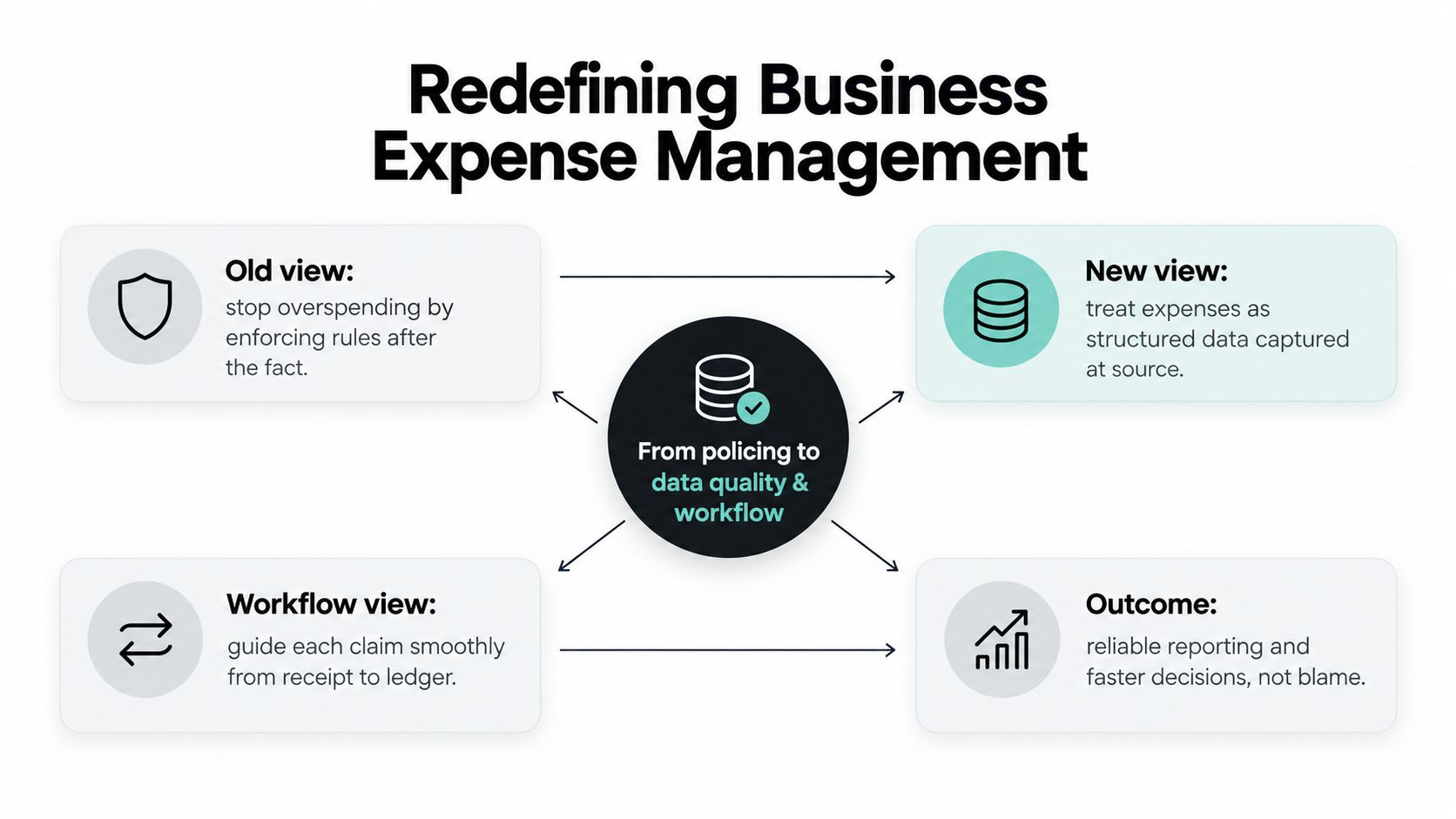
Control starts with usable data
A good system doesn't remove control. It moves control to the point where it can do the most good. A receipt photographed immediately is easier to validate than a faded piece of paper discovered during the month-end close. A claim categorised while the purchase is still fresh is more reliable than a spreadsheet row completed weeks later.
Broader cloud accounting benefits for growing businesses become practical rather than theoretical in this context. Finance teams can only make use of current accounting data when expense information reaches the ledger promptly and consistently.
A well-organized pipeline usually has four connected stages:
- Capture: Collect the receipt and relevant context through a channel employees already use.
- Structure: Extract the merchant, amount, date, tax and category into consistent fields.
- Validate: Check the submission against policy, duplicates, required evidence and approval rules.
- Reconcile: Match the expense to the card transaction, project or cost centre, then prepare it for the ledger.
Practical rule: If employees need to remember a complex process after every purchase, the process will eventually depend on finance chasing them.
The useful question isn't “How do we stop employees spending?” It's “How do we make every legitimate purchase easy to document, review and reconcile?” A concise resource on Bookkeeping and Accounting of Florida Inc expense management is helpful for teams that need to connect everyday purchases with bookkeeping discipline. The strongest system preserves evidence without slowing down the work that generated the expense.
The True Cost of Manual Expense Tracking
Manual expense tracking creates costs that rarely appear as a separate line in the accounts. Finance staff enter data, correct categories, request missing receipts, compare claims with bank statements and carry unresolved items into the next close. Employees lose time searching for evidence, while owners wait for a reliable view of cash leaving the business.
UK expense-management analysis reports that correcting one erroneous claim costs about £41 and takes an average of 18 minutes, with roughly 19% of expense reports containing errors. Those figures describe more than an inconvenience. Each error creates a second piece of work, often performed by a more expensive or more time-constrained person than the original submitter.
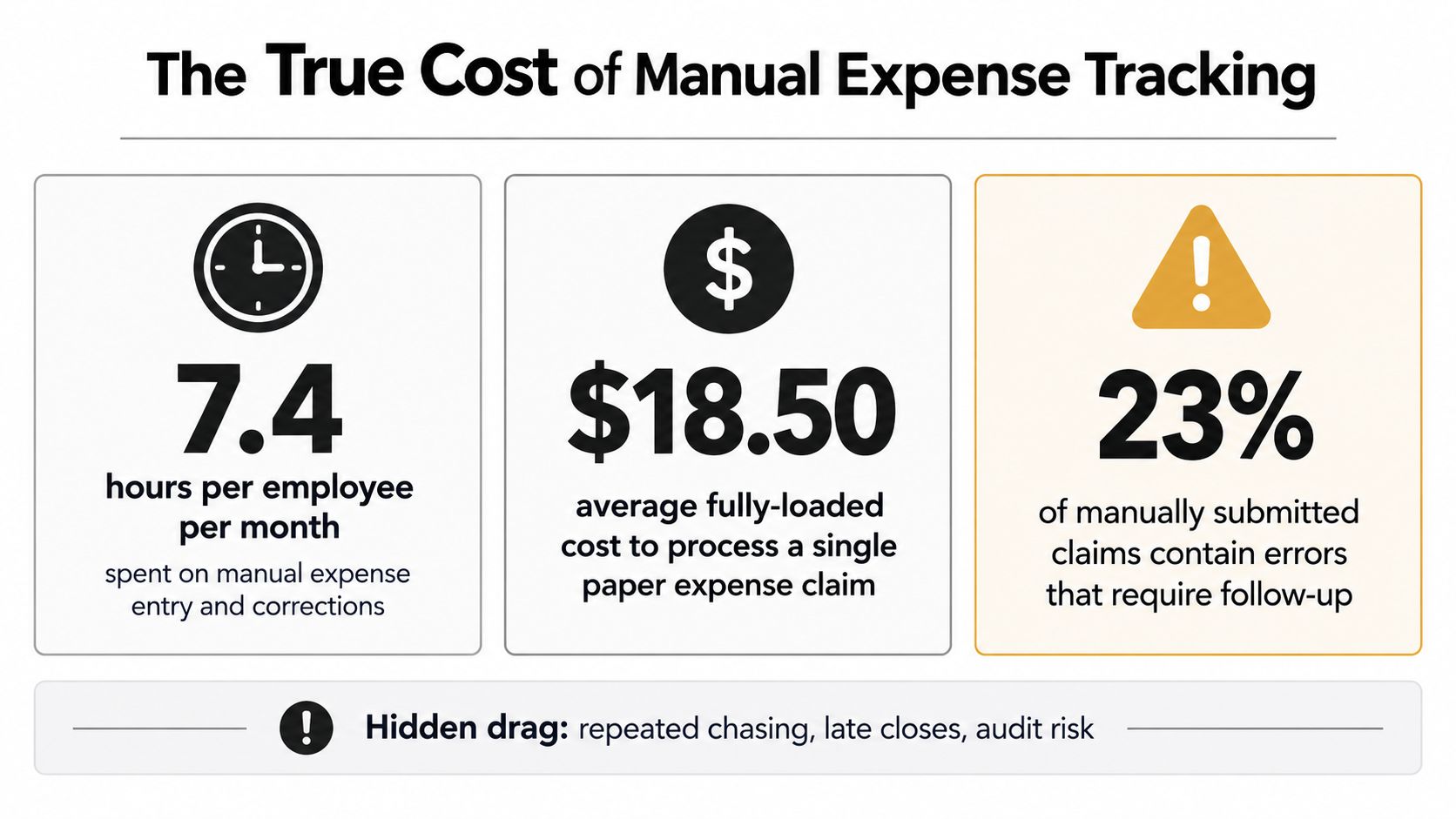
Where the leakage starts
The most damaging manual workflows share three characteristics:
- Evidence arrives late: Receipts sit in wallets, inboxes or vehicles until someone asks for them.
- Data gets re-keyed: A finance employee copies merchant, date, amount and tax information from a document into a spreadsheet or accounting system.
- Errors return to the queue: Missing VAT details, duplicate entries and incorrect categories require follow-up before approval.
The cash-flow impact can be direct. Separate survey data found that UK SMEs lose an average of £742 per month from erroneous invoicing linked to weak reimbursable-expense tracking, while accountants spend around five hours each month correcting client report errors. The reported SME impact also estimated a £1.1 billion monthly shortfall across UK SMEs, illustrating why poor expense records matter beyond administrative neatness.
A spreadsheet can be perfectly adequate for a very small volume of predictable transactions. It becomes fragile when several people submit expenses through different channels, when receipts arrive in multiple formats, or when managers approve without seeing the same evidence finance will later need.
Measure the process before replacing it
Don't begin with a software feature list. Record how long a typical claim takes from purchase to ledger entry, how often finance requests clarification, and which categories produce the most exceptions. Include employee time, manager time and bookkeeping rework.
The business case for automation is strongest when it targets a specific bottleneck. If receipts are the issue, start with capture. If approval is slow, fix routing and notifications. If the ledger is inaccurate, prioritise categorisation and accounting integration. A practical guide to how to track expenses can help a small firm establish that baseline before changing its workflow.
Designing a Frictionless Expense Policy
An expense policy should answer practical questions at the moment someone spends money. What qualifies? What evidence is needed? Who approves it? Which exceptions require an explanation? If employees need to interpret dense legal wording, they'll make inconsistent decisions and finance will spend time correcting them.
Start with categories that reflect real work. Travel, accommodation, meals, mileage, software, equipment and client activity may require different evidence and approval routes. Keep the rules specific enough for an automated workflow to apply, but avoid limits so complicated that employees can't understand them without asking finance.
Write rules users can follow
A usable policy normally defines:
- Eligible purchases: State what the business reimburses and what it excludes. Explain the business purpose required for less obvious categories.
- Evidence requirements: Specify when an itemised receipt, invoice, attendee list, project reference or written explanation is needed.
- Approval ownership: Name the person or role responsible for routine claims, exceptions and higher-risk purchases.
- Submission timing: Set a clear expectation for prompt capture and submission, then explain what happens when evidence is unavailable.
- Exception handling: Give employees a route for legitimate exceptions instead of forcing them to disguise an unusual but necessary purchase.
Mileage needs particular precision. HMRC-related guidance requires mileage logs to include the reason for each journey and the postcode for both the starting and ending points. The approved rates for cars and vans are 45p per mile for the first 10,000 business miles in a tax year and 25p per mile thereafter. Motorcycles have an approved rate of 24p per mile.
That requirement shows why a total alone isn't sufficient. A mileage claim needs the journey's purpose and locations, just as a meal claim may need the date, merchant and business context. Capture these fields through prompts or structured form fields rather than relying on an employee to add them later.
Make compliance feel like guidance
Put the policy where people submit expenses. Use plain examples, show the evidence required for common purchases and let the workflow flag missing information before submission. A rejection should tell the user what to fix, not just state that the claim failed.
Teams refining their process can also use a practical friction reduction guide to examine every unnecessary click, hand-off and decision. The goal isn't weaker control. It's a policy that makes compliant behaviour faster than workarounds.
Moving Beyond Basic OCR to Context-Aware Capture
Scanning a receipt is not the same as understanding it. Basic optical character recognition can read printed characters, but finance still has to decide whether a number is the total, tax or a line item, and whether the merchant belongs under travel, software or another category.
That distinction matters because receipts vary. A digital invoice may contain a clean tax breakdown, while a photographed receipt may be creased, faded or partly obscured. A useful capture system needs to interpret the document in context, preserve the original file and make uncertainty visible for review.
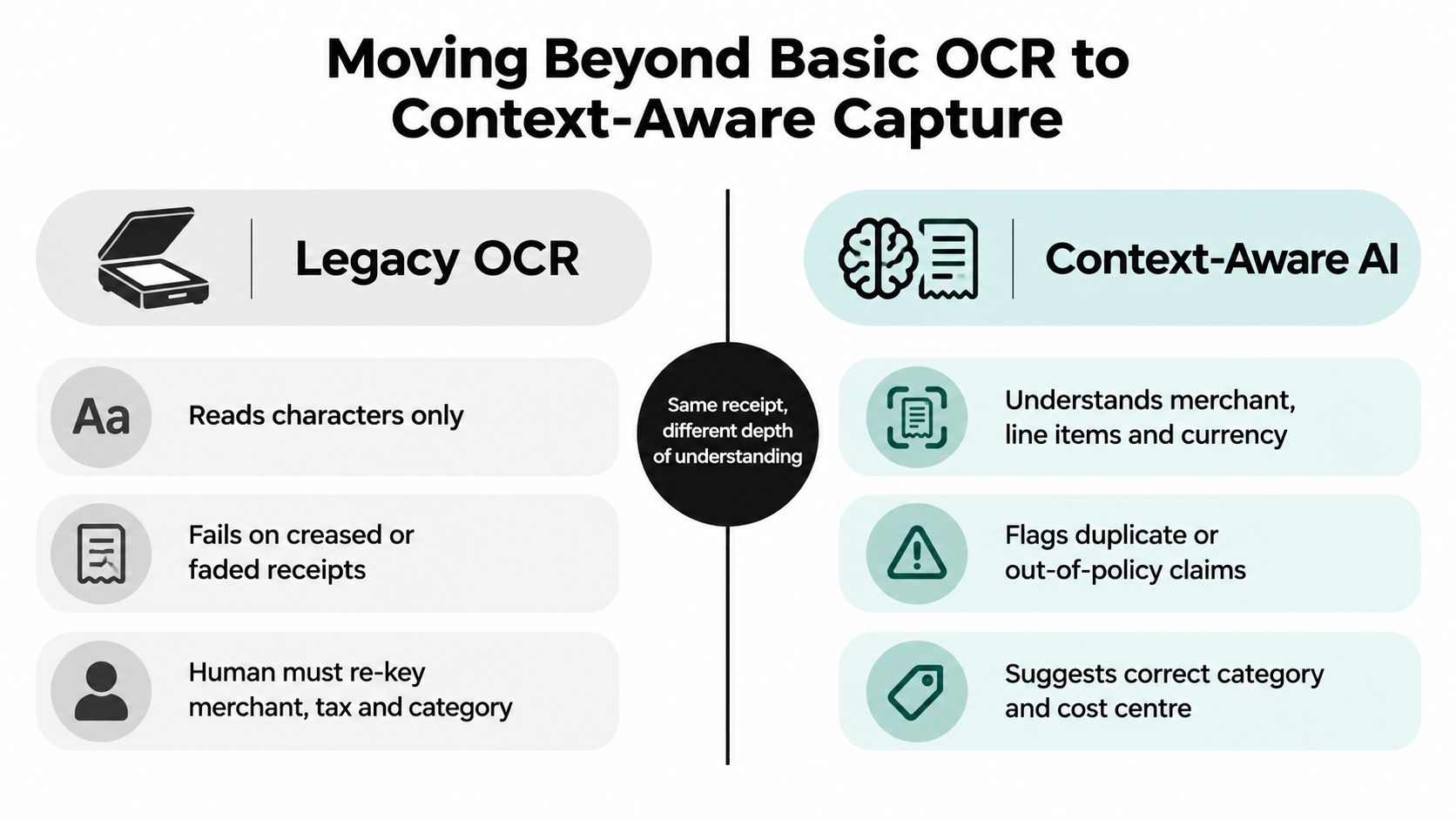
Compare the depth of the result
| Basic OCR workflow | Context-aware capture |
|---|---|
| Reads characters from a document | Interprets merchant, amount, date, tax and currency |
| Often passes raw fields to a human | Suggests category and cost centre using transaction context |
| Struggles when layouts or image quality vary | Flags uncertainty, duplicates and possible policy exceptions |
| Leaves finance to re-key missing information | Produces a structured record ready for review |
The difference is not cosmetic. If the output still requires someone to type the merchant, select the tax treatment and decide the category, the business has digitised the image but retained the manual bottleneck.
Adoption also depends on where capture happens. Employees may not open a dedicated finance application immediately after a purchase, particularly when they work on site or travel between jobs. Email forwarding, mobile photographs and WhatsApp submissions fit more naturally into existing habits. The system should accept JPEG, PNG and PDF files, retain the original evidence and return a record that finance can inspect without opening several separate folders.
The implementation still needs safeguards. Finance leaders in an independent UK SMB survey identified security or data-privacy concerns at 49% and implementation cost at 44% among the leading challenges. The UK SMB findings also note that HMRC supported 3.2 million small businesses in 2025–26 with digital nudges to help them claim expenses correctly. Digital adoption is moving forward, but usability and trust determine whether a new workflow survives beyond its launch.
The practical test is simple. Send the same receipt through the proposed capture route and inspect the resulting record. Can a reviewer see the source document, understand the extracted fields, correct an error quickly and send the approved data to the accounting system? If not, the OCR label doesn't solve the operational problem.
Building an Automated Reconciliation Workflow
Receipt capture is only the first hand-off. The main value appears when the document becomes a validated accounting record without another round of manual copying.
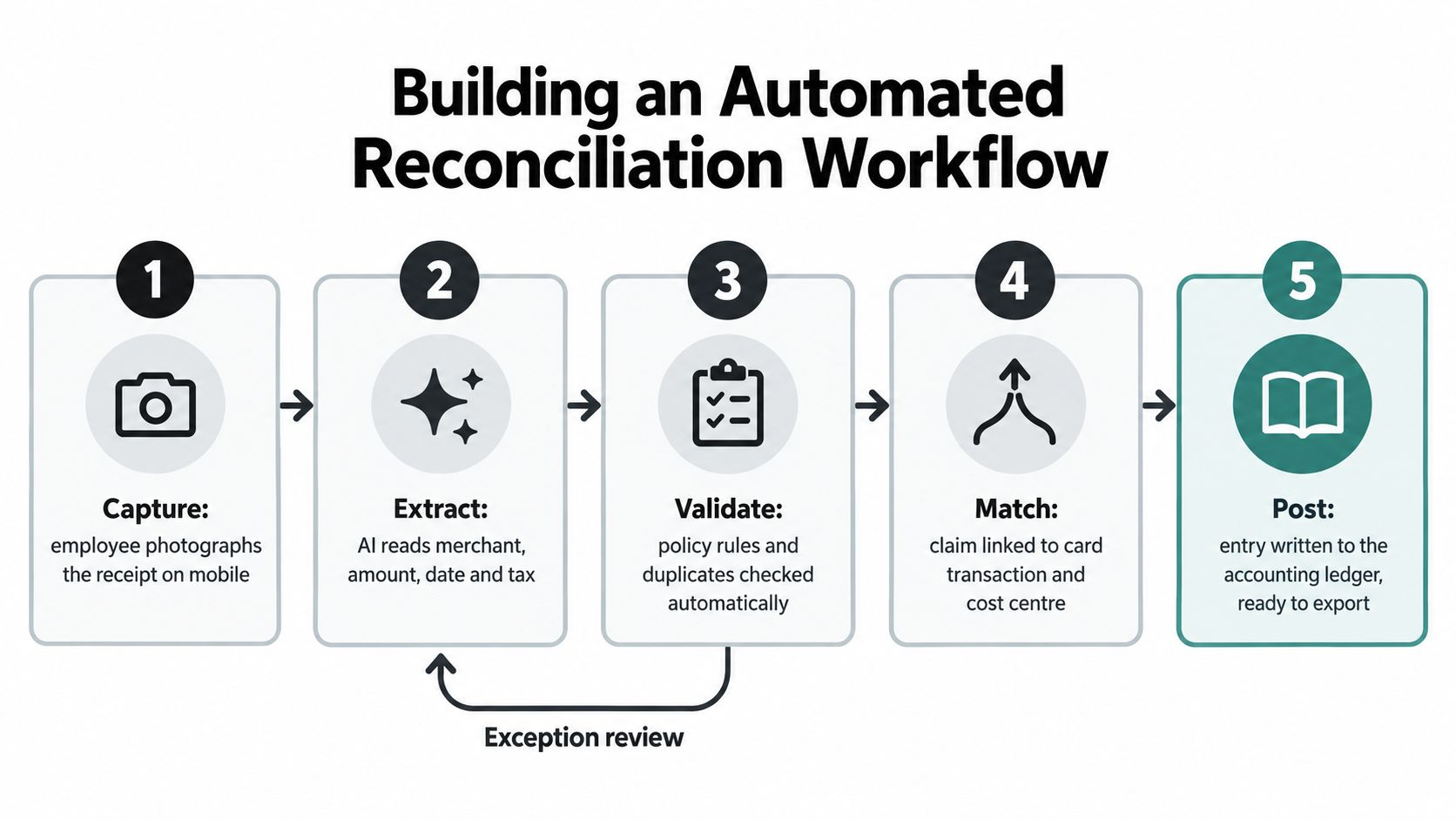
Follow the record from purchase to ledger
An effective workflow can look like this:
- Capture at source: An employee photographs a receipt, forwards an email or uploads a PDF immediately after purchase. The original document stays attached to the transaction.
- Extract the fields: The system identifies the merchant, date, amount, tax, currency and likely category. It should show the extracted values clearly so a reviewer can correct an exception without re-entering the full claim.
- Validate against context: Policy checks look for missing evidence, duplicate documents, unusual categories and required business details. Routine claims move forward, while genuine exceptions reach a person.
- Match the transaction: The expense is linked to a corporate card transaction, bank entry, project, department or cost centre. This prevents finance from comparing separate lists by eye.
- Post for reconciliation: Once approved, the structured record synchronises with the accounting ledger, such as Xero or QuickBooks, with the evidence and approval trail preserved.
The sequence matters. If categorisation happens only after a spreadsheet has been approved, finance still carries the risk of incorrect coding. If matching happens at month-end, a missing receipt can remain invisible until the close is already under pressure.
Design the exception path deliberately
Automation shouldn't attempt to hide uncertainty. A merchant that cannot be identified, a tax field that appears ambiguous or a purchase outside the policy should be routed to an exception queue with a clear reason. The reviewer should be able to correct the field, request context or approve with a documented justification.
This approach reserves human attention for judgement. It also creates useful management information. Repeated exceptions may indicate an unclear policy, a supplier whose receipts lack required details or a category that needs a different approval rule.
The case for replacing spreadsheets is strong. Recent UK-focused coverage reports that 45% of businesses still rely on Excel or similar tools for expense management, while a 2025–26 UK SMB report says companies expect faster reporting, more automation and stronger fraud prevention for hybrid and mobile-first spending. The coverage of UK expense processes reflects the gap between a tool that stores rows and a workflow that keeps records current.
Overcoming Security and Adoption Hesitations
Security concerns deserve a specific answer, not a slogan. Expense records can contain employee names, travel details, supplier information, tax data and account credentials. Before adopting a tool, ask how documents and account data are protected in transit and at rest, how access is controlled, what audit records are retained and how integrations are authorised.
End-to-end safeguards should protect both the source document and the connected accounting account. Role-based access is equally important. A person who submits a receipt shouldn't automatically receive permission to change accounting settings or approve their own exceptions.
Choose proportionate controls
A small firm doesn't need an enterprise transformation programme to improve business expense management. It does need clear ownership and sensible checks.
- Limit access by role: Give submitters, reviewers and administrators only the permissions they need.
- Preserve the evidence: Keep the original receipt attached to the structured record so an auditor or accountant can follow the trail.
- Record decisions: Store approvals, corrections and exception explanations with the transaction.
- Review integrations: Confirm which accounting permissions are requested and remove access that isn't necessary.
- Test with real documents: Include poor-quality photographs, emailed invoices and unusual formats before rollout.
Implementation cost becomes easier to judge when the scope is narrow. Start with one expense stream, such as employee reimbursements or field-service receipts, and measure the work removed from capture, correction and reconciliation. Avoid buying a broad platform whose complexity forces employees to change every habit at once.
Adoption usually fails because the workflow adds effort at the wrong moment. Requiring a user to log into a portal, select several fields and upload a receipt later creates predictable gaps. Let people submit through a familiar channel, then use automation to ask only for information the document doesn't contain.
Good security should be visible in the design, not felt as friction in every submission.
Explain the reason for the new process to the team. Employees are more likely to capture evidence promptly when they understand that the workflow protects their reimbursement, reduces follow-up and keeps the company's records accurate. Finance should publish a short policy, demonstrate the submission route and keep a human contact available during the initial rollout.
Your Roadmap to a Set and Forget Pipeline
A reliable migration starts with the current process, not the software demo. Follow one expense from purchase through approval, reimbursement or card matching, and ledger entry. Write down every hand-off, delay and repeated data entry point.
Start with a controlled workflow
Use this sequence:
- Audit the existing flow: Gather examples of paper receipts, email invoices, spreadsheet claims and rejected submissions. Identify where evidence disappears and where finance re-keys data.
- Choose the first use case: Begin with a category that has enough volume to reveal problems but limited complexity. Employee receipts, mileage or recurring software invoices can each work if the owner and outcome are clear.
- Rewrite the policy: Remove ambiguous wording, define evidence requirements and specify who handles routine claims and exceptions. Make the policy match the fields your capture system can collect.
- Set up ingestion channels: Enable email forwarding, direct file upload and mobile or WhatsApp capture where appropriate. Tell employees exactly what to send and when.
- Configure categories and destinations: Map expense categories, tax fields, departments, projects and cost centres to the accounting structure. Don't create more categories than the business can consistently use.
- Connect the ledger: Test the route into Xero, QuickBooks or the existing accounting platform with sample records. Check that dates, amounts, tax treatment, attachments and approval status arrive correctly.
- Run a short pilot: Include people who submit expenses, approve them and reconcile the accounts. Track missing fields, duplicate records and exceptions, then adjust the workflow before wider adoption.
- Set a review cadence: Once the process is live, review unresolved exceptions and recurring corrections. Change the policy or capture prompts when the same problem appears repeatedly.
Training should focus on behaviour, not every feature. Show employees how to photograph a receipt, forward an invoice and respond when information is missing. Show managers how to approve routine claims and investigate exceptions. Show finance how to correct a field without rebuilding the entire record.
A set-and-forget pipeline still needs ownership. Automation handles repetitive capture, categorisation, validation and synchronisation, but someone must review exceptions, maintain policy rules and confirm that the accounting output remains accurate. That small amount of oversight is far more manageable than rebuilding an incomplete expense record at every close.
Snyp captures receipts and related documents from WhatsApp, email forwarding and direct uploads, then extracts fields such as merchant, amount, date, tax, currency and category for review and synchronisation with Xero or QuickBooks. Visit Snyp to start a trial and replace scattered receipts and spreadsheet re-keying with a cleaner business expense management workflow.