




Bank Statement DR Explained and How to Handle It
DR on a UK bank statement means debit, so money has left your account or the account is overdrawn. It's the opposite of CR, which means credit, or money coming into your account.
You open your banking app after buying supplies, paying a subscription, or transferring money to a supplier. Among the merchant names, dates, and amounts, you notice DR beside a balance. For a moment, you wonder whether it identifies a fee, signals an error, or means the bank has taken action against you.
Usually, it is a direction marker. It tells you to treat the entry as money out, then check whether you recognise and can document it.
That distinction matters for freelancers because a statement isn't just a record of spending. It's the evidence trail connecting your cash flow to receipts, invoices, tax categories, and accounting software. A clear grasp of bank statement DR can help you spot an unexpected payment sooner, understand an overdraft position, and keep your books organised without treating every unfamiliar abbreviation as a crisis.
If your work involves frequent card payments, supplier transfers, or customer deposits, the same habit also supports wider financial administration. For example, a hospitality business comparing payment activity with operational costs may find restaurant banking services useful when reviewing how banking tasks fit into its day-to-day workflow.
Introduction What DR Really Signals on Your Statement
The first time a new freelancer sees DR, the letters often feel more serious than they are. You might be checking whether a client payment arrived, notice DR next to a balance, and immediately ask, “Have I gone overdrawn?” Or you might see it beside a card purchase and assume the bank has added a special charge.
The practical meaning is straightforward. DR means debit, and on a UK bank statement that indicates money leaving the account. It can describe an individual debit item, such as a purchase or transfer, or indicate that the account balance is overdrawn. Major UK banks use DR in these ways, including HSBC, RBS, and Barclays, as described in their statement abbreviation guidance from RBS.
A typical UK bank statement is a formal monthly record of account activity. It can include the opening and closing balances, deposits, withdrawals, transfers, refunds, fees, and interest, while digital banking often provides downloadable PDF statements and transaction histories as explained by HSBC UK. DR is one small piece of that larger record, but it gives you an immediate clue about the movement of cash.
Why this matters to independent workers
A freelancer's bank account can contain business subscriptions, travel purchases, personal spending, client receipts, tax transfers, and bank charges. If you don't distinguish incoming and outgoing entries quickly, a busy statement becomes difficult to review and even harder to reconcile.
You don't need to become an accountant to read it confidently. Start by asking three questions:
- What moved: Did the entry increase or reduce the account balance?
- Who received it: Does the reference identify a supplier, platform, bank, or unknown party?
- What proves it: Can you match the line with a receipt, invoice, contract, or other record?
That sequence turns DR from intimidating shorthand into a cash-flow signal. Once you know the direction, you can investigate the reason and record it correctly.
Understanding What DR Means in Plain English
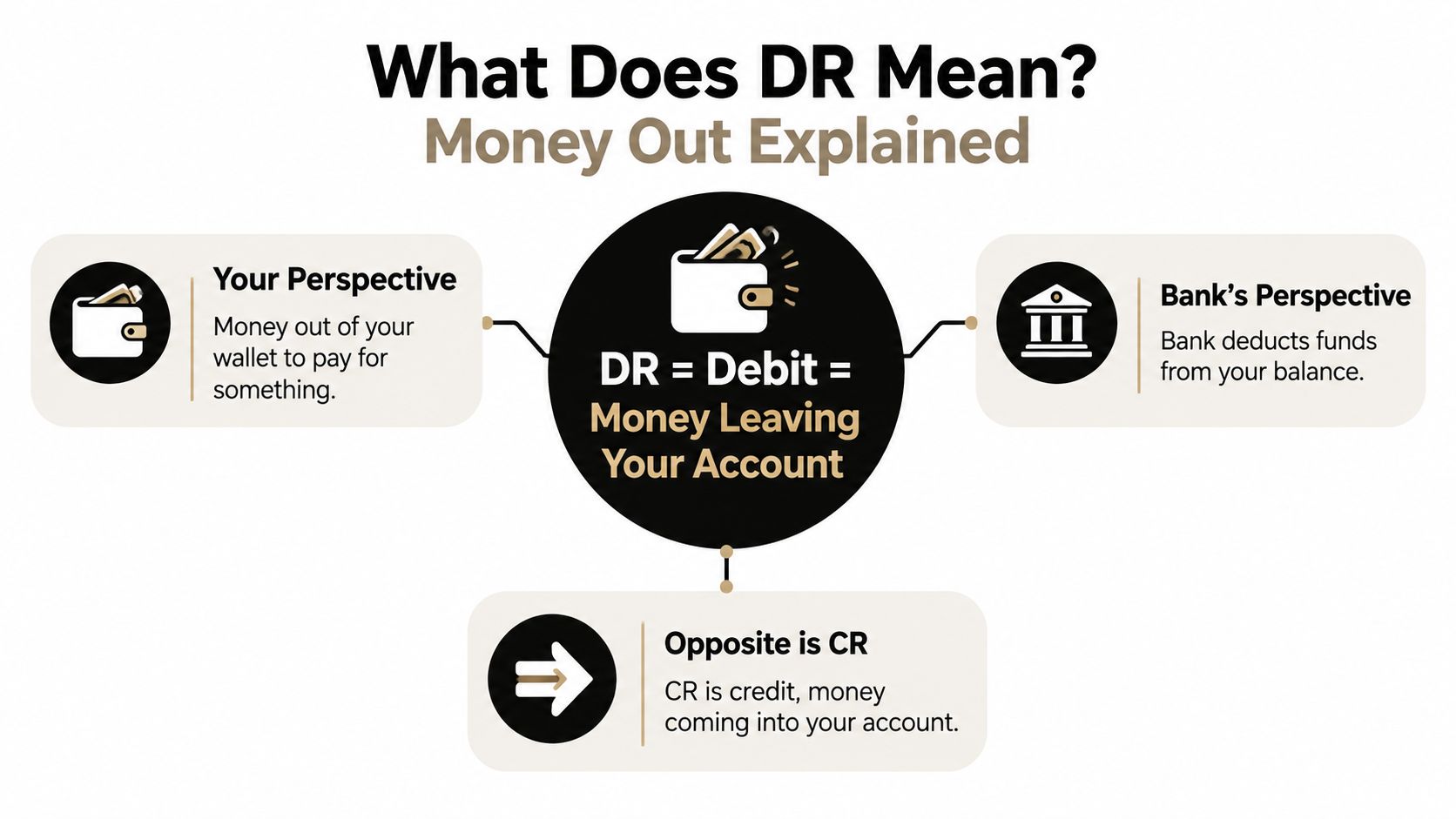
Think about paying for lunch from your personal wallet. The moment you hand over the money, your wallet contains less cash. From your perspective, that's money out. The bank statement expresses the same movement with the label DR, short for debit.
The bank is describing what it has done to the account. It has deducted funds from the balance because you made a card payment, arranged a transfer, withdrew cash, or incurred a charge. The wording differs by institution, but the direction is the useful part.
Plain-English definition: DR means debit. It marks money leaving your account, or it can show that the account is overdrawn rather than in credit.
One code, two common uses
You may see DR beside an individual transaction. In that situation, read it as debit item, meaning the listed payment or charge reduced your available funds.
You may also see DR connected with the account balance itself. RBS describes DR as “Account Overdrawn or Debit Item”, while HSBC lists DR as “Debit” and Barclays uses it for a debit balance or overdrawn state, according to the bank guidance cited above. The surrounding layout matters. A code beside a transaction usually explains that line, while a code beside the balance may warn that the account is below zero.
Banks use abbreviations because statements need to display a lot of information in a compact format. You'll often encounter shortened descriptions for payment types, balances, or channels. The abbreviation doesn't replace your responsibility to investigate the entry, but it gives you a fast first reading.
Start with direction, not category
New business owners sometimes try to decide whether DR means “office cost”, “travel”, or “bank fee”. It doesn't tell you that. It tells you only that the money moved out, so you still need the description, date, amount, and supporting document to classify the transaction.
That's a helpful separation:
- DR answers the cash-flow question: Did money leave?
- The reference answers the identification question: Who was paid?
- Your records answer the bookkeeping question: What was it for?
Once those three layers are kept apart, the statement becomes much easier to understand.
DR vs CR How to Tell Them Apart at a Glance
A statement becomes faster to scan when you treat DR and CR as opposite signals. DR points outwards, towards money leaving the account. CR points inwards, towards money being added to it.
For a freelancer, the simplest reading method is to follow the entry from left to right. Check the date, read the description, look at the amount, then use DR or CR to confirm the direction. Don't decide the category until you've identified the payment.
DR vs CR at a Glance
| Feature | DR (Debit) | CR (Credit) |
|---|---|---|
| Meaning | Debit, or money out | Credit, or money in |
| Effect on the bank balance | Usually reduces the balance | Usually increases the balance |
| Common examples | Card purchase, direct debit, transfer out, cash withdrawal, bank fee | Client payment, refund, bank transfer in, interest received |
| Balance indicator use | Can indicate an overdrawn or debit balance | Indicates credit or money held in the account |
A client payment can be a CR even if the description is unfamiliar. A payment to a software provider can be a DR even if it appears as a recurring monthly line. The code gives you the direction, not the business story.
The bookkeeping confusion to avoid
In double-entry bookkeeping, the words debit and credit can behave differently depending on the account being recorded. A debit to an expense account can increase that expense, while a credit to a bank account can represent money leaving the bank account. That system is about entries across ledgers.
Your bank statement is showing the bank's view of your account. For statement reading, DR means the bank has recorded a debit movement against your balance. You don't need to solve the full double-entry question before identifying what happened in cash.
For a separate explanation of the incoming code, see this guide to what CR means on a bank statement. Keep the two signals visually distinct in your review: DR means investigate an outgoing movement, while CR means investigate an incoming one.
Quick scan habit: Cover the running balance, read the description, identify the direction, and only then decide whether the transaction belongs in your books.
Common Reasons You Will See DR on Your Statement
DR appears for ordinary business activity as well as for charges that deserve a closer look. The letters don't tell you whether a payment is good or bad. They tell you that the account recorded money out.

Read the description as a clue
A card purchase may show a shop, online service, payment processor, or shortened merchant name. Match it against the date and amount on your receipt. The merchant name on the bank statement doesn't always match the brand you remember, especially when a payment platform processes the transaction.
A direct debit often relates to a recurring service, such as software, insurance, utilities, or a mobile contract. Check whether the amount and collection date fit the agreement. A standing order usually represents a scheduled transfer that you set up yourself, perhaps for rent, savings, or a regular supplier payment.
Other common DR entries include:
- Bank fees: Account charges or transaction fees reduce the balance and should be recorded separately from ordinary operating costs.
- Interest charges: Borrowing or overdraft interest may appear as a debit and needs to be distinguished from the original payment.
- Cash withdrawals: An ATM withdrawal proves money left the bank, but the statement alone may not show how you used the cash.
- Transfers out: A transfer to another account, supplier, or tax reserve is still a DR on the sending account.
The reference and amount provide context, but they don't prove that you authorised the transaction. An unfamiliar merchant, duplicate-looking entry, unexpected recurring payment, or amount that doesn't match your records deserves a pause. Check your receipt folder, email, payment app, and any relevant agreement before categorising it.
After you've identified the type of entry, record the reason in a note if the statement description is vague. That small explanation can save time when you review the books later.
The following video can provide another visual introduction to reading and interpreting bank statement activity.
If you still don't recognise the payment, don't force it into an expense category. Mark it for investigation, contact the bank if necessary, and consider whether someone else with account access could have made it.
How to Handle and Categorise DR Entries Without Stress
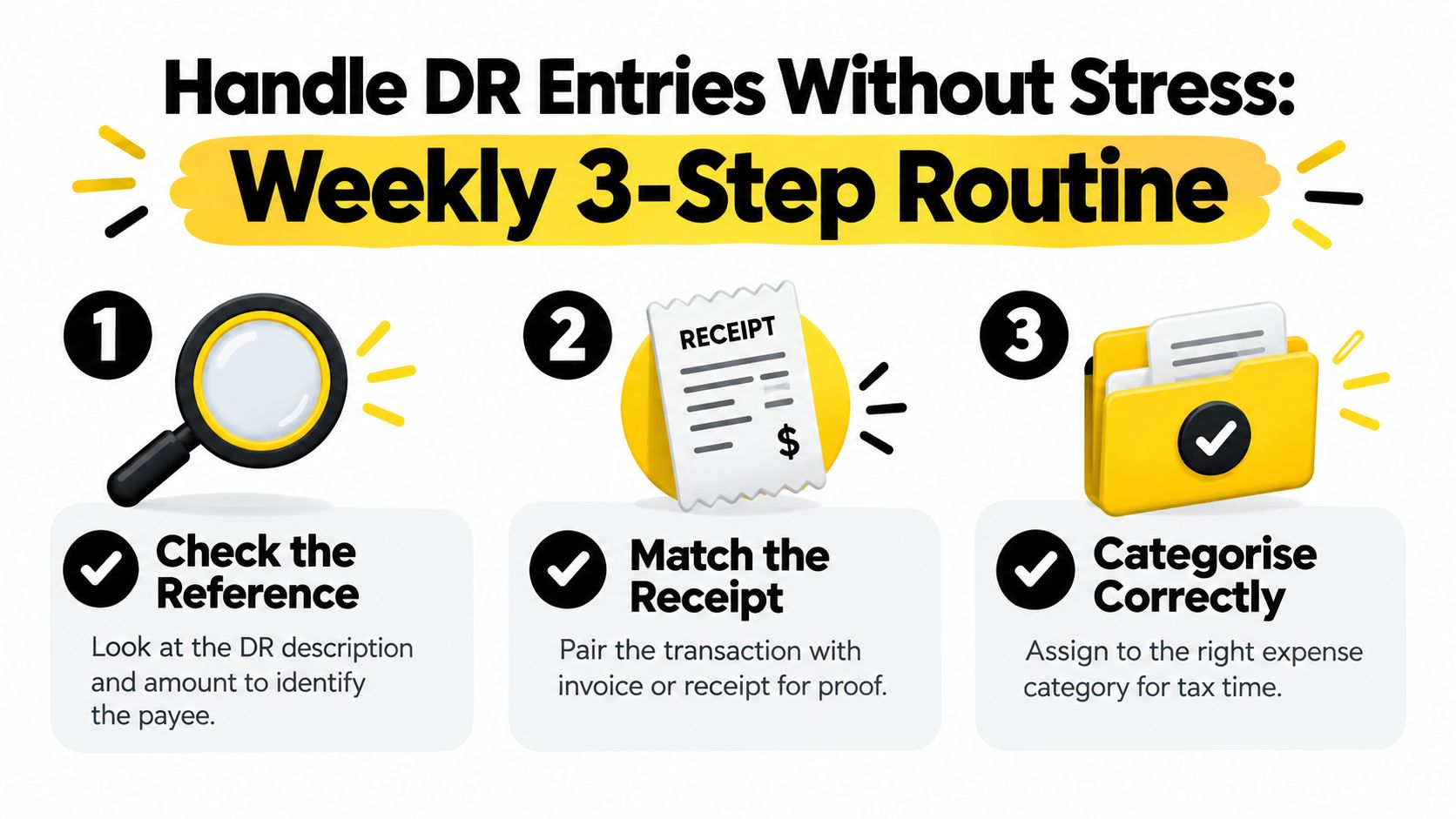
Monthly review often feels overwhelming because every unexamined line arrives at once. A shorter weekly routine gives each DR entry a small amount of attention while the receipt, invoice, or memory is still available.
UK reconciliation guidance commonly describes the task as collecting the statement, matching every line, and resolving unmatched items in this bank reconciliation guidance. Practitioner guidance from Xero UK describes weekly reconciliation as the best balance for accuracy and efficiency, daily review for businesses with high transaction volume, and monthly review as a minimum in its reconciliation guide.
Use the same three checks every week
Check the reference first. Read the description, date, and amount together. Search your email or payment records for the merchant name, and remember that the bank's wording may be abbreviated or different from the supplier's trading name.
Match the proof next. Pair the DR with a receipt, invoice, order confirmation, or payment note. If you paid in cash or used a personal card for a business purchase, write down the business purpose while you still remember it.
Categorise last. Choose the appropriate expense account only after you know what the payment represents. Don't use a vague category to clear the bank feed. An unclear item should remain flagged until you can support the treatment.
Opening-balance errors deserve particular care. If the starting balance is wrong, the discrepancy can carry through the rest of the reconciliation and make later entries appear incorrect. Fix the first unexplained difference instead of repeatedly adjusting the closing balance.
Some exports make this harder. CSV files can use inconsistent date formats, split descriptions across columns, omit useful references, or represent debits differently from one bank to another. Keep the original PDF statement as a reference, and compare the export with the online transaction history when a row doesn't make sense.
For freelancers exploring newer approaches to finance operations, a discussion of the Vibe Accounting platform may help you think about how routine financial data can fit into a more continuous workflow.
Mapping DR Transactions to Xero and QuickBooks Cleanly
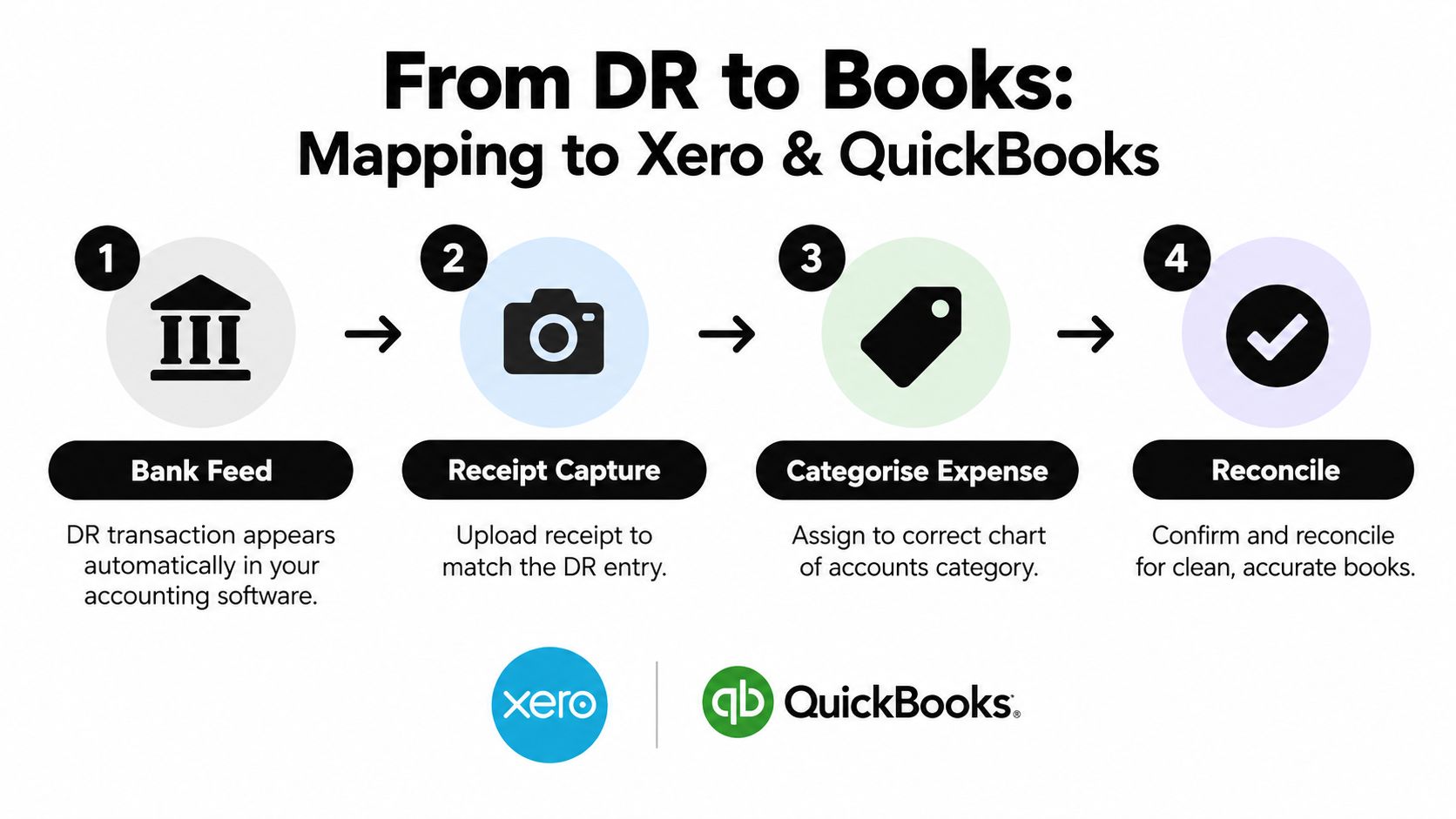
A DR line becomes useful bookkeeping data only when you connect it to a source document and a category. The bank feed shows that money moved. The receipt or invoice explains why. Xero or QuickBooks then gives you a place to record and reconcile the transaction.
A clean workflow looks like this:
- Bank feed: The DR transaction appears in Xero or QuickBooks, either through a live connection or an imported statement.
- Receipt capture: You attach the matching receipt or invoice, preferably soon after the purchase.
- Expense categorisation: You select the correct chart-of-accounts category and review any tax treatment.
- Reconciliation: You confirm that the recorded entry agrees with the bank movement.
Capture documents at the point of spending
The longer a receipt stays in your pocket, inbox, or camera roll, the harder it becomes to match it with a DR line. A useful habit is to capture the document as soon as the payment happens, then add a short note if the business purpose isn't obvious.
Snyp is one option for this document-intake step. It accepts receipts and related documents through WhatsApp, email forwarding, or file upload, extracts information such as the merchant, amount, date, tax, currency, and category, and syncs structured results with Xero and QuickBooks. You can then review the suggested information and match it against the relevant DR entry.
The benefit of this approach isn't that it removes judgement. You still need to decide whether the expense is business-related and whether the category is appropriate. It reduces the chance that a statement line remains detached from the evidence needed to support it.
Treat messy formats as an intake issue
Different banks can present transaction descriptions and debit columns in different ways. If you import a CSV, inspect how the file represents DR entries before assuming that a blank or negative-looking field is an error. A practical guide to CSV bank statement formats can help you understand why imported data sometimes needs cleaning before it matches your accounting feed.
When a reference is missing, compare the amount and date with your receipt list, card provider, supplier records, and recurring-payment schedule. Don't create a duplicate transaction just because the imported description looks different from the original bank entry.
Putting It All Together for Confident Reconciliation
You don't need to fear the letters DR once you treat them as a prompt. The prompt is simple: money has moved out, so identify the recipient, find the evidence, and decide where the transaction belongs.
That mindset separates cash-flow reading from bookkeeping classification. First establish what the bank recorded. Then establish why it happened. Finally, make sure the corresponding record in your software agrees with the statement and has supporting documentation.
A practical review sequence
Begin with your next statement or bank-feed screen and mark each DR line as recognised, awaiting proof, or needing investigation. For recognised items, attach the receipt and categorise them. For uncertain items, keep a short note rather than guessing.
Run that review weekly if your transaction volume allows it. It gives you a regular opportunity to catch duplicate charges, forgotten subscriptions, missing receipts, and incorrect opening balances before they obscure the rest of the period. It also keeps the relationship between your bank, your documents, and your accounting software visible.
The broader purpose of reconciliation for merchants is to compare records and resolve differences, not merely to make a balance appear correct. Your statement is one record, your software is another, and your receipts provide the explanation that connects them.
If a DR entry still looks wrong after you check your records, contact the bank for transaction details or raise it with your accountant or bookkeeper. Ask for help before deleting, duplicating, or forcing the transaction into a category. You can find a practical workflow for bank statement reconciliation when you need a structured process to follow.
The next time you see DR, read it calmly. Confirm the direction, identify the payment, match the proof, categorise it, and reconcile it. That routine turns an unfamiliar abbreviation into a dependable part of your cash-flow review.
If you want fewer unmatched DR entries, try Snyp to capture receipts from WhatsApp, email, or uploads and prepare structured expense data for Xero and QuickBooks. Start by sending your next receipt through the workflow, then review the suggested details before reconciling it with the bank transaction.