




Mastering Bank Statement Reconciliation for UK Businesses
Think of bank statement reconciliation as a monthly health check for your business finances. It’s simply the process of matching the transactions in your business accounts—your cash book or accounting software—with the transactions on your actual bank statement.
For any small business or freelancer in the UK, this isn't just good practice; it's an essential rhythm that keeps your financial pulse steady.
Why Bank Reconciliation Matters More Than You Think

Let's be honest, the phrase "bank reconciliation" can sound like a chore—another bit of dry accounting jargon. But in my experience, it's one of the most powerful habits you can build to truly get a grip on your company’s money. This isn’t about becoming a numbers whizz; it’s about knowing, with total confidence, what your financial position is at any given moment.
Here’s a simple way to look at it: your own records are your best guess of where your money has gone. Your bank statement, on the other hand, is the undeniable truth. Reconciliation is where you line up your guess with the truth to see the full, accurate picture.
The Real-World Benefits of Regular Reconciliation
Getting into the habit of reconciling your accounts at least once a month brings immediate, practical advantages that go far beyond just having neat books. It’s your first line of defence against hidden costs and a crucial tool for keeping your cash flow in good health.
Here's a quick rundown of the key benefits regular bank reconciliation brings to the table.
Key Benefits of Regular Bank Reconciliation
| Benefit | Why It's Critical for Your Business |
|---|---|
| Accurate Cash Flow Insights | You know exactly how much cash you have. This stops you from making spending decisions based on what you think is in the bank. |
| Swift Fraud Detection | Spotting dodgy transactions or unauthorised charges becomes instant. Catching these early can save you a world of trouble. |
| Uncovering Costly Errors | Banks make mistakes. You make mistakes. Reconciliation flags up everything from duplicate charges to simple data entry typos before they snowball. |
| Tracking Invoices & Payments | You get a clear view of which client invoices have been paid and which are still floating around, making it easier to chase what you're owed. |
These aren't just theoretical upsides; they have a real impact on your bottom line every single month.
I worked with a freelance designer in Manchester who, during her first reconciliation, found a recurring £40 charge for a software subscription she was certain she’d cancelled. Without that check, £480 a year would have quietly drained from her business, completely unnoticed.
From Chore to Strategic Advantage
Ultimately, the biggest win comes from changing how you think about reconciliation. Stop seeing it as a tedious task and start treating it as a strategic financial review. It gives you the clarity you need to budget properly, plan for the future, and make tax time less of a headache.
When your books are perfectly in sync with your bank, you can trust your financial reports without a second thought. That confidence is invaluable, whether you’re applying for a business loan or just making smart day-to-day decisions. And if you’re using modern accounting software, the whole process gets even easier when you connect your accounts with platforms like Xero.
A Practical Guide to Reconciling by Hand
Even with all the automation available today, knowing how to reconcile your bank statements manually is a fundamental business skill. It gives you a real feel for the flow of money in and out of your business and puts you in complete control. Think of it as a hands-on health check for your finances.
The whole idea is to compare two versions of your financial story: the one your business records tell, and the one your bank statement tells. Let's walk through how to get those two stories to match up.
First Things First: Gather Your Documents
Before you can even think about matching transactions, you need to get all your paperwork in order. Trust me, spending a few minutes on this now will save you a massive headache later. Interrupting your flow to hunt for a missing receipt from three weeks ago is incredibly frustrating.
Here's what you'll need to pull together:
- Your Bank Statement: This is the bank's official record of every transaction for the period you're looking at (say, the entire month of July). You can almost always download this as a PDF from your online banking portal.
- Your Business Records: This is your version of events. It could be your cash book, a detailed spreadsheet, or the general ledger from your accounting software. It needs to list all the income and expenses you've logged for that same period.
- Supporting Paperwork: This is your evidence. All the receipts, purchase orders, and sales invoices that back up every entry in your business records.
Having all this ready means you can work through the process without stopping and starting. While it’s a great skill to have, the manual grind is why many business owners check out the differences between manual entry and automation to claw back some time.
The Matching Game: Ticking and Tying
With your documents laid out, it's time for the main event. The process itself is straightforward, but it demands your full attention. You’re going to go line by line, ticking off each matching transaction on both your bank statement and your own records.
I always find it easiest to start with the money coming in. Look at each deposit on your bank statement and find the matching sales invoice or entry in your cash book. Once you've confirmed the amount and the date are correct (or very close), give them both a tick.
Then, switch over to the money going out. Go through every debit, withdrawal, and card payment on your statement. Match these against the expenses and supplier payments you’ve recorded, ticking off each pair as you find them.
The goal here isn't to find a perfect match for every single item right away. It's about methodically clearing everything that does line up, which leaves you with a much shorter, more manageable list of odd ones out to investigate.
It’s easy to underestimate the sheer number of transactions a small business handles. In the UK, the payment system processes an average of 210,483 CHAPS payments every day, and 94% of those are for £1 million or less. This just goes to show that most UK businesses, from freelancers to growing companies, are dealing with a constant stream of payments that all need to be reconciled. You can see more of these UK payment statistics on the Bank of England website.
Playing Detective: Investigating the Differences
Once you’ve ticked off all the easy matches, you'll inevitably be left with a few items that are on one list but not the other. This is where you put on your detective hat. Don't worry—there’s almost always a simple explanation.
Common Culprits for Mismatched Records
- Timing Differences: This is, by far, the most common issue. A cheque you deposited on the 31st might not show up on your statement until the 1st of the next month.
- Bank Charges and Interest: Your bank will take its monthly fees and might add a few pounds in interest. These will be on the statement but probably not in your books unless you were expecting them.
- Human Error: It happens to the best of us. You might have typed £89 instead of £98 when logging an expense, or accidentally entered the same payment twice.
- Forgotten Transactions: That coffee you bought for a client or the postage stamps you paid for with cash? It's easy for small, unrecorded transactions to slip through the cracks.
Let’s look at a real-world example.
Example: A Bristol Coffee Shop’s Reconciliation A coffee shop owner is reconciling her July accounts. She sees a £350 payment to her coffee bean supplier logged in her books on the 30th of July. But when she checks her July bank statement, it’s nowhere to be seen.
Her first instinct might be to panic, but she remembers she paid it via a Bacs transfer late on a Friday afternoon. It simply didn't have time to clear before the month ended and will appear on her August statement. This is a classic outstanding payment—it’s a real expense, just delayed. Nothing needs to be "fixed," just noted.
Making the Final Adjustments
The last step is to get your own records updated to reflect reality. This is how you ensure your books are perfectly accurate. You'll need to make what are called adjusting entries for the discrepancies you uncovered.
This simply means adding any missing transactions to your cash book or general ledger.
For instance, if you found a £15 monthly bank fee on your statement that you hadn't recorded, you’d add it to your books as a business expense for July. If you earned £2.50 in interest, you’d add that as income.
Crucially, you do not adjust for timing differences like the coffee shop’s supplier payment. These items are left as they are because they will be ticked off when you reconcile next month's statement. Your final reconciliation report will list these outstanding items, explaining exactly why your book balance doesn't perfectly match the bank's balance on that specific date. Once all these legitimate differences are accounted for, you’re done. Your bank statement is officially reconciled.
Avoiding Common Reconciliation Pitfalls
Even with the best system in the world, the reality of bank statement reconciliation is that small human errors can easily throw a spanner in the works. From my experience, knowing what these common traps look like before they happen is the best way to keep them from eating up your valuable time. It’s all about being proactive, not just reactive.
One of the most classic mistakes I see is letting reconciliations pile up. What seems like a manageable task for one month can quickly snowball into a massive, stressful project if you leave it for a whole quarter. And don't even get me started on leaving it until year-end. Trust me, a consistent monthly routine is far less painful than a frantic scramble when deadlines are looming.
Transposed Numbers and Typos
You wouldn't believe how often a simple switched number is the culprit behind a reconciliation headache. It’s incredibly easy to type £86 when the receipt clearly says £68. These tiny mistakes create discrepancies that don't immediately jump out, sending you on a wild goose chase for a difference of just a few quid.
What It Looks Like: You're reconciling your accounts and find you're out by exactly £18. You scan everything, but no single transaction matches that amount. The problem is often hidden in plain sight—a payment you recorded as £86 in your books that actually cleared the bank as £68.
How to Fix It: Here’s a great little trick. When your discrepancy is a number divisible by 9 (like £18 in our example), it's a huge red flag for a transposed number. Isolate the transactions from around the date the error occurred and check each entry against its source document. This simple mathematical clue can save you hours of searching.
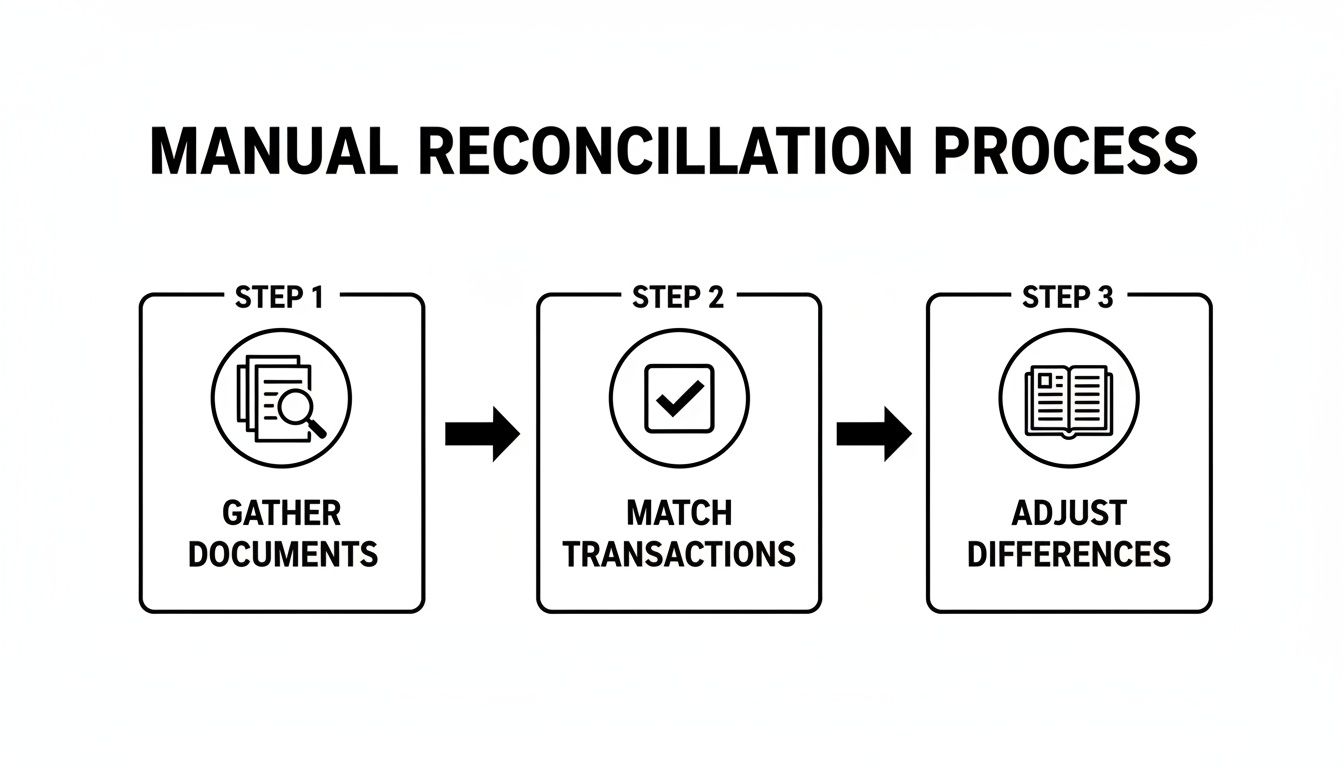
This manual process of gathering, matching, and adjusting is exactly where these fiddly errors creep in. As the diagram shows, each step needs your full attention, because a single typo in the matching phase can derail the whole thing.
Overlooking Minor Cash Transactions
Ah, the small cash expenses. They are notoriously easy to forget. That £3 parking fee, the £5 for office milk, or a client coffee for £7 might not feel like a big deal at the time, but believe me, they add up. When they pop up on your bank statement without a matching entry in your books, they create a nagging mismatch that's a pain to solve.
The smallest unrecorded coffee expense can snowball into hours of frustrating investigation later. Document everything.
This isn't just about tidy bookkeeping; it’s about claiming every legitimate business expense you're entitled to. Forgetting these small purchases is literally leaving money on the table come tax time.
What It Looks Like: Your bank statement shows a £3 cash withdrawal from a cashpoint near a client's office. You have absolutely no record of it in your expenses, and now your books are £3 short.
How to Fix It: The solution here is all about building a habit. Use a dedicated app like Snyp to snap a photo of every single cash receipt the moment you get it. No receipt? No problem. Make a quick note on your phone with the date, amount, and what it was for. This creates an instant digital record you can log properly later.
Confusing Gross and Net Amounts
Another common slip-up, especially for my VAT-registered clients, is mixing up gross and net figures. It's an easy mistake to make. You might record an invoice for its net value (£100) in your sales log, but the customer pays the gross amount including VAT (£120). And just like that, you’ve got a £20 discrepancy on your hands.
This can easily happen with your expenses, too. A supplier invoice will show a net cost, the VAT, and a gross total. If you accidentally enter the net amount into your books but pay the full gross total from your bank, your reconciliation will be off.
How to Fix It: You need to be crystal clear about which figure you are recording. Good accounting software like Xero or QuickBooks should handle this for you, but if you're using spreadsheets, consistency is everything. Decide on a standard process: either always record the gross amount and let your system separate the VAT, or have separate columns for net, VAT, and gross. The key is to pick a method and apply the exact same logic every single time.
Speeding Up Your Reconciliations with Automation
After walking through the manual process, you can probably see the problem. It works, but it's slow and fiddly. A single typo can send you down a rabbit hole for an hour. This is exactly where automation comes in—not to take over completely, but to get rid of the soul-crushing, repetitive parts of reconciling your bank statements.
Your accounting software is the core of it all, but the real game-changer is pairing it with tools that do the painful data entry for you.
Let’s paint a picture. You’ve just met a client and bought a round of coffees. Instead of shoving the receipt in your pocket where it will inevitably get lost or washed, you just take a quick photo of it with your phone. That’s it. You’re done.
In the background, a smart AI tool reads that receipt, pulls out the key details—the café name, the date, the total, even the VAT—and sends it straight into your accounting software, whether that's Xero or QuickBooks. The expense is already in your books, neatly categorised and waiting.
From Crumpled Receipt to Reconciled Entry
A few days later, when you sit down to do your accounts, the transaction for that coffee pops up in your live bank feed. Since the receipt data is already in your system, the software instantly suggests a match. All you have to do is click "OK".
That’s the power of an automated workflow. It shrinks the gap between spending money and recording it, turning a tedious, multi-step chore into a single, effortless action. That crumpled receipt goes from your wallet to a perfectly reconciled line item in seconds, not minutes.
For any freelancer or small business owner, the time saved really adds up. What used to be a dreaded, hours-long task at the end of the month can become a quick 15-minute review. That’s time you can spend on work that actually pays the bills.
Going this route isn't just about speed; it's also about accuracy. When you take manual data entry out of the equation, you eliminate the risk of typos, switched numbers, and all the other little mistakes that can throw your reconciliation completely off. The result? Cleaner, more reliable financial data that you can actually trust.
This direct connection between tools is what makes the whole thing work so smoothly.

This kind of integration creates a seamless flow of information, from the moment you capture an expense right through to the final, reconciled entry.
How Automation Gives You Real-Time Clarity
One of the biggest wins here is getting a real-time view of your finances. When your expenses are captured and categorised as they happen, your accounts always show the true picture. You no longer have to wait until month-end to figure out where your money has gone.
This has some very practical, everyday benefits:
- Smarter Budgeting: You can see exactly where your money is going, as it happens, letting you make better spending decisions on the fly.
- Confident Cash Flow: Knowing your accounts are always current gives you a precise handle on your cash position, helping you sidestep any nasty surprises.
- Stress-Free Taxes: Come VAT or year-end, all your expenses are already documented and sorted. Preparing your tax return becomes as simple as running a report.
Having this kind of up-to-the-minute accuracy is more important than ever. Even the UK's core banking infrastructure is evolving. The Bank of England recently finished a huge overhaul of its Real-Time Gross Settlement (RTGS) system, which underpins how all UK payments are processed. While these upgrades improve bank feeds, they don't solve the fundamental problem of getting your expense data into your accounting system in the first place. This is precisely where powerful AI extraction tools step in to bridge that gap.
Making the Switch to an Automated System
Switching to an automated workflow is probably easier than you think. It's really just about building a new habit—one that quickly pays for itself in time saved and headaches avoided.
Here’s what that new habit looks like:
- Get Your Kit: Start with a solid accounting platform like Xero or QuickBooks. Then, find a smart receipt capture tool, like Snyp, that plugs right into it.
- Snap Everything: Get into the habit of capturing every receipt the second you get it. Forward email invoices to a dedicated address or use an app to take photos of paper ones.
- Review and Approve: Once a week, just pop into your accounting software for a few minutes. You’ll see a list of proposed matches between your bank transactions and the receipts you’ve uploaded.
- Click to Confirm: Simply click to approve the matches. If the software isn't sure about something, you can quickly categorise it yourself.
This simple, repeatable process turns bank reconciliation from a chore you dread into a quick, ongoing check-in. It puts your financial admin on autopilot and gives you the confidence that your books are always accurate and ready for anything.
Creating a Consistent Reconciliation Schedule
Good financial management is all about rhythm and routine. Just like any other crucial business activity, bank reconciliation works best when it's done consistently. If you treat it as a task to be squeezed in "whenever," you're setting yourself up for stress and missed opportunities down the line. By setting a firm schedule, you can turn a potential chore into a powerful, proactive habit.
The trick is to find a frequency that actually matches the pace of your business. There’s no single right answer, but there are a few clear guidelines that can point you in the right direction.
Choosing Your Reconciliation Frequency
The two most common schedules are weekly and monthly. For most freelancers and small businesses, a dedicated monthly reconciliation is the absolute minimum you should aim for. It gives you a regular, manageable checkpoint to keep your finances in order without it feeling like a constant burden. On the other hand, if your business handles a lot of transactions, a weekly check-in might be a much better fit.
To figure out what’s right for you, it helps to weigh the pros and cons of each approach.
Choosing Your Reconciliation Frequency
| Frequency | Best For | Pros | Cons |
|---|---|---|---|
| Weekly | High-volume businesses like retail, e-commerce, or cafés. | Catches errors almost immediately and provides a very current view of cash flow. | Can feel like a constant administrative task and might be overkill for lower-volume businesses. |
| Monthly | Most freelancers, consultants, and service-based small businesses. | Strikes a great balance between staying current and being manageable. Aligns with other monthly reporting. | A fraudulent transaction could go unnoticed for a few weeks. Discrepancies can be harder to recall. |
Ultimately, choosing a monthly schedule is a fantastic starting point for most. It lines up perfectly with your bank statement cycle, which makes the whole process feel much more straightforward.
Building Simple Internal Controls
The phrase "internal controls" might sound like corporate jargon reserved for big companies, but it's just as vital for a solo entrepreneur. It simply means creating simple, non-negotiable rules to protect your business and keep your financial records accurate. These habits act as a safety net, making your reconciliation process smoother and far more reliable.
Even if it’s just you running the show, you can implement some really effective controls:
- Rule 1: No Receipt, No Reimbursement. Make it a personal policy. Every single business expense must have a corresponding receipt or invoice attached to it. This completely eliminates guesswork and ensures you have the proof you need for every transaction.
- Rule 2: Separate Duties (If You Have a Team). If you have even one other person helping you, separate the financial tasks. For instance, the person who makes purchases or handles payments shouldn't be the same person who reconciles the bank account. This simple separation is one of the most effective ways to prevent honest mistakes and deter potential fraud.
Think of these controls as your financial guardrails. They keep you on the right track and make it much harder for things to go wrong, creating a stronger foundation for your business.
This need for robust checks isn't just a small business concern. When UK public sector data showed that HMRC had significantly underestimated VAT receipts, it triggered a complete overhaul of their quality assurance. Their response—implementing stricter checks against independent data—is a powerful lesson for everyone. It proves that without consistent controls, even the largest organisations can make costly errors. You can learn more about these public finance findings and see why verification is so crucial.
By building these habits now, you create a more resilient business that’s always ready for tax season or a potential audit.
Your Top Reconciliation Questions Answered
When you're first getting to grips with bank reconciliation, a few common questions always seem to pop up. Let's tackle some of the most frequent sticking points head-on, so you can handle the process with confidence.
What If My Books and Bank Statement Never Perfectly Match?
First off, don't panic. It's actually quite rare for your books and bank statement to match to the penny on any given day. The whole point of a bank statement reconciliation is to find, understand, and account for those differences.
Most of the time, you're just dealing with simple timing differences. Think about it: a cheque you posted on the 31st of the month won't have been cashed and cleared by the bank yet. Or maybe a customer's payment hits your account a day after your statement period ends. These are normal. Your accounting software will simply keep these transactions as 'unreconciled' until they show up on next month's statement. The key isn't a perfect match, but a perfect explanation for every single discrepancy.
I've Never Reconciled Before. How Far Back Should I Go?
Facing a backlog can feel like staring up at a mountain. The ideal, textbook answer is to go back to the beginning of your current financial year. This gives you a completely clean slate and ensures your next tax return is built on solid, accurate figures, which can save you a massive headache later.
If that sounds like too much to take on, a more practical starting point is the beginning of your last VAT quarter. It's tempting to just draw a line in the sand and start from today, but that's a risky move. Without clearing up the past, you could be carrying forward errors that will continue to cause problems down the line.
Tackling a reconciliation backlog is one of the best things you can do for your business's financial health. The trick is to not get overwhelmed. Just work through it methodically, one month at a time.
Can't I Just Trust My Accounting Software's Bank Feed?
Bank feeds from tools like Xero and QuickBooks are fantastic, but they aren't a substitute for a proper reconciliation. Think of a bank feed as a list of what happened in your bank account. It has no idea why it happened.
That's where you come in. Your job is to provide the context. You're the one who matches that bank data to your own records—the invoices you sent, the bills you paid, and the receipts you collected. This is how you confirm a transaction is genuine, categorise it correctly for your tax records, and catch any sneaky duplicates or errors. The software does the heavy lifting, but that final, human check is what makes the process trustworthy.
Ready to eliminate the tedious manual entry from your reconciliation process for good? Snyp uses AI to automatically capture data from your receipts and syncs it directly to your accounting software, making reconciliation faster and more accurate than ever. Try it risk-free and see how much time you can save at https://snyp.ai.