




Automatic Accounting Software: A Practical Guide to Streamlining Finances
Let’s be honest, nobody starts a business because they love bookkeeping. But what if your financial admin could run on autopilot? That's the promise of automatic accounting software. It's a massive upgrade from wrestling with spreadsheets or clunky old desktop programs, designed to handle the tedious, repetitive work for you.
Think of it less as a tool and more as a financial co-pilot, giving you a constantly up-to-date, accurate picture of your business's health without the late-night data entry sessions.
Moving Beyond Spreadsheets to Real Financial Automation
Automating finances isn't a new concept, but modern automatic accounting software is a world away from where we started. The first accounting programs were little more than digital versions of paper ledgers. They were better than nothing, but you still had to manually punch in every single transaction, leaving plenty of room for human error.
Today's systems are far more intelligent. They connect the dots between your various financial accounts, interpreting and organising the data with very little input needed from you. It’s like having a dedicated financial assistant who works 24/7, never makes a typo, and actually learns your business's spending patterns over time. That’s what we’re really talking about here.
How It Changes the Day-to-Day Grind
At its core, this software is built to kill off the most draining parts of bookkeeping. It plugs directly into your business bank accounts, credit cards, and payment platforms like Stripe or PayPal. Once connected, it pulls in all your transaction data automatically, so your books are always current.
But it’s not just about pulling in numbers. The real magic is what it does with that information.
- Reads Your Receipts and Invoices: You can snap a photo of a receipt or forward an email invoice, and the software will "read" it, pulling out the vendor, date, amount, and VAT. No more typing.
- Sorts Your Spending for You: The software uses clever rules and machine learning to categorise your transactions automatically. That coffee with a client goes into "Entertainment," and your fuel receipt is filed under "Vehicle Expenses."
- Makes Reconciliation a Breeze: Remember spending hours matching your bank statement to your books? The system does that for you, turning a painful monthly chore into a quick, simple review.
By taking over these routine tasks, automatic accounting software frees you up to focus on what actually matters. Instead of being buried in data entry, you can spend your time analysing financial reports, planning for growth, and making smart decisions backed by solid numbers.
This isn't just about saving a few hours. It’s about shifting your entire perspective on accounting. It transforms bookkeeping from a backward-looking chore into a forward-looking strategic tool that helps you manage cash flow, spot trends, and run your business with real confidence.
What's Really Under the Bonnet of Automatic Accounting Software?
To truly get to grips with what automatic accounting software does, we need to lift the bonnet and have a look at the engine. These platforms are far more than just digital ledgers; they’re powered by a series of interconnected components that work in harmony to turn messy financial data into organised, actionable insights. Understanding these core pieces is the key to seeing how automation can fundamentally change how you run your business.
Each component is designed to tackle a specific, time-consuming part of old-school bookkeeping. By automating these individual steps, the software creates a seamless flow of information that slashes manual work, minimises errors, and gives you a real-time picture of your financial health.
It's easiest to think of it as a simple, three-stage workflow: capture, sort, and report.
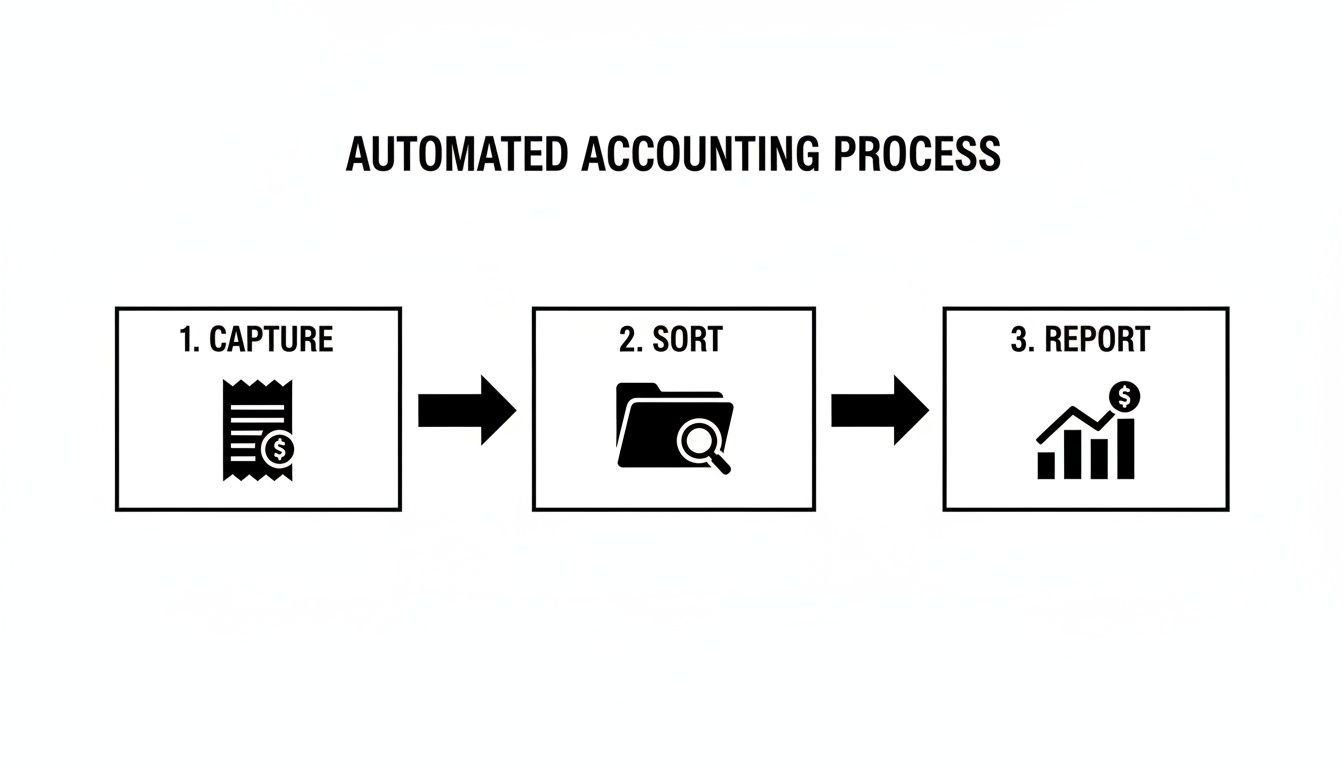
This elegant flow is the bedrock of modern financial management, turning raw inputs like receipts into strategic outputs like cash flow reports—all with very little human intervention.
Intelligent Data Capture
The automation journey starts right here, with intelligent data capture. This is the first and most critical component, and it's a world away from simply scanning a document. Instead of just creating a digital picture of a receipt, this technology acts like a detail-obsessed assistant, actually reading and understanding the information in front of it.
Think about it. You've just paid for fuel. In the past, you’d stuff the paper receipt in your wallet, manually type the details into a spreadsheet later, and then file the original away. With modern software, you just snap a photo of the receipt with your phone, and the system instantly gets to work.
- Optical Character Recognition (OCR): At its most basic, OCR technology spots and converts the text on the image into machine-readable data. It sees the letters and numbers.
- Artificial Intelligence (AI) Extraction: This is where the real magic happens. AI goes beyond just reading the text; it understands the context. It figures out which number is the total, which is the VAT, and which is the date. You can learn more about how AI extraction transforms document processing on our features page.
This clever process means the software doesn't just digitise your paperwork; it pulls out the crucial financial data with incredible accuracy, getting it ready for the next step.
Automated Transaction Categorisation
Once the data has been captured, the next job is to put it in the right place. This is automated transaction categorisation, a feature that saves countless hours and prevents the kind of simple mistakes that can throw your books off balance. The software learns your business's spending habits and uses logical rules to sort everything automatically.
For example, when it spots a transaction from "Trainline," it instantly files it under "Travel Expenses." A recurring payment to Adobe? That’s correctly assigned to "Software Subscriptions." This intelligence is usually customisable, too, so you can set up your own rules for specific suppliers or payment types.
The whole point of automated categorisation is to remove the guesswork and repetitive decisions from bookkeeping. The system learns from what you do, getting smarter over time and ensuring your accounts are always consistent and accurate.
For any business with a high volume of transactions, this feature is a complete game-changer. It turns a mountain of receipts and invoices into neatly organised records without anyone having to sort them by hand.
Seamless Bank Reconciliation
The third core component is seamless bank reconciliation. For years, this has been one of the most dreaded accounting jobs—a painstaking process of matching every single line on your bank statement to the entries in your books. Automatic accounting software turns this nightmare into a simple review.
By securely connecting to your business bank accounts through direct feeds, the software pulls in all your transaction data as it happens. It then uses smart algorithms to match this incoming bank data with the invoices you've sent and the expenses you've recorded.
- An incoming payment from a client is automatically matched to the right open invoice.
- A debit card payment at a coffee shop is matched with the receipt you snapped earlier.
The system flags any oddities or unmatched items, leaving you to focus only on the exceptions. What once took hours at the end of every month can now be done in a few minutes a week, giving you a constantly up-to-date and accurate view of your cash position.
The growth in this area is telling. The UK tax accounting software market alone was valued at USD 1072.5 million in 2024 and is projected to hit USD 2586.1 million by 2035. This massive trend just underscores how much businesses are coming to rely on automation for accuracy and compliance.
Calculating the True Return on Your Investment
When you invest in automatic accounting software, you’re doing more than just buying a new tool. You're fundamentally upgrading your business's financial engine. While the features themselves are impressive, their real worth shows up in tangible, bottom-line results. Calculating this return on investment (ROI) goes way beyond comparing the subscription fee to the hours saved—it's about unlocking a genuine strategic advantage.
The first and most obvious return is reclaimed time. We all know that manual bookkeeping is a notorious time sink, filled with endless data entry, matching transactions, and chasing down receipts. By automating these chores, you're not just clawing back a few minutes here and there; you're freeing up significant chunks of your week.
Think about what you could do with that extra time. Instead of being buried in spreadsheets, you can focus on high-value activities that actually drive growth, like finding new clients, improving your services, or planning your next move.
Beyond Time Savings to Cost Reduction
Beyond the sheer value of your time, automation delivers a powerful blow to the hidden costs lurking in manual accounting. Let's be honest: human error is an expensive, yet often overlooked, business liability. A simple typo, a misplaced decimal point, or a forgotten invoice can set off a chain reaction of financial headaches.
These aren't just minor annoyances; they can lead to serious problems:
- Incorrect Tax Filings: Resulting in penalties, interest charges, and the dreaded possibility of an HMRC audit.
- Delayed Invoices: This directly hits your cash flow and can put a strain on client relationships. You can find out more about streamlining this process in our guide on AP automation software.
- Missed Expense Claims: Leading to you paying more tax than you need to simply because you didn't claim every eligible deduction.
By minimising human involvement in repetitive tasks, automatic accounting software drastically improves accuracy. The system doesn't get tired, distracted, or have an off day—it applies the same precise rules to every transaction, every single time. This consistency is your best defence against costly mistakes.
The results speak for themselves. Businesses that embrace automation often report 25-40% faster bookkeeping and see 15-20% better cash flow forecasting. This isn't just about efficiency; it's about building a more resilient and predictable business.
The Power of Real-Time Financial Clarity
Perhaps the most valuable benefit of all is achieving real-time financial clarity. With old-school bookkeeping, your financial reports are often out of date the moment they’re printed, giving you a snapshot of the past. Automatic accounting software, on the other hand, offers a live, continuously updated view of your financial health.
This means you can make decisions based on what’s happening in your business right now, not what happened last month. With an always-accurate picture of your finances, you can manage cash flow with confidence, spot trends before they become problems, and jump on growth opportunities without hesitation.
Estimate Your Own Savings
To make this feel more concrete, let's crunch some numbers. The table below gives a rough idea of the potential monthly savings for a typical small business. Try plugging in your own numbers—think about how many hours you really spend on these tasks and what your time is worth per hour.
ROI Calculator Manual vs Automated Accounting (Monthly Estimate)
| Task | Manual Method (Hours/Month) | Automated Method (Hours/Month) | Time Saved (Hours) | Potential Cost Saving (@ £25/hr) |
|---|---|---|---|---|
| Receipt & Invoice Data Entry | 10 | 2 | 8 | £200 |
| Expense Categorisation | 6 | 1 | 5 | £125 |
| Bank Statement Reconciliation | 5 | 0.5 | 4.5 | £112.50 |
| Preparing Financial Reports | 4 | 0.5 | 3.5 | £87.50 |
| Total | 25 | 4 | 21 | £525 |
As you can see, the true ROI isn't just one thing. It's a powerful combination of time saved, costly errors avoided, and the strategic edge that comes from having real-time financial insight at your fingertips.
How to Choose the Right Automation Software
Choosing the right automatic accounting software can feel like a daunting task, but it doesn't have to be. When you break it down, it’s all about finding the tool that fits your business like a glove—not just for today, but for where you're headed tomorrow.
Think of it this way: a sole trader might just need a nimble scooter to get around, whereas a growing business needs a versatile van that can handle much heavier loads. The goal is to find your perfect vehicle. You need to look past the shiny features and really dig into the core of what each platform offers, focusing on things like scalability, user-friendliness, and how well it plays with your other tools. Get this right, and your financial management becomes effortless. Get it wrong, and you could create more headaches than you solve.
Assess Your Future Growth and Scalability
One of the first questions to ask yourself is, "Will this software grow with me?" Scalability is everything. A tool that works brilliantly for a freelancer managing ten clients a month could completely buckle under the pressure of a business processing hundreds of daily transactions. You need a solution that can handle more complexity without forcing you to make a painful and expensive switch down the line.
Here’s what to look for:
- Transaction Volume: Can the platform handle a sudden spike in invoices or expenses without slowing to a crawl?
- User Access: As your team expands, can you easily add your staff or accountant with customised permissions?
- Feature Tiers: Does the provider offer advanced modules you can switch on later, like multi-currency support or project accounting?
Choosing a scalable platform from the outset is a strategic move. It ensures your financial backbone supports your growth instead of holding it back.
Prioritise Simplicity and Ease of Use
Let's be honest, even the most powerful software in the world is useless if you and your team can't figure out how to use it. A clean user interface and a straightforward onboarding process are absolute must-haves. After all, the whole point of automatic accounting software is to save time and reduce friction, so a steep learning curve defeats the purpose.
Look for a tidy, logical dashboard that gives you a clear snapshot of your finances. Connecting your bank accounts, uploading receipts, and checking categorised expenses should all feel intuitive. Most providers offer free trials—take full advantage of them. If you’re constantly reaching for the help guide just to perform basic tasks, it’s probably a red flag.
A great user experience means the software works the way you think. It should feel less like learning a complex new system and more like working with a smart assistant who anticipates your next move.
Scrutinise Integration Capabilities
No business operates in a silo. You're likely already using a suite of tools to run your operations, and your accounting software needs to be a team player. This is where integrations become a deal-breaker.
Make sure the software connects seamlessly with the systems you rely on every day:
- Banking: Reliable, direct bank feeds are the bedrock of automation. This is non-negotiable.
- Payment Gateways: If you run an e-commerce business, connections to platforms like Stripe or PayPal are essential.
- Core Accounting Platforms: For specialised automation tools, deep integration with systems like Xero is vital. For example, you can see how a dedicated tool connects with Xero to streamline workflows.
Solid integrations create a single source of truth for your finances, which means no more manual data entry and a much lower risk of errors. This connectivity is particularly important in the UK, where the accounting software market is booming. The sector is forecast to hit USD 0.95 billion in 2025, largely driven by the demand for cloud solutions that simplify VAT compliance and provide real-time reporting. You can read the full research on the UK's growing accounting software market.
Your Implementation Checklist and Common Pitfalls
Making the switch to automatic accounting software isn't as simple as flipping a switch. It's more like preparing the foundations before you build a house—get it right from the start, and you'll avoid some major headaches down the line. A thoughtful implementation is what unlocks the real value, turning a potentially disruptive change into a smooth upgrade for your entire business.
This means doing more than just installing the software. You'll need to clean up your existing financial data, get your accounts organised, and make sure your team feels confident and ready to embrace the new tools. By following a clear plan, you can move from manual drudgery to automated efficiency without missing a beat.

Your Step-by-Step Implementation Plan
To ensure a smooth rollout, it pays to work through these key stages. Each step logically builds on the last, creating a solid foundation for your new, automated workflow.
Prepare Your Existing Data: Before you even think about importing anything, take the time to clean up your current records. Reconcile all bank accounts, chase up any outstanding invoices, and check that your supplier and customer details are spot on. This stops you from carrying old errors into your new, pristine system.
Set Up Your Chart of Accounts: This is the perfect moment to review and refine your chart of accounts. Can you simplify some categories? Do you need to add new ones that are specific to your business model? Make sure the structure is set up to give you the clear financial insights you actually need.
Connect Bank Feeds Securely: The direct bank feed is easily one of the most powerful features of automatic accounting software. Follow the platform’s instructions to the letter to establish a secure, read-only connection to your business bank accounts and credit cards.
Train Your Team for Adoption: Introduce the new software to everyone who’ll be touching it, from the staff submitting expenses to the managers who need to approve them. Give them clear guidance on how to capture receipts, check categorisations, and run reports. A little bit of training early on builds confidence and makes sure people actually use the tool.
Sidestepping Common Pitfalls
Even with the best checklist in hand, it's surprisingly easy to fall into common traps. Knowing what these potential issues are is the first step to avoiding them and making sure your investment really pays off.
The most common reason for a failed implementation isn't the software itself, but a lack of preparation. A rushed setup almost always leads to frustration, low adoption, and a failure to realise the promised benefits of automation.
Pitfall 1: Migrating Messy Data
This is the classic 'garbage in, garbage out' scenario. If you import disorganised, unreconciled, or just plain inaccurate financial data into your shiny new system, the automation will only make the chaos worse, faster. The software can't fix fundamental errors that are already in your books.
- The Fix: You have to dedicate time to a thorough data cleanse before you start the migration. This is non-negotiable. It might feel like a tedious chore at the time, but it will save you dozens of hours of frustrating corrective work later.
Pitfall 2: Skipping Team Onboarding
Just giving your team a login and expecting them to figure it out on their own is a recipe for disaster. Without proper training, people will inevitably revert to their old, comfortable habits. This leads to inconsistent data entry, low adoption rates, and a system that never gets used to its full potential.
- The Fix: Organise a proper onboarding session. Walk everyone through the key workflows, explain why this change is a good thing for them, and answer any questions. Creating simple quick-reference guides can also be a massive help in reinforcing best practices.
Pitfall 3: Ignoring Customisation
Every business is unique, and a one-size-fits-all approach to automation rarely works. If you don't take the time to tailor the software’s rules and settings to your specific needs, you'll be missing out on some of the biggest efficiency gains.
- The Fix: Get under the bonnet and explore the settings. Customise your expense categories, set up rules for recurring transactions from certain suppliers, and personalise your invoice templates. A small amount of customisation upfront makes the system infinitely more powerful and relevant to how you actually operate.
Still Have Questions About Automation?
Jumping into the world of automation is a big step, and it’s completely normal to have a few questions before you dive in. After all, making a smart decision for your business is what matters most.
We’ve gathered some of the most common queries we hear from businesses thinking about making the switch. Let's clear up the practicalities of security, setup, and compliance, so you can feel confident you're making the right move.
"Is My Financial Data Really Safe in the Cloud?"
This is almost always the first question, and for a very good reason. Your financial data is sensitive, and trusting someone else with it is a big deal. The good news is that modern cloud accounting tools are built with security at their very core. In fact, your data is often far safer in a specialised, encrypted cloud environment than it is sitting on a computer in your office.
Here’s what that security looks like in practice:
- End-to-End Encryption: Think of this as a digital armoured van. Your data is scrambled while it's travelling across the internet and while it's stored on servers, making it completely unreadable to anyone who shouldn't have access.
- Robust Access Controls: You are the gatekeeper. You can give your accountant full access to run reports, but an employee might only have permission to upload their own expenses. You decide who sees what.
- Data Privacy Standards: Any reputable provider operating in the UK will be fully compliant with strict regulations like GDPR. This isn't just a suggestion; it’s a legal requirement for how your information is protected and handled.
You can think of it like this: keeping your financial records on your office PC is a bit like stuffing cash under the mattress. Using a secure cloud platform is like putting it in a bank vault with 24/7 surveillance and multiple layers of security.
"How Long Will It Actually Take to Get Set Up?"
The fear of a long, painful setup process stops a lot of people in their tracks. But here’s the reality: for most small businesses or freelancers, you can be up and running in a few hours, not weeks.
A realistic timeline might look something like this:
- Account Creation & Basics (Under 1 Hour): This is the simple stuff – signing up, plugging in your business details, and maybe adding your logo.
- Connecting Your Bank Feeds (15-30 Minutes): This is a secure, guided process to link your business bank and credit card accounts so transactions can flow in automatically.
- A Few Basic Rules (1-2 Hours): This is where the magic starts. You can tell the software how to categorise recurring payments from suppliers you use all the time.
Honestly, the biggest job is usually getting your old data ready if you're moving from another system. But if you’re starting fresh, you can genuinely be capturing receipts and reconciling transactions the very same day you sign up.
"Can This Software Handle Our Complex UK Tax Rules?"
Yes, absolutely. This is one of the key benefits of choosing a UK-focused automatic accounting software. It’s been built from the ground up to understand our unique tax system, especially regulations like Making Tax Digital (MTD) for VAT.
These platforms aren't just guessing. They automatically calculate the correct VAT on your purchases and sales, which makes preparing your VAT return a matter of a few clicks. It takes the headache and guesswork out of staying compliant with HMRC, so you don't have to be a tax expert to get it right.
All-in-One Platform vs a Specialised Tool
One final point to clear up is the difference between a complete accounting suite and a more focused automation tool.
An all-in-one platform (like Xero or QuickBooks) wants to be the central hub for your entire financial world. They handle invoicing, payroll, tax returns, and everything in between.
A specialised automation tool, on the other hand, is designed to do one or two things brilliantly. For example, a best-in-class receipt capture tool focuses entirely on getting expense data into your books with maximum accuracy and minimum effort. These tools then integrate perfectly with your main accounting platform, giving it a serious upgrade. The right choice really comes down to your biggest problem: do you need a whole new system, or do you just need to fix the nightmare of manual receipt entry?
Ready to eliminate manual data entry for good? Snyp uses AI to automatically capture and categorise your receipts from WhatsApp or email, syncing everything perfectly with your accounting software. Start your free trial at Snyp.ai and reclaim your time.