




Ap Automation Software: Cut AP Costs with ap automation software
At its heart, AP automation software is a tool that takes over the entire accounts payable process, from the moment an invoice lands on your desk (or in your inbox) right through to paying it and logging it in your books. Think of it as a smart digital assistant, swapping out all those tedious, manual tasks—like data entry—for a smooth, automated workflow. For small businesses and freelancers, this is a game-changer, giving you back precious time and preventing costly slip-ups.
What Is AP Automation and Why Does It Matter?
Let's use an analogy. Imagine your accounts payable process is like an old-school post room, piled high with letters and parcels. If you're doing it manually, you're the one sorting every single piece of mail by hand. You’re opening the envelopes, reading the contents, popping them into the right filing cabinet, and then arranging payment for each one. It's slow, it's repetitive, and if just one document gets misplaced, it can cause a world of trouble. Mistakes aren't just possible; they're practically guaranteed.
This is precisely where AP automation software comes in. It’s your intelligent assistant, ready to instantly read, sort, and process every invoice and receipt the moment it arrives. That chaotic post room becomes a slick, error-free operation.
From Manual Drudgery to Digital Efficiency
Fundamentally, AP automation is all about using software to manage and streamline your accounts payable. It automates the entire journey of an invoice, which usually involves a few key steps:
- Invoice Capture: The software automatically grabs invoices from wherever they come from—be it an email attachment, an uploaded PDF, or even a quick photo you've snapped on your phone.
- Data Extraction: Forget manually typing out the vendor's name, the date, the total amount, or the VAT. The software reads and pulls out all this information for you.
- Processing and Approval: It then sends the invoice to the right person for approval based on rules you’ve already set. It’ll even send them a gentle nudge if they’re taking too long, avoiding delays.
- Accounting Sync: Once it’s got the green light, all the data is pushed directly into your accounting software, like Xero or QuickBooks, ready for payment and reconciliation.
This isn't just a small convenience. The numbers back it up. Research shows that automating accounts payable can slash invoice processing costs by as much as 80%—a huge saving for any business.
An Essential Tool for Modern Businesses
For a long time, this kind of powerful automation felt like something only big corporations with massive finance teams could afford. That's simply not true anymore. Today’s cloud-based AP automation software is designed specifically for UK freelancers, sole traders, and small businesses who often feel like they're drowning in admin.
It’s about so much more than just getting rid of paperwork. It’s about having a real-time view of your cash flow and financial obligations. It's about stopping human errors that can lead to overpayments or late fees. Most importantly, it's about freeing up your most valuable asset: your time. Instead of losing hours to data entry, you can get back to what you do best—serving your clients and growing your business.
The Real-World Benefits of Automating Accounts Payable
Let's move past the theory and talk about what AP automation software actually does for you day-to-day. This isn't about vague concepts; it's about solving the real, often frustrating, problems that chew up your time and money.

Think about the freelancer who gives up their Sunday evening to painstakingly type up a week’s worth of receipts into a spreadsheet. With automation, that entire chore shrinks down to forwarding a few emails. The job is done in seconds, not hours, and they get their weekend back. This is the kind of huge time saving you’ll notice right away.
Drastically Reduce Costly Errors
Let’s be honest, manual data entry is a minefield for mistakes. A single misplaced decimal point or a mistyped invoice number can easily lead to overpayments, duplicate payments, or missed payments altogether. These aren't just numbers on a screen; they can seriously damage your cash flow and your supplier relationships.
AP automation software is your safety net. It uses intelligent technology to read and capture information with incredible precision. This isn't just basic scanning; it understands the context of a document, making sure amounts, dates, and VAT details are recorded correctly every single time. By cutting out human error from the start, you shield your business from expensive and completely avoidable slip-ups.
The numbers speak for themselves. UK finance leaders have found that automating their AP process cuts manual costs by a staggering 60-70%, freeing up staff for more important work. Yet, only a tiny 6% of UK firms have fully automated their AP, leaving the other 94% exposed to errors and compliance headaches, especially with Making Tax Digital rules. If you're interested, you can explore more data on AP automation adoption and its impact in the UK.
Gain Unprecedented Financial Clarity
For any small business owner or accountant, financial visibility is everything. A manual AP system often means your books are days, or even weeks, behind reality. This makes it impossible to know your true financial standing. You might think your cash flow is healthy, only to be caught off guard by a pile of unpaid invoices.
Automation flips this on its head by giving you a real-time view of all your liabilities.
- See Every Liability: You can instantly see all outstanding invoices, so you know exactly what you owe and when it's due.
- Improve Budget Forecasting: With accurate, up-to-the-minute data, you can make much smarter spending decisions.
- Strengthen Supplier Relationships: Paying on time, every time, builds trust and can even put you in a better position to negotiate terms.
Ultimately, automating your accounts payable is about more than just being efficient. It's about taking back control and gaining the insight you need to stop wrestling with paperwork and start focusing on what really matters—growing the business.
Comparing AP Management: Manual vs. OCR vs. Modern AI
It’s important to realise that not all "automation" is the same. To really get a feel for what modern AP automation software can do, it helps to look at where your current process sits on the spectrum and what a real upgrade actually involves. Let's break down the three main ways businesses handle their accounts payable.
Each approach is a step up from the last, moving from entirely hands-on work to smart systems that practically run themselves. Getting your head around these differences is the key to picking a tool that genuinely solves problems instead of just creating new ones.
Manual Processing: The Classic Time Sink
This is the old-school paper-and-spreadsheet method we all know. Invoices land in your postbox or inbox, and someone has to manually punch every single detail—supplier, date, amount, VAT—into a spreadsheet or accounting ledger. It's incredibly labour-intensive, painfully slow, and an absolute minefield for human error.
Think about it: a single typo could mean you overpay a supplier or miss a crucial due date. This approach gives you zero real-time insight into your cash flow, and it turns month-end reconciliation into a task everyone dreads. When you add up the time, the cost of errors, and the missed early payment discounts, it's easily the most expensive way to manage your payables.
Basic OCR: A Half-Step Forward
The next rung on the ladder for many businesses is Optical Character Recognition (OCR) software. You can think of this as a simple digital scanner on steroids. It takes a picture or a PDF of an invoice and turns the image into text, saving you from some of the mind-numbing typing.
But here’s the catch: basic OCR is often a "dumb" technology. It can read characters, but it has no idea what they actually mean.
- It frequently gets confused by different invoice layouts, mistaking a date for an invoice number.
- It struggles when a supplier changes their invoice design, forcing you to create and maintain templates for every single one.
- The data it pulls out almost always needs a careful manual review and a lot of correcting, which often wipes out the time you were meant to save.
While it's certainly better than pure manual entry, basic OCR often just shifts the bottleneck. Instead of spending hours on data entry, you're now spending hours on data correction.
Modern AI-Powered Automation: The Intelligent Solution
This is where true AP automation software really comes into its own. Modern solutions use Artificial Intelligence (AI) and Machine Learning (ML) to do so much more than just read text. The AI doesn’t just see the numbers on an invoice; it understands what they represent.
An intelligent system like this can correctly identify the supplier, invoice date, VAT, and even individual line items without ever needing a template. Better yet, it learns from every document it processes, getting smarter and more accurate over time. You can learn more about how our AI-powered data extraction delivers this superior accuracy.
Modern AI handles the whole workflow—from capturing the invoice to categorising the expense and syncing it perfectly with your accounting software—all with very little human intervention.
Comparison of Accounts Payable Management Methods
To really see the difference, it helps to put the three approaches side-by-side. The table below lays out just how stark the contrast is between them.
| Feature | Manual Processing | Basic OCR Software | Modern AI Automation |
|---|---|---|---|
| Accuracy | Low (error-prone) | Medium (needs correction) | High (self-learning) |
| Speed | Very Slow | Slow to Medium | Near-Instant |
| Manual Effort | High | Medium | Very Low |
| Adaptability | None | Low (template-dependent) | High (understands context) |
As you can see, the leap from basic OCR to an AI-driven system is just as significant as the one from manual processing. It's the difference between a tool that helps you do the work and a system that does the work for you.
Core Features Every Small Business Should Demand
When you start looking at AP automation software, it's easy to get bogged down in a sea of features. For a small business, freelancer, or accountant, though, only a handful of capabilities are truly essential. Think of this as your must-have checklist—the core functions that will actually solve your problems instead of creating new ones.
This diagram shows the journey from manual drudgery to intelligent automation.
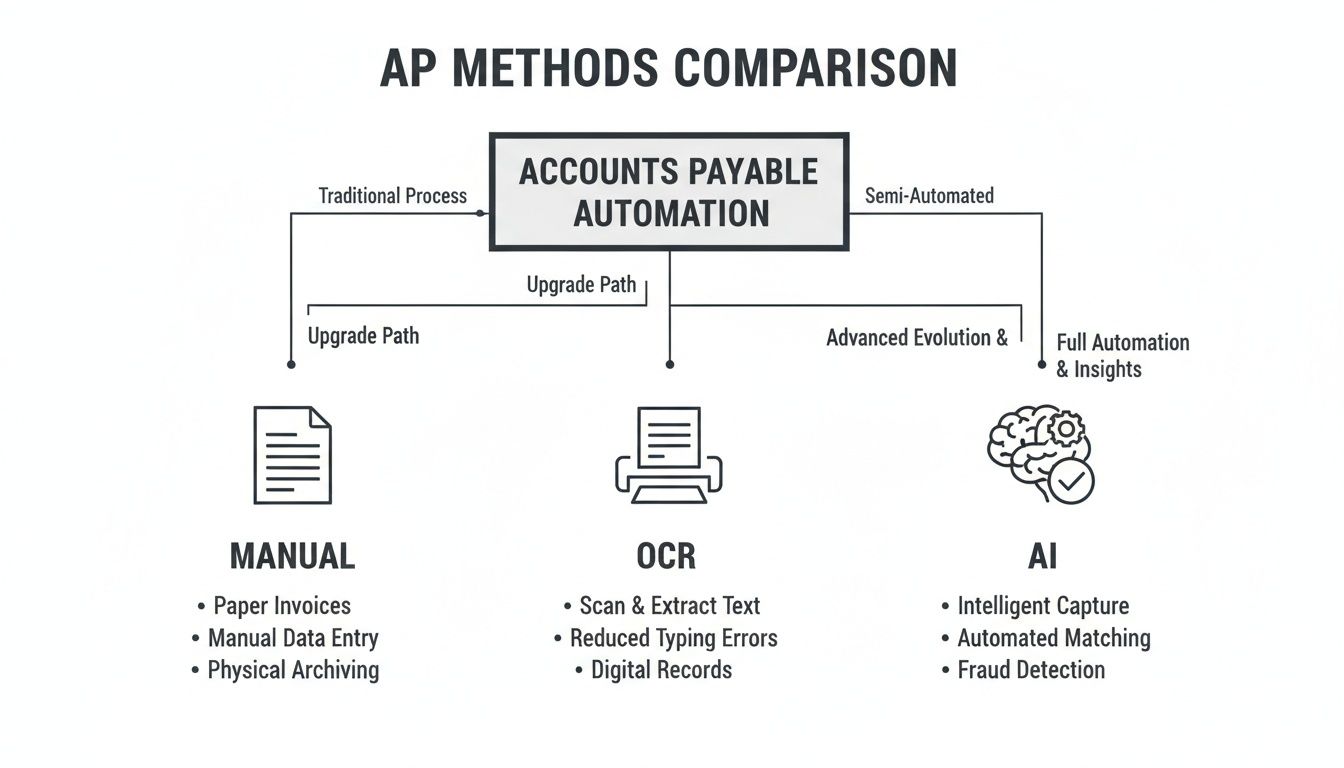
It’s clear that while old-school OCR is a step up from paper, true AI is where you see a massive jump in both efficiency and accuracy.
Frictionless Document Capture
First things first: getting invoices and receipts into the system has to be effortless. If you’re still having to scan, save, and manually upload every single document, you’ve just swapped one tedious job for another. The right tool should slot right into how you already work, not force you to change your habits.
Look for a tool that gives you options:
- Email Forwarding: The ability to just forward a supplier email to a dedicated address is a game-changer.
- WhatsApp Integration: Perfect for when you're on the go. Just snap a photo of a receipt and send it straight in.
- Direct Upload: A simple drag-and-drop interface for those PDFs and image files already on your computer.
This kind of flexibility means documents get captured the moment they land, so they don’t get lost in a chaotic inbox or a pile of paper on the corner of your desk.
Intelligent Data Extraction
This is where the real magic happens. It’s what separates a basic scanning tool from a genuinely powerful piece of software. The system shouldn’t just be looking for text; it needs AI that can actually understand the document's context. It has to accurately pull out the vendor, date, total amount, VAT, and currency without you having to build a new template for every supplier you work with.
A common mistake is getting stuck with outdated OCR technology. Right now, only 37.3% of UK teams have fully automated their AP process. Many are still using older systems that need constant human supervision. For a busy business owner, that means wasting hours double-checking data—something you can learn more about from recent automation statistics.
Seamless Accounting Integration
Your AP software absolutely must play nicely with your accounting platform. A one-way data dump just won't cut it. What you need is a deep, two-way sync with tools like Xero or QuickBooks.
This means that as soon as an invoice gets the green light, all the key data—and even the document image itself—is pushed directly into your accounting software, correctly coded and ready for reconciliation. A proper sync ensures both systems are always perfectly in line, killing off manual reconciliation and keeping your books accurate and up-to-date. This also paves the way for a smooth invoice approval and review workflow, giving you complete control and visibility.
Your Simple Step-by-Step Implementation Guide
Switching to new accounts payable software might sound like a massive undertaking, but today’s cloud-based tools have made getting started surprisingly simple. Forget about weeks of complex data migration or steep learning curves—you can be up and running in minutes with a clear, manageable plan.
Despite all the talk about automation, it's an area where many UK businesses are still lagging. Research shows just 6% of firms have fully automated their AP process. At the same time, 70% of finance leaders admit that sticking with manual methods is actively holding back growth. This problem is particularly acute for small businesses and freelancers, whose old-school systems start to crack under the pressure of more invoices and tighter financial control. You can read more on these finance automation challenges if you're interested.
Your Five-Step Launch Plan
A smooth rollout isn't about doing everything at once. It’s about taking small, logical steps that build momentum and show you the benefits right away.
Map Your Current Workflow: Before you touch any new software, just pause and look at what you’re doing now. How do invoices get to you? Who needs to sign off on them? A quick sketch of this process will instantly show you where the biggest headaches and delays are.
Choose the Right Software: With your workflow map in hand, you can find a tool that solves your specific problems. Don't get distracted by a million features; focus on the essentials, like being able to capture invoices from email and WhatsApp and having a rock-solid integration with your accounting software.
Connect Your Accounting Platform: This is the magic step, and it should only take a few clicks. Any good AP automation software provides a secure, two-way connection. For example, connecting Snyp to your Xero account means your financial data flows between both systems without you lifting a finger, keeping your books perfectly in sync.
Configure Basic Automation Rules: You don’t need to be a coding genius for this. Start simple. You could set a rule to automatically assign all invoices from a particular supplier to a specific expense category. You can always get fancier with more complex rules once you're comfortable.
Start Capturing Invoices: Time to see it in action! Start with the easiest route. Just forward a couple of supplier emails to your dedicated capture address or upload a PDF bill you have saved. You’ll see the system pull out all the key information instantly, and that’s when the real value clicks.
By focusing on these five simple actions, you take the mystery out of implementation. This isn't about a massive, overnight business overhaul. It's about making small, smart changes that give you back your time and bring welcome clarity to your finances.
Common Questions About AP Automation Software
Deciding to bring any new software into your business is a big step, and it's bound to come with questions. When you're talking about a process as vital as paying your suppliers, you need clear, no-nonsense answers. We've gathered some of the most common queries we hear from small business owners and freelancers to help you feel confident about your decision.
Let's cut straight to the chase and tackle the three biggest concerns: security, cost, and how the software plays with the tools you already rely on. Getting these points straight is the key to picking the right ap automation software.
Is My Financial Data Secure?
This is usually the first question, and for good reason. Handing over sensitive supplier invoices and financial data requires a massive amount of trust. Any reputable AP automation platform is built on a foundation of security, using several layers of protection to keep your information safe.
This nearly always includes:
- End-to-end encryption, which scrambles your data while it's being sent and while it's stored.
- Secure cloud infrastructure from trusted providers who have their own robust physical and digital security measures.
- Strict access controls to make sure only people you authorise can ever see or approve financial information.
Think of it like your online banking. The same high-level security that protects your bank account is used to guard your accounts payable data, giving you total peace of mind.
How Much Does It Really Cost?
Pricing for AP automation software is almost always designed to scale, which makes it affordable even for a one-person business. Most providers use a subscription model, often based on how many documents you process each month. This means you only pay for what you use, so you can forget about huge upfront investments.
The thing to remember is that the software pays for itself. Once you stop paying late fees, avoid expensive data entry mistakes, and get back hours of your time every single week, the return on your investment becomes obvious.
When you're looking at the price, try to look past the monthly fee and think about the value of the time you’ll reclaim.
How Deep Is the Integration with Xero or QuickBooks?
This one is non-negotiable. The connection to your accounting software has to be seamless. A truly deep integration isn’t just about pushing data in one direction; it's a two-way conversation that keeps both systems perfectly in sync.
When an invoice gets processed in your AP tool, all the important data—even the invoice image itself—should pop up in Xero or QuickBooks automatically. It should be correctly categorised and ready for you to reconcile. This completely removes manual data entry and ensures your books are always accurate and up to date.
Ready to see how seamless automation can fit into your business? Snyp offers AI-powered receipt and invoice capture that syncs perfectly with your accounting software, saving you time and eliminating errors. Start your free trial with Snyp today.