




Accounting Automation Software: What It Does and Costs
It's the last evening of the month, your VAT quarter is closing, and there's a shoebox of faded receipts on the desk next to an inbox full of PDF invoices. None of it is in the books yet. That's the moment most small businesses feel what manual bookkeeping really costs, not in software fees, but in evenings spent typing amounts that were already printed on the documents in front of you.
What Accounting Automation Software Does
A receipt can reach your books in several ways: a photo from your phone, an invoice forwarded from email, or a statement uploaded as a PDF. Without automation, you enter the date, amount and supplier, choose a category, work out the VAT, then check for a matching bank transaction.
Accounting automation software connects those documents to your ledger. It extracts details such as the merchant, amount, date, tax and currency, suggests a ledger category, matches bank transactions and prepares an entry for review. The typing shrinks; checking the proposed entry remains.

The Three Parts Most Tools Share
- Capture: You photograph a receipt, forward an email or upload a PDF. The document enters the system when you receive it, rather than waiting in a folder until bookkeeping time.
- Extraction: The software reads fields from the document. Basic optical character recognition turns an image into text; extraction also identifies which figure is the total, which is the VAT and who supplied the goods.
- Sync: The extracted fields move into Xero, QuickBooks or another ledger, usually with the original document attached. You can then search, sort and total the entries.
Each part can work well or fail on its own. A tool might store every receipt clearly but misread the amounts, leaving you with a neat archive and the same data-entry task. The useful measure is how much manual work it removes after you allow time for exceptions, review and compliance.
Why This Became a Compliance Question in the UK
Since April 2022, VAT-registered businesses below the £85,000 VAT-registration threshold have also had to keep digital records and submit VAT returns using compatible software under Making Tax Digital for VAT, as HMRC's guidance on keeping digital VAT records explains. Making Tax Digital for Income Tax also extends digital record keeping to sole traders and landlords, so structured records are part of meeting tax requirements, not just a tidier way to work.
Practical rule: Judge the software by the document-to-ledger workflow. If it captures and matches routine entries reliably, your time shifts from retyping figures to reviewing exceptions and deciding whether the proposed entries are right.
Processes It Can Automate and Where People Still Check
Start with what each task looks like when software handles the routine part, and what it leaves for you.
| Process | What the software does | What still needs review |
|---|---|---|
| Receipt capture | Reads photos, PDFs and forwarded emails, then extracts merchant, amount, date and tax | Blurred, handwritten or multi-page receipts |
| Expense categorisation | Suggests a ledger category from merchant history | Mixed personal and business spend, new suppliers |
| Bank feed matching | Pairs card and bank lines with receipts and invoices | Split payments, duplicate receipts, timing differences |
| VAT coding | Applies the VAT rate to each line item | Reverse charge, mixed-rate invoices, zero-rated items |
| Foreign currency entries | Converts amounts to the base currency | Rate date choices and currency-specific invoices |
| Sales invoicing and reminders | Sends invoices and chases unpaid balances on schedule | Disputed invoices and bad-debt decisions |
| Period totals and VAT returns | Groups entries into period totals and submits MTD returns | Late receipts and cut-off dates |
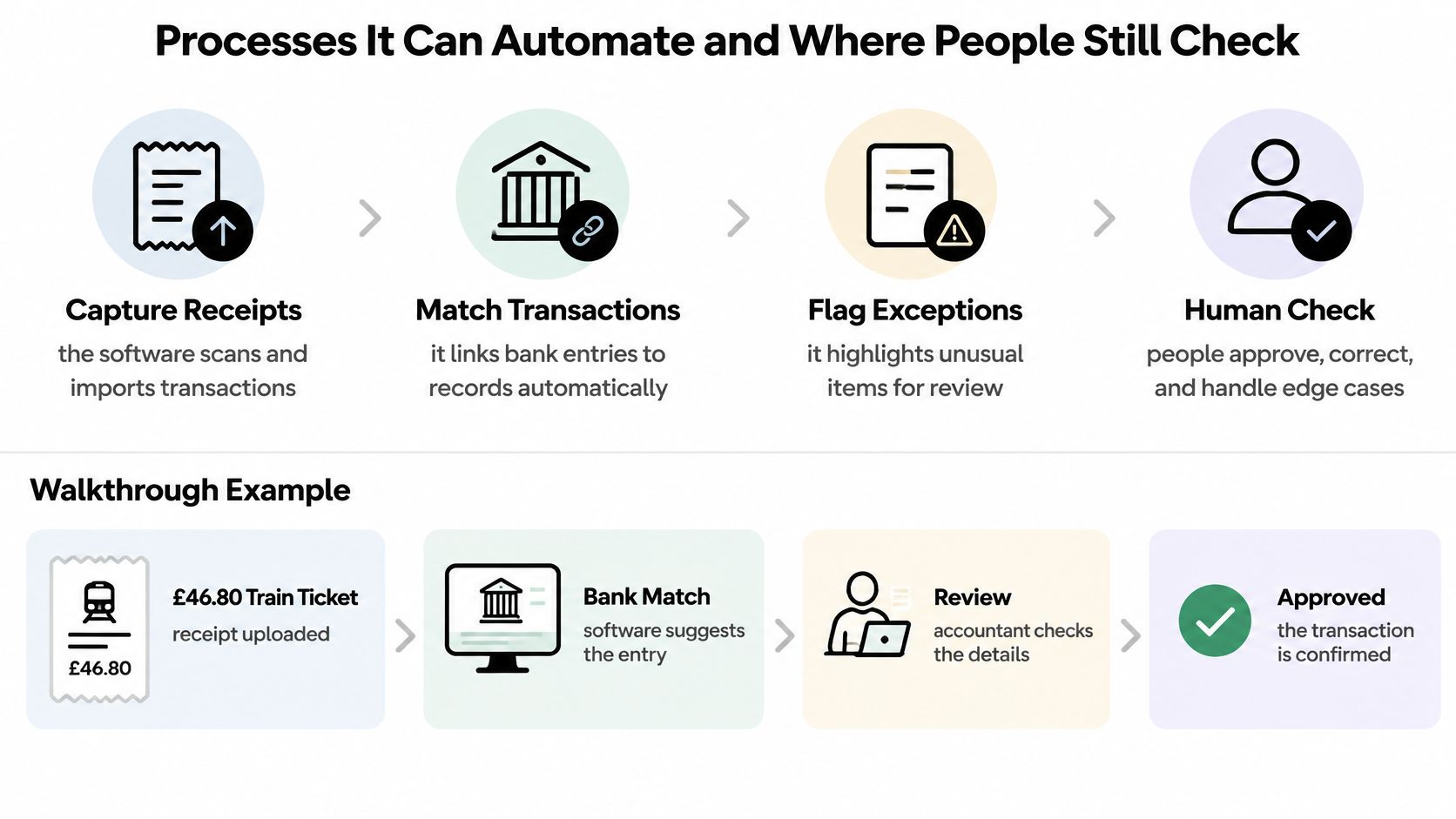
The workflow below shows that split between automatic steps and the human check at the end.
One Receipt Through the Whole Workflow
Take a £46.80 train ticket from a client visit, forwarded by email. The software reads the merchant, date, total and VAT, then suggests the travel category because it's seen that train operator coded to travel before. That category memory is what keeps the same supplier coded the same way each month instead of drifting between travel, subsistence and general expenses depending on who typed it.
Next it searches the bank feed for a matching card transaction, the step explained in this guide to bank statement reconciliation. Matching matters because it stops double counting, where the receipt and the card line both become expenses and you've claimed the journey twice. If the amount, date and merchant agree, the entry posts without you touching it.
If the card line shows a different amount, perhaps because you bought two tickets in one transaction, or the receipt has no VAT breakdown, the item moves to a review queue instead. That's deliberate. VAT coding fixes the tax treatment at the point of entry rather than at year end, so an ambiguous rate caught now is a thirty-second decision, not an afternoon of unpicking.
The same trigger-and-action logic extends past expenses. Scheduled journals can post recurring entries on a timetable, which is how finance teams automate church fund interest accruals and similar month-end routines without rebuilding them each period.
This short walkthrough shows the capture, matching and review sequence in practice.
Read the table's right-hand column as the product. The tasks on the left are only reliable when exceptions reach someone who can decide them.
Benefits for Small Businesses and Accountants
The strongest UK evidence is about hours. For the 2022-2023 tax year, HMRC estimated that businesses using fully functional MTD software saved between 26 and 40 hours per business annually on business-finance and record-keeping tasks, and that, scaled across VAT businesses using fully compatible software, this represented an estimated 32 million to 49 million hours saved nationwide, in its technical note on modernising the tax system through Making Tax Digital.
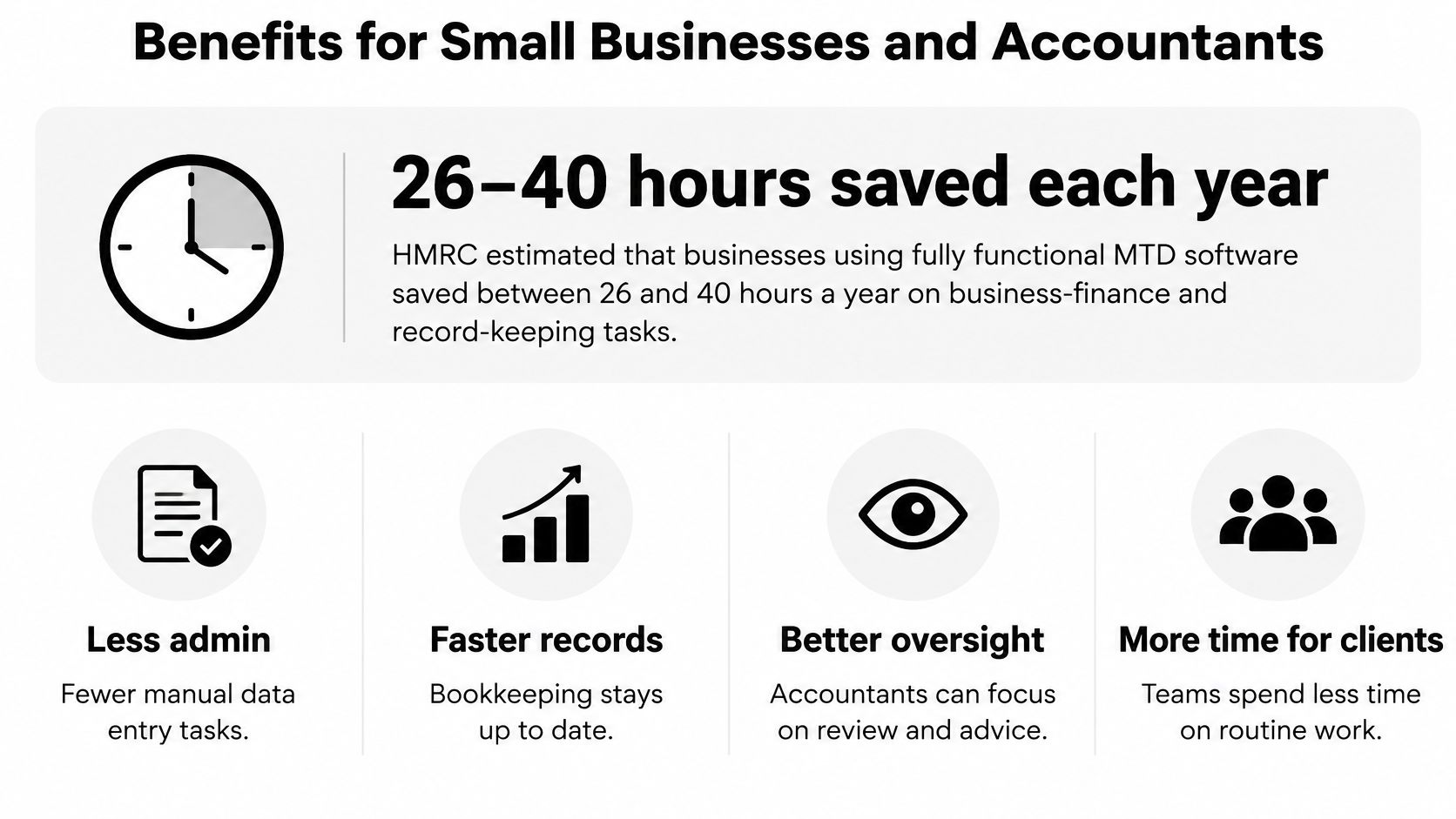
For an owner-run business, those hours are not abstract. They are the evenings you do not spend sorting receipts, the chases for missing documents that do not happen because the photo was taken at the till, and the shorter scramble before each quarterly update.
What Changes for Your Accountant
Accountants gain when your records arrive structured and categorised. Review replaces rework. Instead of re-keying your spreadsheet into their system and querying half the lines, they check exceptions, confirm VAT treatment and close the month faster. That changes the conversation too, because the meeting is about what the numbers mean rather than whether they are complete.
Automation works like a filing clerk who only interrupts when a document does not match the rule. Routine entries post themselves. The odd receipt, the split transaction, the missing VAT breakdown lands in a review queue for a person to decide. The benefit is a shorter queue of items that need your judgement. Set-and-forget software is the wrong mental model.
| Evidence | Figure | What it means for you |
|---|---|---|
| HMRC technical note on MTD, 2022-2023 | 26-40 hours saved per business a year | Real admin time back for owner-run firms |
| Sage Practice of Now 2024-2025 on professionals saying automation frees time | 89% expect it, 37% already doing it | Belief runs ahead of practice |
| IT Brief 2025 on UK accounting firms estimating average AI time saving | 9% | A modest gain, so measure your own workflow |
Reading Those Figures Honestly
The time savings are real but partial. Automation removes typing errors, transposed digits and missed receipts. It does not remove wrong categories or wrong VAT treatment, because those are decisions, not keystrokes. A tool that trims data entry but adds a longer review queue is not a saving. Count the review queue, the coding decisions and the quarterly checks alongside the hours you get back.
Expectation also runs ahead of practice. In Sage's Practice of Now 2024-2025 report, 89% of surveyed accounting professionals said automating processes would free up time, but only 37% said their organisations were already doing so. And in research covering 350 UK accounting-firm partners and employees reported by IT Brief, accountants estimated that AI produced an average 9% time saving.
Averages describe other people's workflows. Yours depends on how many documents you handle and how messy they are when they arrive.
Measure your own before-and-after minutes using the steps in the implementation section below rather than budgeting on someone else's average.
Connecting Automation to Xero, QuickBooks and HMRC
Your filing situation decides what has to connect to what.
| Case | What must connect | MTD requirement |
|---|---|---|
| Sole trader, MTD for Income Tax | Receipts and income records linked to HMRC-compatible software | Quarterly updates per income source, not full returns |
| Landlord with rental income | Rental income and expenses kept as separate, linked records | Quarterly updates for the property income source |
| VAT-registered business | Records and VAT figures from compatible software | Digital records and MTD VAT returns since April 2022 |
| Business still using spreadsheets | Bridging software linking the spreadsheet to HMRC software | Spreadsheets allowed only with digital links |
| Accountant managing several clients | Client ledgers with audit trails and export access | Client owns records and can export them |
| Xero or QuickBooks user adding a capture tool | Structured fields for date, amount, tax, currency, merchant and category | Records must stay accessible and exportable |
Updates Are Not Returns
For sole traders and landlords, software must create, store and correct digital records for business income and expenses, then transmit quarterly summaries to HMRC, as the HMRC guidance on using Making Tax Digital for Income Tax for the first time sets out. Those quarterly submissions are updates rather than tax returns. That's the point people miss. Your workflow has to keep transaction-level records underneath, because the period totals you send are summaries of real entries that you may still need to correct.
HMRC allows one all-in-one application or several interoperable products, which is where integrations such as integration with Xero become the compliance mechanism rather than a convenience. Spreadsheet users can keep their spreadsheets only if bridging software digitally links them to HMRC-compatible software. Copying figures across by hand breaks that link.
Integration quality is worth testing wherever money enters the system. If you take payments through Square, OrderOut's guide to Square integrations shows how point-of-sale data should land in QuickBooks as mapped entries rather than as a file you reformat.
What a Capture Tool Must Preserve
- Original plus extraction: Keep the receipt image alongside the fields read from it, so anyone can check one against the other.
- Correction history: Record who changed a category or amount, and what it was before.
- Exportable records: You must be able to get your structured data out, not just view it inside the tool.
- Period and identity checks: Validate the accounting period and business before anything is submitted.
- Fixed mappings: Use deterministic links from receipt categories to ledger accounts so the same category always lands in the same place.
The practical test is whether date, amount, tax, currency, merchant and category arrive in your ledger as structured data or merely as an attached image. Run that check through the implementation steps before you commit.
What Automation Really Costs to Set Up
A monthly subscription is easy to spot on a pricing page. The less visible costs are the time spent setting up rules, checking exceptions and keeping records compliant. Automation can pay for itself, but only when the manual bottleneck it removes costs more than the full workflow that replaces it.
HMRC estimates an average transitional cost of about £320 per affected business and an additional annual compliance cost of roughly £110 for Making Tax Digital for Income Tax Self Assessment, according to its policy paper on extending MTD for Income Tax to sole traders and landlords. These are estimates, not quotes. Your own costs depend on your records, software and the support you need.
What Sits Inside Those Figures
Allow for the subscription, staff familiarisation, training, quarterly updates and bridging software if you keep using spreadsheets. There may also be early data correction while category rules settle, time to review exceptions, accountant time to check the setup, and migration from your current system. Compare those costs with the price of having someone else do the work using this breakdown of how much bookkeeping costs.
Accounting software is widely used by businesses, but adoption alone does not remove the work that happens before a transaction reaches the ledger. If receipts are still scattered across inboxes and folders, capture and categorisation may remain the bottleneck.
A Quick Worked Example
A freelancer handles 40 receipts a month, spending five minutes typing, categorising and filing each one. That adds up to about 3.3 hours a month. If a capture tool removes most of that work, compare the value of the time saved with the subscription and the time still needed to review exceptions. At ten receipts a month, the same fee may not pay back.
The calculation should include review time, not just minutes saved. Automation can sort routine receipts, while a person still needs to check unclear details or unusual transactions. A low subscription can still cost more overall if its exception queue takes too long to clear.
Ask this first: Does this remove my bottleneck, or does it add another system I have to feed?
A capture tool layered onto an existing ledger may cost less in money and disruption than replacing the accounting suite. The right purchase is the one that reduces the specific manual step consuming your time, without creating more review work than it saves.
Implementing Accounting Automation Without Disruption
Work through these steps in order. Each one prevents a specific problem later.
- Inventory your records: List where receipts live now, whether that's an inbox, a shoebox, a spreadsheet or an app, and name the ledger that holds your books.
- Confirm your obligation: Establish whether MTD for VAT, MTD for Income Tax or both apply to you, and whether your spreadsheets will need bridging software.
- Map your chart of accounts: Match each receipt category to a ledger account and fix your VAT codes before the first import, so mappings are settled rather than improvised per receipt.
- Run one real month: Forward or upload a month of genuine receipts and check every extracted field, merchant, amount, date, tax, currency and category, against the original. Log every correction you make.
- Set review thresholds: Decide which confidence levels post automatically, which go to an approval queue, and who clears that queue.
- Test the export: Send the result to your ledger or your accountant's system and confirm it opens cleanly with no reformatting.
- Measure the difference: Record the minutes you spent on that month before and after, then compare the saving against the subscription plus your exception-handling time.
That sequence mirrors how you'd approach any repetitive operational task, and HiveHQ's guide to automating shop operations makes the same point for physical workflows. Automate the step you've measured, not the whole process at once.
Budget for correction time in months one to three, while the software learns your suppliers. Agree with your accountant now who reviews the queue and who owns the exported records, so neither question surfaces at quarter end.
Where Automation Goes Wrong and Where You Keep Control
A receipt arrives with a clear total, but the software assigns it to the wrong expense category. The figures look tidy; the bookkeeping is still wrong. A 2025 survey found that 58% of UK SMBs still relied on manual financial processes and only 4% were fully automated, according to an IAB supplement on the technology gap for UK SMBs. The sticking point is often not access to software, but confidence in its output, exceptions that need attention, and clear responsibility when it makes a mistake.
AI-generated financial advice can also be misleading, and acting on it can lead to losses. That risk is distinct from routine bookkeeping automation, but the underlying problem is similar: a plausible-looking result can pass unchecked when reviewing it feels like doing the work twice.
Accuracy Is Not the Same as Reliability
A tool may read a receipt perfectly and still assign it to the wrong account. OCR can capture a £46.80 total, but it cannot establish whether the expense was client travel or a personal commute. That distinction requires context and judgement, so assess how the software handles uncertainty, not just how it processes a clean sample.
The Controls That Stop a Silent Error
Set a confidence threshold so low-confidence extractions cannot post without review. A clear invoice from a regular supplier may pass; a faded till receipt with an uncertain total should wait in an approval queue. Review that queue weekly rather than letting items pile up until month-end, when a long backlog can make rushed approvals more likely.
Keep an audit trail showing who changed a category, what it was before, and why. That record helps explain a supplier's change of account to your accountant or in response to an HMRC query.
Corrections should also improve future suggestions. If you recode a supplier's transaction, the system should use that decision the next time a similar item appears. Repeatedly correcting the same merchant means the workflow still needs attention, even if the software has reduced some typing.
Set-and-forget is appropriate only for low-risk, high-confidence transactions.
For other items, automation should remove repetitive entry while leaving targeted review to a person. Judge the tool by the whole workflow: subscription and setup costs, compliance needs, and the time spent checking exceptions, weighed against the manual bottleneck it removes.
Choosing the Right Automation Fit Before You Buy
Choose by situation rather than by feature list. Four tool types cover most small UK businesses.
Match the Tool Type to Your Bottleneck
- Bridging software: You keep spreadsheets and need to file under MTD. You need a digital link between your records and HMRC-compatible software, not a new way of working.
- Capture layer on your existing ledger: You already use Xero or QuickBooks but receipts still arrive scattered across email, pockets and vans. The bottleneck is upstream of a ledger you're happy with.
- Audit-focused tools: You're an accountant managing many clients. Prioritise audit trails, clean exports and a separate review queue per client over capture speed.
- Mobile capture: You work in the field. Prioritise photographing a receipt where you stand and approving items from your phone.
Snyp sits in the capture-layer group. Receipts arrive by WhatsApp, email forwarding or direct upload in JPEG, PNG or PDF, its engine extracts merchant, amount, date, tax, currency and category, and results sync to Xero and QuickBooks after a brief review before approval. Pricing starts from £19 a month with a trial, so you can test it on real documents before committing.
Deciding Without a Leap of Faith
Don't judge any tool on a vendor's demo receipts, which are chosen to extract cleanly. Judge it on your worst month, the faded petrol receipts, the supplier who sends one combined invoice for three jobs, the refund that looks like a payment. That's where review queues earn their keep and where weak extraction shows up.
Also check what happens if you leave. You need your documents and your structured records exportable in a usable form, because a tool you can't exit cleanly owns part of your books.
Use the implementation steps above as your evaluation, run them with whichever tool type fits your situation, and let your own correction log and your own minutes make the decision.
If your bottleneck is receipts scattered across WhatsApp, email and coat pockets, Snyp turns them into structured, reviewable expense data that syncs to Xero and QuickBooks, so you approve entries instead of typing them. Start the trial, forward one real month of receipts, and check the extracted fields against your own records before you decide.