




Account Packages for Self Employed

You've got three months of paper receipts in a drawer, two bank accounts with no clear purpose, and a Self Assessment deadline approaching fast. Some expenses are in your inbox, others are buried in WhatsApp, and one sizeable payment could be personal or business, depending on which account you check.
That situation is common among freelancers, contractors, tradespeople and consultants. The answer is not just to open a business bank account or buy the cheapest bookkeeping app. The right account package for self-employed people connects banking, invoicing, expense capture, bookkeeping and tax preparation in a workflow you will sustain.
The UK market is substantial. IPSE counted approximately 4.2 million solo self-employed people in 2024, covering sole traders and people in partnerships without employees, as reported in its 2024 analysis of the self-employed landscape. That makes package selection a practical issue for a large part of the economy, not a niche concern.
| Package tier | Best suited to | Main strength | Main weakness |
|---|---|---|---|
| Banking-led | Simple, early-stage freelance work | Separate business banking and basic invoicing | Limited bookkeeping and tax workflows |
| Accounting-led | Contractors and established sole traders | Detailed records and MTD-compatible software | Often requires a separate bank account |
| Hybrid | Busy owner-managed businesses | Banking, receipts, bookkeeping and tax tools together | Higher cost and greater vendor lock-in |
Why the Right Account Package Matters for Self-Employed People
An account package gives a sole trader one system for banking, invoicing, bank feeds, receipt storage, expense categories, reconciliation and tax software. Some packages also provide accountant access or support with submissions. The right choice connects these tasks instead of leaving you to move information between separate tools.
A sole trader does not have the same legal separation between owner and company as a limited company. You remain responsible for monitoring client income, supplier payments, travel costs, equipment purchases and tax reserves. A dedicated business account gives those transactions a clear home, but it does not replace an organised bookkeeping workflow.

Separate the jobs before choosing the tools
List the work the package must handle:
- Receive income: Client payments should be identifiable and matched to invoices.
- Record spending: Receipts should stay attached to the correct transaction.
- Reconcile activity: The bank balance and bookkeeping records should agree.
- Prepare tax information: Records must export cleanly into the software used for your tax obligations.
- Preserve evidence: Digital receipts and explanations should remain available for you or your accountant.
This checklist also exposes where a package falls short. If it captures payments but not receipts, you still have a manual evidence trail. If it imports bank data but offers weak categories, your accountant may need to correct the records. If it cannot export usable information, the package may become a problem when quarterly reporting under MTD applies to you.
Accountant's rule: Choose the package that makes the correct action easiest on an ordinary busy day, not the one with the longest feature list.
A low-cost package suits simple activity when you keep records current. Judge it by admin time, not the subscription alone. On a busy day, photograph a receipt, check that it matches the bank feed, and export a clean CSV for your accountant. If that workflow takes under two minutes, the package is doing its job. If it requires searching through emails, correcting categories or rebuilding transaction history, choose a stronger workflow before the lost evenings outweigh the saving.
The Three Tiers of Account Packages Available in 2026
Most account packages for self employed people fall into three practical tiers. The labels used by providers vary, but the underlying trade-offs are consistent.
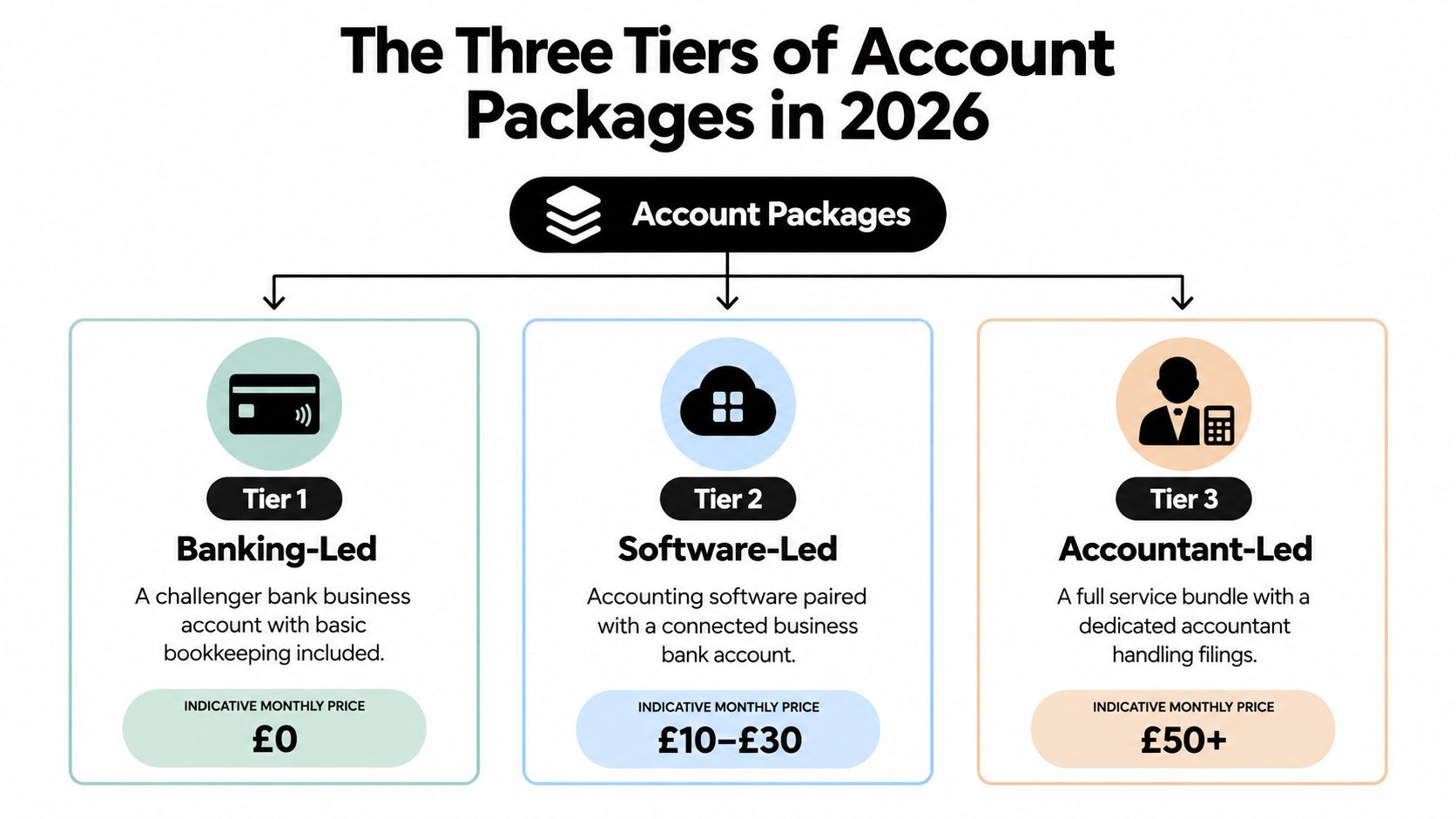
Tier one banking-led
A banking-led package starts with a business current account, usually from a challenger bank, and adds a light bookkeeping layer. You may get a debit card, payment notifications, basic invoice creation and a simple spending overview. Some providers offer a free entry-level option, while paid features typically sit around banking, transfers or additional account controls.
This tier suits a freelancer with a small number of clients, uncomplicated expenses and a strong willingness to review transactions regularly. It's also useful for someone whose accountant already manages the tax work.
The limitation is depth. Categorisation may be broad, receipt handling may involve manual uploads, and the package may not support the complete digital-record workflow you'll eventually need. If you're comparing bookkeeping applications separately, this guide to the best bookkeeping apps offers useful context on the software layer.
Tier two accounting-led
An accounting-led package puts bookkeeping first. It generally includes invoicing, expense categories, bank feeds, reconciliation and tax-related workflows, with MTD compatibility becoming a central selection criterion. You'll often connect a separate business bank account to the software.
This is the strongest fit for contractors, consultants and established sole traders whose income, expenses or tax position needs more detailed treatment. The chief drawback is fragmentation. You may have one login for banking, another for bookkeeping and a third for receipt capture.
Tier three hybrid
A hybrid package combines banking, bookkeeping, receipt capture and tax tools in one environment. It can reduce duplicate data entry and give you a single view of money received, money spent and records still needing attention.
The trade-off is cost and dependence on one provider. A hybrid package may be excessive for a sole trader with very few transactions, and moving away can be more complicated if your banking and accounting history are closely integrated. Choose it because it removes repeated work, not because a bundle sounds all-inclusive.
Core Features Compared Across UK Account Packages
The important question isn't whether a package includes invoicing. Nearly every serious option does. The question is whether it turns daily transactions into records that are complete, reviewable and ready for tax work.
| Feature | Banking-led | Accounting-led | Hybrid |
|---|---|---|---|
| Invoicing | Basic invoices and payment tracking | Detailed invoices, reminders and reporting | Invoicing linked directly to banking activity |
| Expense capture | Manual upload or simple transaction notes | Categorisation with broader accounting controls | Receipt capture, matching and review in one workflow |
| Bank feed and reconciliation | Usually simple and easy to start | Stronger matching and reconciliation tools | Integrated feed with fewer separate logins |
| MTD readiness | May require an upgrade or connected software | Usually the central purpose of the package | Often built into the wider workflow |
| Pricing | Low entry cost, but limited depth | Subscription based, with possible add-ons | Higher bundled cost, fewer separate tools |
Invoicing is only the first test
A banking-led package wins if you send straightforward invoices and mainly need clients to pay into a separate business account. It loses value when you need recurring invoices, detailed payment allocation or a clear connection between an invoice and the bank receipt.
Accounting-led tools usually provide better control over invoice status and reporting. Hybrid tools can match payment activity automatically, but they may limit your flexibility if you later want to change banks or accounting software.
Expense capture determines the quality of your records
Basic packages often let you attach a note or photograph to a transaction. That's better than keeping a paper receipt in a drawer, but it still leaves you responsible for naming, categorising and reviewing every item.
Accounting-led packages tend to offer more detailed tax categories and integrations. Hybrid packages can reduce the number of times you re-enter the same information. For a detailed comparison of connected tools, best software for freelancers and contractors is a useful resource to review alongside your bank's own features.
Read the price beyond the headline
Compare the base subscription with bank-feed charges, invoice limits, receipt allowances, extra users, accountant access and MTD functionality. A package that looks cheap at sign-up can become less attractive after you add the features that make reconciliation workable.
These five criteria matter more than cosmetic extras. They also determine whether a package will remain suitable as your qualifying income approaches the MTD thresholds.
Making Tax Digital and How It Changes Your Package Choice
A sole trader earning above the first MTD band can no longer choose software on invoice limits and monthly fees alone. The package must keep usable digital records, support quarterly reporting and reduce the time you spend checking transactions.
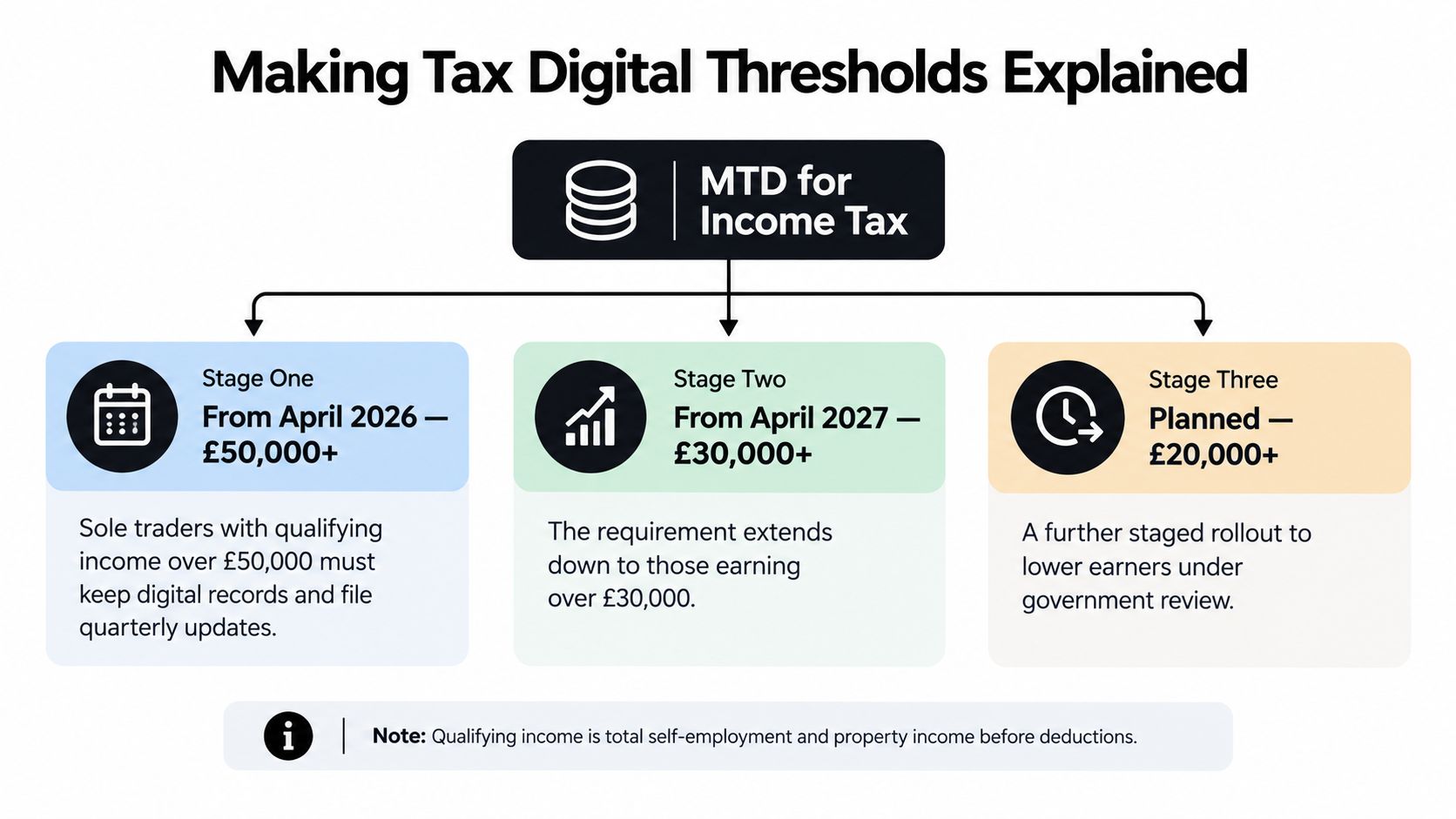
The scheduled timetable begins on 6 April 2026 for sole traders and landlords whose qualifying income exceeded £50,000 in the 2024–25 tax year. The threshold is scheduled to fall to more than £30,000 from 6 April 2027, based on 2025–26 qualifying income, and more than £20,000 from 6 April 2028, based on 2026–27 qualifying income, as currently set out in HMRC's guidance on preparing for Making Tax Digital. Affected users will need digital records, compatible software and quarterly summaries of income and expenses.
For a practical checklist on software choice and quarterly workflows, see Making Tax Digital guidance for self-employed people.
Qualifying income is not profit
A freelancer can fall into an MTD band even when their take-home profit looks modest. The thresholds use qualifying income, not just the amount left after expenses. HMRC explains how to find out if and when you need to use Making Tax Digital, including income from self-employment and property.
Choose a package that lets you monitor qualifying income separately from costs. A bank feed alone may show money received, but it will not always give you the control needed to assess your position accurately.
Match the package to the band
- Below the current threshold: A banking-led package suits simple records and low transaction volume. Choose one with a reliable export or migration route, so a later move to compatible accounting software does not create avoidable rework.
- Approaching a scheduled threshold: Start preparing before HMRC requires quarterly submissions. Digital receipt storage, categorisation and exportable records should be the minimum.
- Above the middle scheduled band: Select a hybrid or accounting-led package with dependable quarterly summaries and a clear review process. Paying slightly more is sensible if it removes repeated manual checks.
- Above the initial band: Use a full accounting-led workflow unless your accountant has configured another compatible system. Disconnected spreadsheets and manual records create too much checking for quarterly reporting.
HMRC does not supply the software. Compatible software must store digital records and send quarterly updates, so migration readiness matters even while you remain outside the relevant band. Move early enough to correct categories, test the workflow and establish a routine before a reporting deadline.
Receipt Capture, Expense Categorisation, and Reconciliation Workflows
The largest difference between packages is often the expense-to-bank loop. Invoices attract attention because they're visible, but receipts determine whether your records support the expenses you claim and whether your accountant can work efficiently.
There are three common capture methods. Manual photo upload is easy to understand but depends on you remembering to do it. Email forwarding and document parsers reduce friction when suppliers already send electronic receipts. Connected capture tools can link the document to the bank transaction, extract the relevant details and leave you with an item to review rather than a blank transaction.
| Workflow step | Banking-led tier | Hybrid tier | Accounting-led tier |
|---|---|---|---|
| Capture | Photograph or attach receipts manually | Capture through connected channels | Upload, email or integrate with a separate receipt tool |
| Categorise | Broad spending categories | Automated suggestions with review | Detailed tax categories and accounting codes |
| Match | Basic bank transaction notes | Receipt-to-transaction matching | Bank-feed rules and reconciliation controls |
| Review | Search for missing attachments | Exceptions and unmatched items | Reconciliation reports and accountant review |
| Export | Often limited | Usually designed for the package's own tools | Strong export and accounting-platform compatibility |
Categorisation must reflect the work
A flat category list may be enough for a simple consultant. A tradesperson or contractor may need mileage records, project tags, equipment treatment and clear separation between business and private use. If you work across several platforms, the package must capture every income stream, not just transactions from one bank.
Snyp can be used as a receipt-capture option for freelancers and sole traders. It accepts documents through WhatsApp, email forwarding or file upload, extracts details such as merchant, amount, date, tax and category, and synchronises structured expense data with Xero or QuickBooks. The practical workflow is described in automatic data capture for business documents.
Reconciliation is where time disappears
Every unmatched transaction creates a future task. You need to find the receipt, decide what the purchase was for, check whether it was partly personal, and then confirm the correct category. A package that suggests accurate matches and surfaces exceptions clearly will normally outperform one with more impressive invoice branding.
HMRC's guidance also makes clear that users must check whether their software covers all relevant income sources and supports their chosen accounting period. That makes reconciliation a control process, not just an administrative convenience.
Matching Account Packages to Real Self-Employed Scenarios
The right package depends on the shape of the work, not the job title. A designer with a handful of clients has different needs from a contractor with several income streams, even if both operate as sole traders.
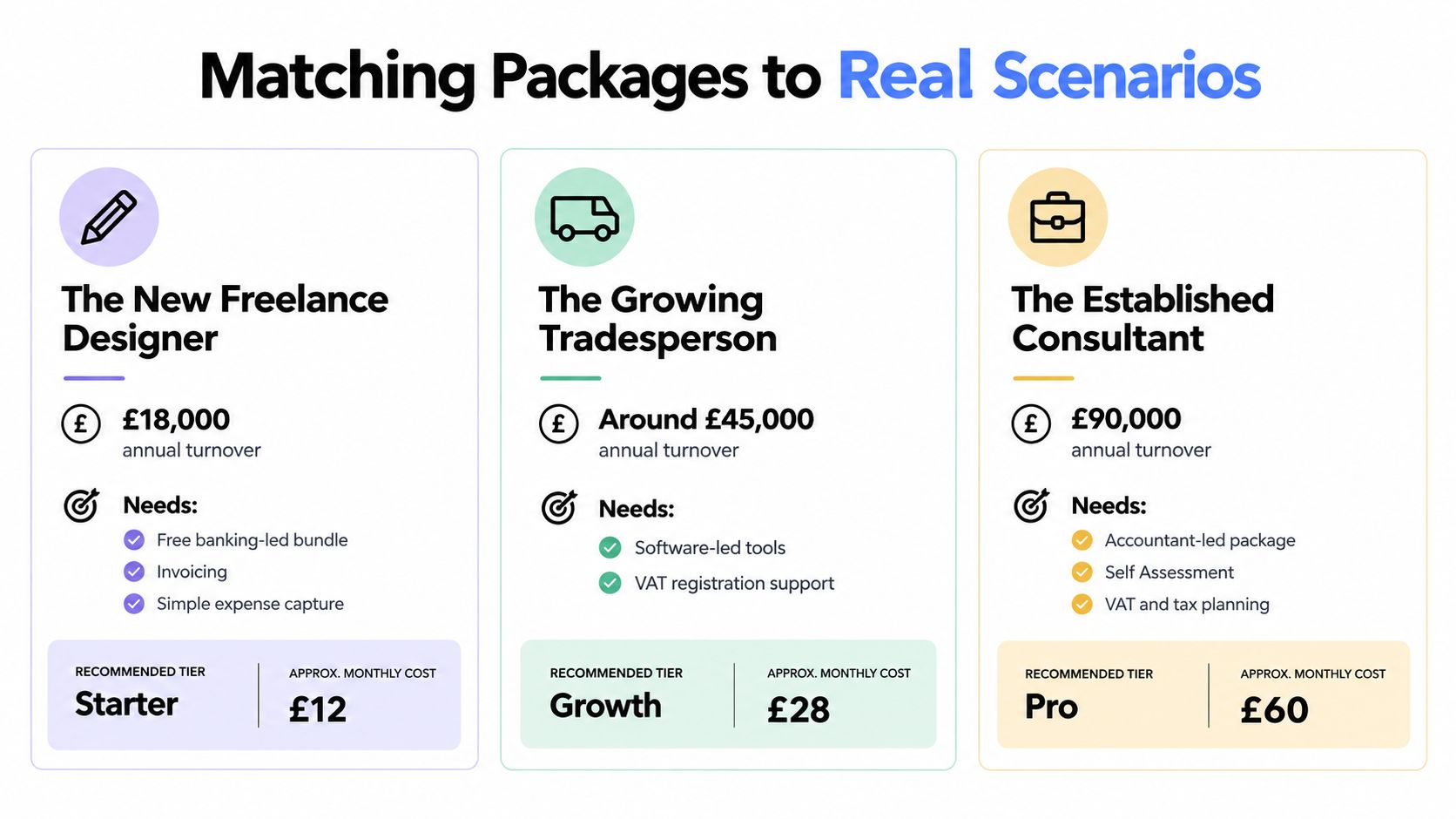
The new freelance designer
A new designer with modest turnover, few clients and straightforward software expenses should start with a banking-led package. The priority is a separate business account, basic invoicing and a reliable habit for storing receipts.
Avoid paying for an accountant-led bundle before the records justify it. Instead, check that the package can export transactions and move into MTD-compatible software if income grows. The feature that tips the decision is migration readiness, not a large invoice limit.
Keep business receipts separate from personal purchases from the first client payment. That single discipline makes later bookkeeping far easier.
The growing contractor
A contractor whose income is moving towards or beyond an MTD threshold needs an accounting-led or hybrid package. The package should support digital records, bank feeds, detailed expense categories, accountant access and a clean quarterly-review process.
Avoid a banking-led package with attractive introductory features but weak export and categorisation. The deciding feature is the quality of the reconciliation and accountant hand-off. If your work involves deductions, subcontractor records or sector-specific tracking, confirm that the software and accountant can handle those requirements before you commit.
Don't choose a tool solely because it produces attractive invoices. Choose the system that makes missing evidence visible before a quarterly submission.
The side hustler
A side hustler combining PAYE employment with a weekend online shop needs separation and discipline. A hybrid package can work well if it separates business receipts, stock costs and sales from personal banking without creating unnecessary complexity.
Avoid a full accountant-led package if the shop is small and the records are uncomplicated. Also avoid leaving everything in a personal current account, because stock purchases and platform payments become difficult to identify later.
The deciding feature is income and cost separation. A side business may have fewer transactions, but those transactions can be mixed with household spending and employment income. A clear account structure and searchable evidence reduce the risk of turning a small venture into a second tax-return headache.
For contracts, terms, privacy wording or other operational documents, an AI legal assistant for business owners can sit alongside your financial workflow. It doesn't replace an accountant or solicitor, but it can help you deal with routine business administration.
The Hidden Cost of Cheap Packages and Admin Time
The cheapest package is only cheap when it doesn't create extra work. A low subscription can be undermined by paid invoice features, bank-feed charges, receipt limits, additional user fees, MTD upgrades or awkward exports.
The calculation is simple:
Total cost = subscription, add-ons, your admin time, correction work and accountant remediation.
Suppose a cheaper package saves a small amount each month but forces you to download statements, rename receipts and match transactions manually. That saving may disappear quickly if you spend regular evenings on bookkeeping instead of client work. It can disappear again when your accountant has to reconstruct categories or ask for missing evidence.
Test the workflow, not the sales page
Before buying, run a few real transactions through the package:
- Client payment: Can you match the payment to the correct invoice without manual searching?
- Mixed-use purchase: Can you record a business item that also has a private element?
- Email receipt: Can you preserve the document and connect it to the bank transaction?
- Missing evidence: Does the system show which expenses still need attention?
- Accountant export: Can another professional understand the records without a long explanation?
If the answer is no, the package is shifting work onto you. That may be reasonable for a simple business with plenty of spare time. It isn't reasonable for a busy contractor whose records must support regular digital reporting.
The correct price comparison is not “Which subscription costs less?” It's “Which package leaves the least expensive work for me to do manually?”
Pay attention to year-end hand-off costs as well. A system that exports clean, categorised records can reduce questions. A system that exports a pile of uncategorised transactions may leave you paying for catch-up work.
Choosing and Switching Your Account Package With Confidence
Choose according to your next operational problem, not your current anxiety. A new freelancer needs a low-friction routine. An established contractor needs thorough records and professional oversight. A side hustler needs separation without paying for a corporate finance system.
Direct recommendations
- New freelancer: Choose a banking-led tier with basic invoicing, digital receipt storage and a clear path to MTD-compatible software. Don't overbuy before your transaction volume or income requires it.
- Established contractor: Choose an accounting-led package or a hybrid with accountant access, detailed categories, strong bank-feed reconciliation and support for the records your sector requires.
- Side hustler: Choose a hybrid workflow if personal and business spending are mixed. Prioritise separate accounts, stock-cost tracking and easy export over advanced forecasting.
A virtual finance professional may be useful once decisions move beyond transaction recording. This explanation of how a virtual CFO helps is relevant for owners who need financial insight as well as bookkeeping.
Questions to ask before switching
- Can I export the data? Check the formats available for transactions, invoices, receipts and categories.
- How much history transfers? Find out whether the new system accepts prior records or starts from a chosen date.
- Will direct debits continue? Confirm what happens to recurring payments when you change the bank account.
- Do previous submissions remain valid? Changing software doesn't automatically undo earlier filings, but retain the records supporting them.
- Can my accountant access the system? Ask about permissions, review workflows and export quality.
- Does it support every income source? Include platforms, property income and other relevant sources in your assessment.
Short answers to common questions
Can I switch part way through the tax year? Yes, but plan the opening and closing dates carefully. Keep the old records available and check that transactions aren't duplicated or omitted.
Can I combine a bank account with separate accounting software? Yes. That arrangement often works well when the bank is convenient but the accounting software has stronger tax and reconciliation tools.
When should I involve an accountant? Bring one in when your income approaches an MTD threshold, your expenses become difficult to classify, you have several income sources, or you're spending more time repairing records than running the business.
Choose the package that keeps evidence attached to transactions, makes exceptions visible and gives you a realistic route into digital reporting. That is a better decision than choosing the lowest monthly fee and hoping the gaps won't matter.
Snyp gives freelancers and sole traders a practical receipt pipeline through WhatsApp, email or file upload, with structured expense data ready for review and accounting workflows. Visit Snyp to see how it can reduce manual receipt entry and keep your records organised before the next tax deadline.