




LTD Company Accounts Software: A Practical Buyer Guide
You've got a limited company, a bank feed, a phone full of receipts and an accountant asking for “the books” again. VAT is due, annual accounts are approaching, and the software you chose because it looked simple now turns out to handle only one part of the job.
That's the trap with ltd company accounts software. Receipt capture, bookkeeping, annual accounts, Corporation Tax and Companies House filing are connected, but they aren't the same thing. Choose the wrong combination and you'll still be downloading spreadsheets, correcting VAT codes and paying someone to re-key figures at year end.
The deadline makes this more urgent. Companies House says over 4 million sets of accounts are filed each year, and over 65% of companies already use software filing as their preferred method. From 1 April 2028, all companies must file accounts using commercial software, ending paper and web-based accounts filing. (Companies House explains the move to software-only filing)
| What you need | The question to ask |
|---|---|
| Receipt capture | Can it extract the right information and preserve the document? |
| Bookkeeping | Does it post cleanly into the ledger and reconcile the bank? |
| Annual accounts | Can it prepare the correct Companies House format? |
| Tax and filing | Can you complete the CT600 and submit the accounts through the required route? |
| People and controls | Can your accountant review, adjust and file without workarounds? |
What LTD Company Accounts Software Actually Does in 2026
A typical week starts with a director photographing a supplier receipt between client calls. By the end of the quarter, those images are scattered across WhatsApp, email and a downloads folder. Then the VAT return arrives, followed by the annual accounts deadline, and the director discovers that storing receipts isn't the same as maintaining usable accounting records.
In 2026, the product category is really a connected workflow. It can include:
- Document capture: Receipts, invoices and bills enter the system through an app, email or upload.
- Bookkeeping: Transactions are categorised, matched to bank entries and posted to nominal codes.
- VAT compliance: The system keeps digital records and communicates with HMRC through its API.
- Payroll: Salaries, deductions and reporting are handled in the core product or an integrated module.
- Year-end accounts: The ledger is converted into statutory accounts in the format your company needs.
- Tax filing: Corporation Tax calculations and the CT600 are prepared and submitted separately from the Companies House accounts where required.
The important distinction is between recording data and filing compliant accounts. A receipt app may extract a merchant, amount and tax value accurately, but it may not create full accounts. Conversely, an accounts package may produce statutory accounts but offer a poor way to get source documents into the ledger.
Making Tax Digital capability is now part of the baseline. HMRC says compatible software must keep and preserve digital records, prepare VAT returns from those records and communicate with HMRC through its API. For VAT, submissions must always be made through an API. (HMRC's MTD for VAT notice sets out the digital record and API requirements)
Practical rule: Don't buy software because it scans receipts. Buy a workflow that turns those receipts into reconciled, reviewable records and then into the right filing.
The approaching Companies House deadline changes the buying decision. Companies House has digitally enabled over 99% of accounts, and from 1 April 2028 commercial software will be compulsory. Your platform should therefore support the appropriate statutory accounts format, structured data and a clean handover to whoever files the accounts.
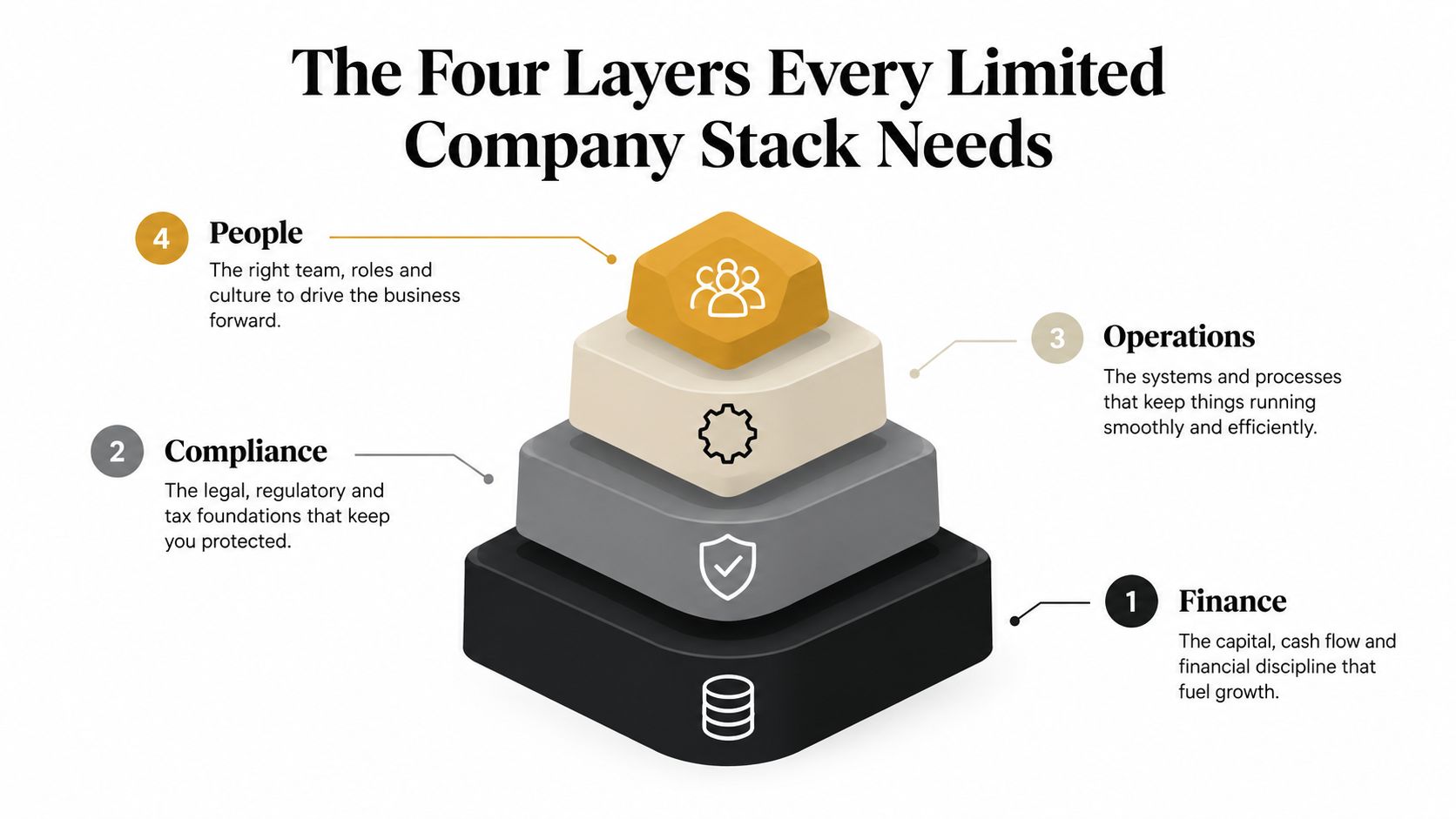
Judge every option against four layers: capture, bookkeeping, annual accounts, and tax and statutory filing. If one layer is missing, you're not buying an all-in-one solution. You're buying one component and accepting the integration risk.
The Four Layers Every Limited Company Stack Needs
A limited company's finance stack has four separate jobs. The software brands blur those boundaries, but the compliance risks remain distinct.
First layer, receipt and document capture
This is the evidence layer. It collects receipts, supplier invoices, bills and expense claims, then extracts useful fields such as merchant, date, amount, tax, currency and category. It should flag duplicates and preserve the original document so the bookkeeping entry can be reviewed later.
A receipt tool that merely creates a searchable image is incomplete. If the extracted data doesn't post into the nominal ledger with the correct VAT treatment, the director still has to enter it manually. That leaves the bookkeeping and VAT process exposed to avoidable mistakes.
Second layer, bookkeeping and bank feeds
Here transactions become accounting records. The system needs reliable bank feeds, sensible categorisation, bank reconciliation, invoicing and reporting. UK buyer data identifies billing, bank reconciliation and reporting as highly valued accounting functions, making them more important than a polished receipt gallery. (Capterra's UK accounting software directory provides buyer feature context)
The owner is usually the director or bookkeeper, while the accountant reviews the coding and reconciles exceptions. A slick app with weak reconciliation creates a tidy-looking but unreliable ledger.
Third layer, annual accounts production
Year-end software converts the ledger into accounts for Companies House. It must match the company's accounting basis, whether that involves micro-entity, small full, dormant or abridged accounts.
Many buyers get caught at this stage. A platform can produce management reports without being able to generate and submit the statutory accounts format your company needs. The accountant then exports figures, re-enters them into another package and checks the result from scratch.
Fourth layer, Corporation Tax and filing
The CT600 is an HMRC filing. Companies House accounts are a separate submission. The old combined online accounts and Company Tax Return service closed on 31 March 2026, so a small company must understand which product handles which filing. (GOV.UK explains the closure of the online accounts and Company Tax Return service)
Before comparing brands, write down who owns each layer, what software performs it and what happens when an exception appears. That simple exercise exposes gaps faster than a feature list.
Comparing the Main UK Platforms Side by Side
The five names most directors encounter are Xero, QuickBooks Online, Sage Business Cloud Accounting, FreeAgent and KashFlow. They aren't interchangeable. Their strengths differ, and their exact filing features can depend on the plan, integrations and the accountant's production software.
| Platform | Best For | MTD VAT | Statutory Accounts (iXBRL) | CT600 Filing | Payroll | Starting Price |
|---|---|---|---|---|---|---|
| Xero | Growing teams and practices | Supported, verify current plan | Usually through connected accounts tools | Usually through connected tax tools | Integrated options | Check current pricing |
| QuickBooks Online | Invoicing, stock and small-business workflows | Supported, verify current plan | Often through connected accounts tools | Usually through connected tax tools | Integrated options | Check current pricing |
| Sage Business Cloud Accounting | Traditional businesses wanting a familiar finance brand | Supported, verify current plan | Check product and accountant workflow | Check product and accountant workflow | Sage payroll options | Check current pricing |
| FreeAgent | Freelancers and micro limited companies | Supported, verify current plan | Check current Companies House workflow | Check current tax workflow | Integrated options | Check current pricing |
| KashFlow | Owners who want straightforward administration | Supported, verify current plan | Check product and accountant workflow | Check product and accountant workflow | Integrated options | Check current pricing |
Xero is the strongest general choice when a company expects more users, integrations, projects or complex reporting. Its bank reconciliation and ecosystem are useful, but don't assume the bookkeeping subscription alone covers statutory accounts and Corporation Tax filing.
QuickBooks Online suits businesses that put invoicing, stock and transaction workflows first. It's capable, but confirm exactly how annual accounts and CT600 work in your accountant's preferred setup.
Sage remains a sensible choice for traditional businesses and teams already comfortable with Sage processes. It can feel heavier than a lightweight startup product, which is often a fair trade for stronger controls and familiarity.
FreeAgent is appealing for freelancers and micro limited companies that want a simpler interface and a close connection between everyday records and tax tasks. Check whether its current filing route matches the accounts your company submits.
KashFlow is a reasonable pick for an owner who wants minimal administration and doesn't need a broad operational ecosystem. Keep the same discipline, though. Confirm the accounts format, CT600 route and accountant access before committing.
For a wider perspective on how accounting products differ by business structure, this guide to compare LLC accounting tools is useful, although UK directors must still validate Companies House and HMRC compatibility. Snyp's own overview of the top ten accounting software options can also help when you're narrowing the shortlist.
Don't choose the brand with the longest feature page. Choose the platform that covers your actual filing route with the fewest handoffs.
Compliance Features That Are No Longer Optional
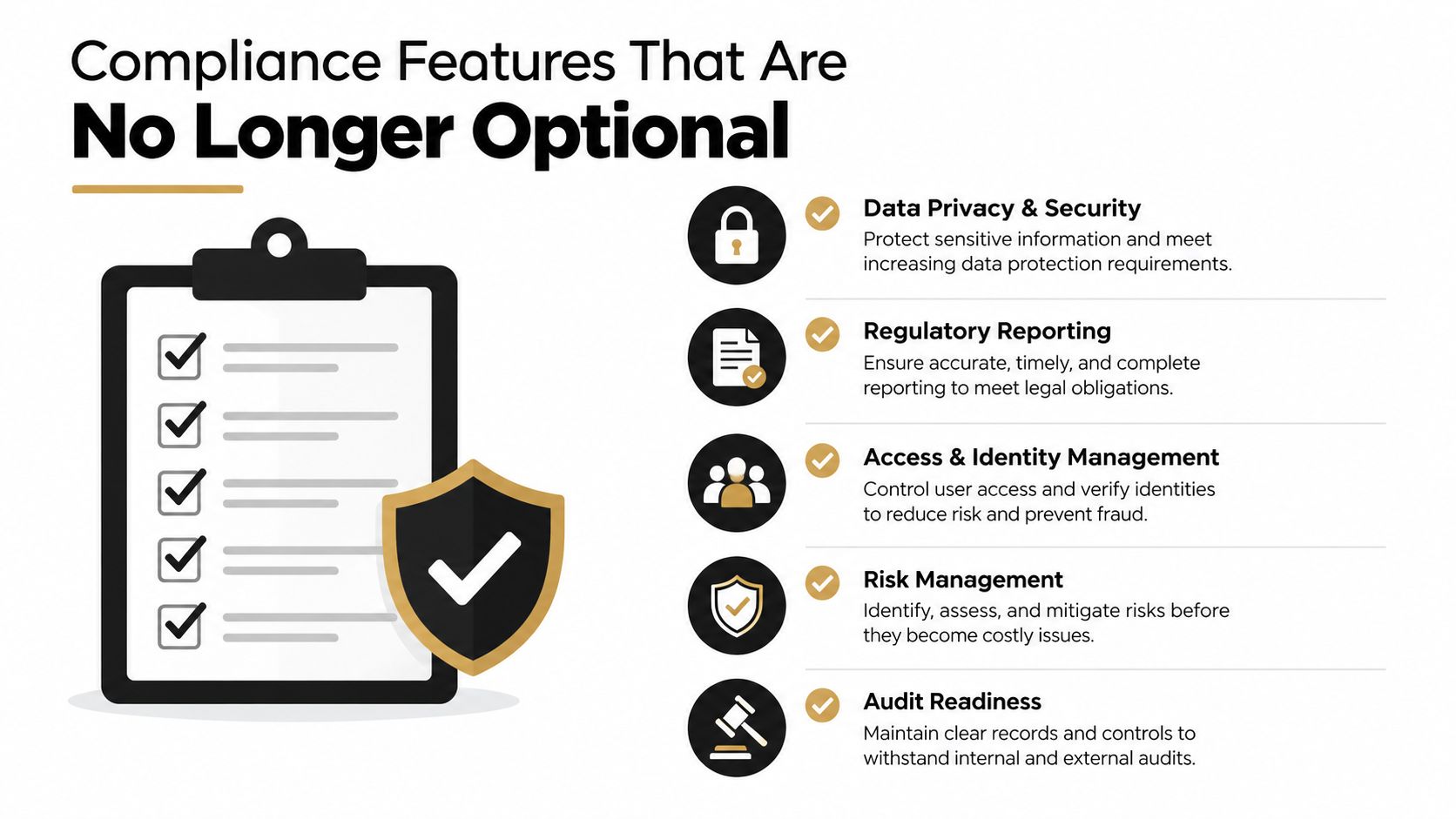
Compliance isn't a single tick box. A director needs to separate VAT, Companies House accounts and payroll, because each follows a different process.
MTD and digital records
MTD-compatible software must preserve digital records and submit VAT information through HMRC's API. It should also support a clear audit trail from the source document to the transaction, VAT return and reconciliation.
HMRC's wider MTD roadmap includes quarterly updates and year-end tax-return submission for Income Tax. That matters most to directors with personal self-assessment obligations alongside company responsibilities. A limited company's own Corporation Tax filing remains a separate task.
If you're unsure which obligations apply to your structure, use this plain-English guide to whether MTD applies to limited companies.
Companies House accounts
The filing transition is the major buying deadline. From 1 April 2026, companies can use third-party software, web services or paper during the transition period, but from 1 April 2028 commercial software will be the only permitted route for accounts filing. Companies House says software filing is quicker, easier and more secure, and its guidance covers small full accounts, micro-entity accounts, dormant accounts and abridged accounts. (Companies House software filing guidance)
Ask these questions before signing:
- Account type: Can it prepare the exact account type your company files?
- Submission route: Does it submit to Companies House, or only prepare figures?
- Structured output: Does it produce the required tagged file, such as iXBRL, where applicable?
- Amendments: Can your accountant amend and resubmit the previous filing if needed?
- Access: Can the accountant use the platform without sharing your login?
Payroll
Payroll creates a separate compliance stream. Look for RTI submissions, FPS and EPS handling, pension auto-enrolment connections and P11D support where benefits in kind apply.
Don't pay for payroll merely because the product advertises it. Check whether the module handles your pay frequency, directors' payroll, pension provider and year-end reporting. A payroll add-on that still requires manual re-entry isn't reducing much risk.
Where Receipt Capture and Tools Like Snyp Fit In
Receipt capture is the front door to the ledger, not the ledger itself. A built-in mobile app may be enough if the business has modest expenses, one accounting platform and disciplined staff. It becomes less convincing when receipts arrive through several channels or when the accountant spends time repairing extracted data.
A useful capture layer should handle:
- Reliable extraction: Merchant, amount, date, tax, currency and category.
- Duplicate detection: The same receipt shouldn't create two expenses.
- VAT treatment: The data should map to the correct tax code, not merely display a tax figure.
- Multiple formats: Email attachments, phone photos, PDFs and supplier documents.
- Review controls: Someone should be able to check and edit the result before posting.
- Ledger connection: The approved data should reach the correct nominal code and reconciliation workflow.
| Criterion | Built-In Mobile App (Xero, QuickBooks, Sage, FreeAgent) | Snyp-Style Add-On |
|---|---|---|
| Capture speed | Convenient when users already work inside the accounting app | Useful when users capture through email, WhatsApp or file upload |
| Extraction scope | Depends on the platform and plan | Designed around structured receipt and document fields |
| Emailed receipts | May require forwarding rules or manual upload | A central forwarding workflow can reduce scattered inboxes |
| Review | Usually available inside the accounting workflow | Review and edit before syncing can be part of the process |
| Ledger destination | Direct when the app is native to the ledger | Depends on the connected accounting integration |
| Best fit | Low-volume, simple expense workflows | Businesses with varied document sources and repeated capture work |
A standalone tool earns its place when it removes a real bottleneck. If every receipt is already captured correctly in the accounting app and the accountant rarely fixes postings, another subscription adds complexity rather than value. If directors forward documents from several places and the bookkeeping team repeatedly corrects fields, a dedicated capture layer can make sense.
Snyp captures receipts and related documents through WhatsApp, email forwarding or direct upload, extracts structured expense data and syncs it with platforms such as Xero and QuickBooks. It also provides a review step before the data is sent to the accounting system. (Snyp explains automatic data capture)
Pricing the Workflow Not Just the Subscription
The monthly headline price is a poor comparison. The full cost includes every module needed to complete the workflow, plus the time spent fixing transactions that should have arrived correctly.
A director should count:
- Users and access: Additional seats for staff or an accountant.
- Payroll: A separate module or connected payroll service.
- VAT tools: Bridging or submission tools where the core product doesn't cover the required route.
- Documents: Receipt capture, storage and expense-management subscriptions.
- Banking: Bank-feed or payment add-ons.
- Corrections: Accountant time spent repairing categories, VAT codes and duplicates.
Use scenarios rather than pretending there is one universal price. Actual subscription totals vary by plan and supplier, so ask each vendor for a complete quote based on your users, VAT status, payroll and filing method.
| Company Profile | Base Subscription | Typical Add-Ons | Effective Monthly Cost | Effective Annual Cost |
|---|---|---|---|---|
| Solo freelancer | Core bookkeeping | Receipt capture, accountant access, optional VAT tools | Calculate from current quotes | Multiply the confirmed monthly total |
| Five-person team with payroll | Core bookkeeping | User seats, payroll, expenses, accountant access | Calculate from current quotes | Multiply the confirmed monthly total |
| Company using an external accountant | Core bookkeeping | Accountant licence, accounts production, CT600 workflow, receipt capture | Calculate from current quotes | Multiply the confirmed monthly total |
The useful mental model is cost per fully reconciled transaction, not cost per month. A cheaper product that leaves every expense needing manual review may cost more than a broader platform with better automation.
Ask for a live demonstration using your own workflow. Send a supplier invoice, a mileage claim, a foreign-currency receipt and a VAT receipt. Then watch where the data lands, who approves it and what the accountant has to correct.
Migrating to New Software Without Losing Your History
Don't switch accounting systems over a weekend because the new dashboard looks better. Plan the migration around an agreed cutover date, a reconciled trial balance and a filing calendar.
Export the right records
Start with the data the new system can import:
- Chart of accounts: Export the account codes and descriptions, then map them deliberately.
- Contacts: Include customers, suppliers and payment terms.
- Transactions: Preserve the previous years' transaction history in an accepted CSV or Excel structure.
- Documents: Keep source receipts and invoices attached where the system supports it.
- Tax details: Record VAT registration information, PAYE references and the Corporation Tax UTR securely.
A generic data dump is not a migration plan. It often imports incomplete descriptions, incorrect tax codes or balances without the transaction detail needed to explain them.
Reconcile before you cut over
Agree the opening balances against the latest management accounts. The bank, VAT control, debtors, creditors, payroll liabilities and retained profit should tie to the old ledger before the new system becomes the source of truth.
Preserve the previous year-end file rather than retyping old accounts. The accounts production software that created the prior filing remains important evidence, especially if an amendment or historical query arises.
Test the live workflow
Run a controlled test before switching:
- Reconnect bank feeds and confirm the accounts are correct.
- Import a small sample of contacts and transactions.
- Test one payroll run in a dummy period.
- Check the VAT period against HMRC records.
- Confirm the accountant can access reports and filing outputs.
- Keep the old subscription available in read-only mode for at least a full quarter.
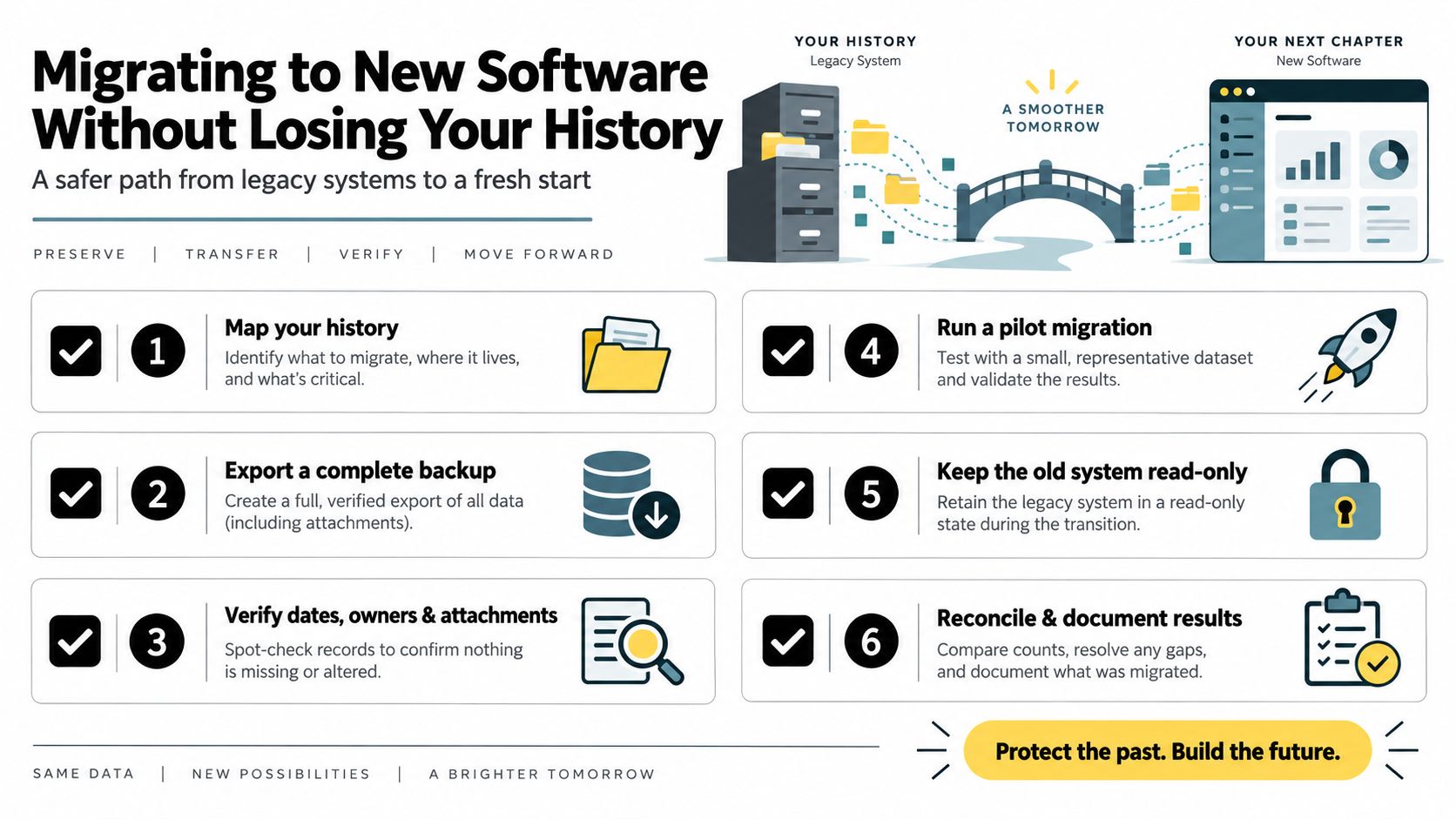
Migration sign-off: Don't close the old system until the opening trial balance agrees, the first VAT workflow has been checked and your accountant can retrieve the historical reports they may need.
The most dangerous migration is one that looks successful because the dashboard opens. Test the filing format, tax mapping and review process, not just the import wizard.
Choosing the Right Setup for Your Situation
Your business profile matters more than the software brochure. A solo consultant with no staff needs a different stack from a company managing payroll, stock, multiple currencies or a future sale.
A freelancer or micro limited company usually benefits from one straightforward bookkeeping platform, simple receipt capture and accountant access. FreeAgent can suit this profile when its current accounts and tax workflow matches the company's needs. Don't add a separate capture tool if the built-in app handles the volume reliably.
A two-director agency with payroll and VAT needs stronger collaboration. Xero or QuickBooks Online can provide a solid core, with a dedicated expenses layer where receipts arrive through several channels. The accountant should have their own access, not a password passed around by email.
A growing company with employees, stock or multi-currency invoicing needs deeper controls. Sage may be worth the additional learning effort for a traditional finance team, while Xero or QuickBooks may fit better where integrations and operational flexibility matter.
| Director Profile | Core Bookkeeping | Receipt Capture | Payroll | Accountant File Format |
|---|---|---|---|---|
| Solo consultant or micro company | FreeAgent or a simple cloud ledger | Built-in app first | Usually unnecessary or light | Confirm statutory accounts and CT600 route |
| Two-director agency with VAT | Xero or QuickBooks Online | Built-in app or dedicated capture | Integrated payroll option | Confirm accountant's preferred accounts workflow |
| Growing employer with stock | Sage, Xero or QuickBooks after testing | Dedicated capture if document volume demands it | Full payroll and pension integration | Confirm iXBRL-capable statutory accounts |
| Company preparing for sale or an R&D claim | Platform with detailed projects and audit history | Structured, reviewable document capture | Based on headcount and benefits | Direct access to granular records and filing software |
If you're preparing for a sale or an R&D claim, keep granular project history, supporting documents and a clear audit trail. If the company files different accounts from the product's default workflow, change products or involve an accountant before migration.
Use this checklist before committing:
- Role: Who enters, reviews and approves transactions?
- Headcount: How many employees need payroll or access?
- VAT: Are digital records and API submissions supported?
- Filing: Can the package prepare and submit the required accounts?
- Tax: Who handles the CT600 and Corporation Tax calculation?
- Growth: Will stock, currencies, projects or users increase?
- Evidence: Can you retrieve the source document behind every material transaction?
The safest setup is usually one core bookkeeping platform, one receipt capture layer where needed, an appropriate payroll add-on and an accountant who can complete the statutory filing workflow. Avoid buying five overlapping subscriptions. Make each tool own a clear job.
Snyp turns receipts and related documents from WhatsApp, email or file upload into structured expense data that can be reviewed before syncing to Xero or QuickBooks. If scattered receipts and repeated manual entry are slowing your ltd company workflow, visit Snyp and test whether its capture layer fits your current accounts setup.