




How Is VAT Calculated in UK: Formulas and Examples
To add standard-rate UK VAT, multiply the net price by 1.20; to strip it from a gross price, divide by 1.20. A £100 net price at 20% becomes £120 gross, containing £20 of VAT.
The familiar advice to “take twenty per cent” only works when you're starting with the price before tax. Apply it to a receipt total and you'll extract too much VAT. The calculation itself is straightforward, but you must first know what your starting figure represents, which rate applies and whether you're entitled to reclaim the tax.
The UK VAT Rates and Multipliers at a Glance
UK VAT is a percentage applied to a net price, meaning the amount before VAT. The gross price is the amount after VAT has been added, which is normally what the customer pays.
The multiplier combines the original price and its tax in one calculation. Use 1.20 for standard-rated supplies, 1.05 for reduced-rated supplies and 1.00 for zero-rated supplies. These are arithmetic expressions of the applicable rates, not separate charges.
UK VAT rates on a £100 net price
| Rate | Multiplier on net price | VAT amount | Gross price |
|---|---|---|---|
| Standard 20% | 1.20 | £20.00 | £120.00 |
| Reduced 5% | 1.05 | £5.00 | £105.00 |
| Zero-rated 0% | 1.00 | £0.00 | £100.00 |
| Exempt (no VAT charged) | No VAT multiplier, price unchanged | No VAT charged | £100.00 |
The table uses the same hypothetical starting price throughout so you can compare the arithmetic directly. The rate belongs to the supply and its circumstances, not to whichever multiplier gives the most convenient result.
Zero-rated and exempt aren't interchangeable
A zero-rated sale is still a taxable supply. An exempt sale isn't. Although neither adds VAT to the customer's bill, those classifications can produce different results when you calculate what VAT your business can recover on its purchases.
Don't classify a receipt by looking for an extra tax charge. A document showing no VAT could involve a zero-rated supply, an exempt supply or a supplier that isn't registered. Those aren't interchangeable bookkeeping entries.
Practical rule: Identify the VAT treatment first. Choose the multiplier afterwards.
Descriptions alone can also be misleading. Food purchases, for example, need more care than assigning every meal or ingredient the same tax code. The guide to VAT on restaurant food is useful when you're checking that distinction.
Check each invoice line rather than assuming the entire document uses one rate. If a supplier sells items with different VAT treatments, calculate each category separately and then bring the amounts together. That gives you a total you can explain, rather than a plausible-looking figure produced by applying one multiplier to everything.
When VAT Registration Changes the Sums
A UK business generally must register when taxable turnover exceeds £90,000 in a rolling 12-month period, or when it expects to exceed £90,000 in the next 30 days, under HMRC's VAT registration guidance. That test concerns taxable sales, not the profit left after expenses.
Keep your registration review alongside your invoicing records, rather than treating it as a year-end task.
What changes for your quote
Say a sole trader quotes £1,000 for a service before becoming VAT-registered. Assuming registration isn't yet required, they don't add a separate VAT charge, and the customer pays the quoted amount.
After registration, suppose the trader wants to keep that same net fee for a standard-rated service. The hypothetical invoice becomes £1,000 net + £200 VAT = £1,200 gross. The tax collected isn't extra earnings, and the eventual payment to HMRC will also depend on allowable input VAT.
Alternatively, if the trader keeps the customer's total unchanged, VAT must come out of that total. That's a pricing decision, not a different tax rate.
Registration can change either the customer's bill or the amount you retain before expenses. Check your quotation wording before promising a fixed total.
The following video provides another way to follow the registration topic.
Monitor turnover, not your bank balance
The threshold increased from £85,000 to £90,000 from 1 April 2024, according to HM Treasury and HMRC's threshold announcement. A rolling test doesn't restart with your accounting year, so keep an updated sales schedule.
Bank deposits aren't a reliable substitute. A transfer from your own savings isn't a customer sale, while unpaid sales may still matter to your records.
Voluntary registration below the compulsory threshold may allow recovery of eligible purchase VAT. It also brings charging, record-keeping and return obligations, so weigh the recoverable costs against the effect on customers and administration.
How to Add VAT to a Price Before Tax
Start with a figure clearly labelled net, excluding VAT or before VAT. A bare number on a quotation doesn't tell you whether tax still needs adding, and guessing can create a dispute before the work even starts.
For a hypothetical standard-rated sale, use the following sequence. Keep the net amount, tax and total in separate fields in your spreadsheet or invoicing software.
Calculate the tax and total
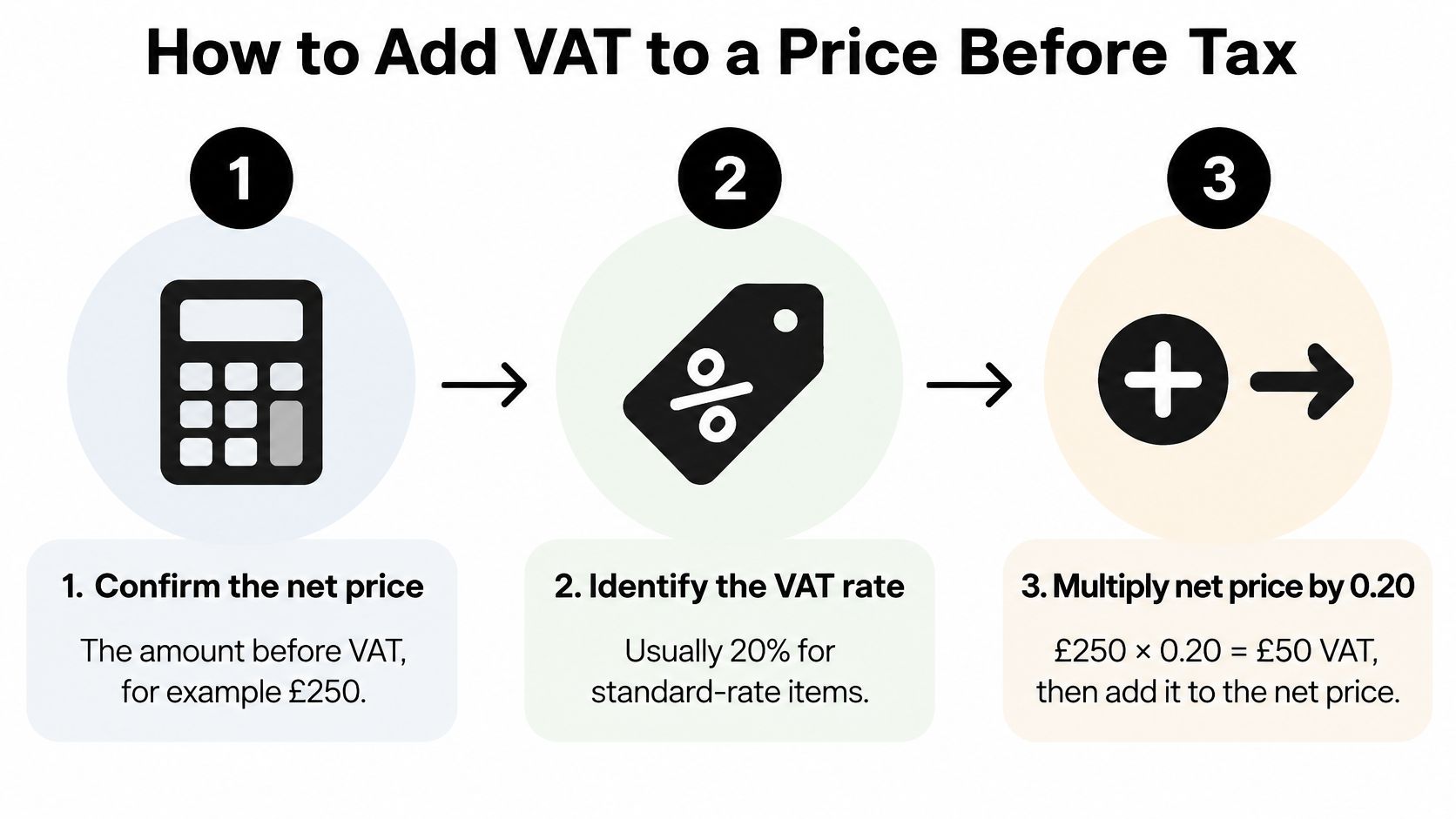
Confirm the net price. Suppose your agreed fee is £250 before VAT. This is the amount on which you'll calculate the tax, not the amount already collected from the customer.
Identify the applicable rate. For this example, assume the service is standard-rated at 20%. Confirm the classification rather than choosing the rate because you've used it on another invoice.
Calculate the VAT amount. Enter £250 × 0.20 = £50 VAT. Multiplying by the decimal rate gives you only the tax, not the customer's final bill.
Add the tax to the fee. The calculation is £250 + £50 = £300 gross. The shortcut, £250 × 1.20 = £300, reaches the same total without calculating the tax separately first.
Keep the pence consistent. Retain the calculator's precision while working, then apply a consistent rounding method in your invoicing software. Don't independently round intermediate figures in ways that make the displayed lines disagree with the invoice total.
Reverse-check your answer. In this example, £300 ÷ 1.20 = £250. Getting back to your original fee confirms that you've used the correct multiplier in the correct direction.
The visual below follows the same hypothetical calculation.
Make the starting price unambiguous
For a hypothetical qualifying reduced-rate item priced at £80 net, the arithmetic is £80 × 0.05 = £4 VAT, producing £84 gross. The process hasn't changed, only the rate and its corresponding multiplier.
Price comparisons need the same discipline. If you're budgeting for a bespoke kitchen, The White Kitchen Company's pricing information can help you frame your budget, but check whether each quotation includes VAT before comparing suppliers. Don't compare one supplier's net figure with another's final customer total.
Show the breakdown clearly on your own invoice: the description, net charge, applicable VAT and amount payable should be easy to follow. Your customer shouldn't have to reverse-engineer the tax from an unexplained total.
The avoidable error is adding VAT to a price that already includes it. Before multiplying, read the quotation, purchase order or price agreement and confirm whether the number is a net fee or the complete bill.
How to Work Out VAT Inside a Gross Price
Taking 20% of £120 gives £24, but that isn't the VAT inside a standard-rated £120 receipt. The correct split is £100 net and £20 VAT, because VAT was calculated on the original net price, not on the larger final total.
HMRC's guidance on charging VAT explains that the standard rate is 20% and that you divide a VAT-inclusive standard-rated price by 1.2 to recover the price before VAT. Its £100-before-tax example produces £20 VAT and a £120 customer total.
Why the VAT fraction is one-sixth
Think of the gross amount as the original net value plus the tax added to it. At the standard rate, the gross comprises 100 parts net value and 20 parts VAT, making 120 parts altogether.
The VAT therefore represents 20/120 of the gross, which simplifies to one-sixth. That's why dividing a standard-rated receipt total by six extracts the VAT, while dividing it by the gross-price multiplier extracts the net value.
Use whichever route matches the figure you need:
- To find the net price: Divide the VAT-inclusive amount by the rate's gross-price multiplier.
- To find the VAT: Subtract that net amount from the gross, or apply the appropriate VAT fraction directly.
- To check the split: Add your recorded net and VAT figures together. They must reproduce the receipt total.
Extracting VAT from VAT-inclusive prices
| Gross price (VAT-inclusive) | Rate | Net price | VAT included |
|---|---|---|---|
| £120.00 | 20% | £100.00 | £20.00 |
| £300.00 | 20% | £250.00 | £50.00 |
| £84.00 | 20% | £70.00 | £14.00 |
| £49.99 | 20% | £41.66 | £8.33 |
| £105.00 | 5% | £100.00 | £5.00 |
These worked examples assume the full amount carries the stated rate. They aren't a method for extracting tax from a mixed-rate receipt without checking its lines.
Handle awkward receipt totals carefully
For the hypothetical £49.99 standard-rated purchase, dividing the gross by six gives a VAT figure that rounds to £8.33. Subtracting that recorded tax from the gross leaves £41.66 net.
At the reduced rate, the equivalent VAT fraction is 5/105, or one twenty-first, and the net-price divisor is 1.05. You can't use the standard-rate fraction just because it's easier to remember.
The rate tells you which fraction to use. The receipt total alone doesn't tell you how much VAT it contains.
Where the supplier provides a VAT breakdown, retain it and reconcile your entry to the document. If the evidence is unclear, investigate rather than manufacturing a tax amount from a card-payment total.
Reverse Charge and Other Special Cases
Suppose a subcontractor issues a hypothetical £5,000 net construction invoice for a supply that qualifies for the domestic reverse charge. Instead of collecting VAT from the contractor, the supplier leaves the VAT collection to the customer, who accounts for it through their VAT records.
For an assumed standard-rated supply, the calculation is £5,000 × 0.20 = £1,000. The arithmetic looks familiar, but the responsibility for reporting the tax has moved.
Establish who accounts for the tax
Reverse charge doesn't mean exempt or zero-rated. It changes who accounts for VAT, not necessarily the underlying liability of the service.
Who accounts for VAT in each case
| Case | Who accounts for VAT | Invoice treatment |
|---|---|---|
| Standard UK business sale | Supplier | Supplier charges VAT at the applicable rate |
| Domestic reverse charge in construction | Customer, where the qualifying conditions apply | Supplier doesn't collect VAT and includes reverse-charge wording |
| Imported services from an overseas supplier | UK business customer, where reverse-charge rules apply | Supplier doesn't charge UK VAT; customer accounts for applicable UK VAT |
Construction reverse-charge treatment isn't automatic whenever two builders trade. Check the service, the parties' status and the relevant conditions before deciding how to invoice.
For overseas services, check the nature of the service and the place-of-supply treatment. An overseas supplier's address alone isn't enough to decide the UK accounting entry.
Check before posting: An invoice without VAT isn't, by itself, evidence that no VAT accounting is needed.
Recovery still needs checking
The customer generally records reverse-charge VAT as output tax and claims the allowable amount as input tax. For a fully taxable business with full recovery, those entries can offset each other.
A restricted input-tax claim can leave a different result. Keep the supplier invoice, the reason for the treatment and your calculation together, and ask your accountant to confirm unfamiliar transactions before filing.
Reclaiming VAT and When It Is Paid
Suppose your records for a VAT period show £2,000 output VAT on sales and £600 recoverable input VAT on purchases. In this hypothetical example, the ordinary calculation is £2,000 − £600 = £1,400 payable.
Output VAT is the tax your business accounts for on sales. Input VAT is the tax on purchases, but only the allowable portion belongs in your recovery calculation. The guide to VAT input and VAT output helps distinguish those two sides of the ledger.
Invoice timing and payment timing aren't the same
Under standard accounting, the tax point determines the relevant VAT period. That often connects to the invoice date, but payments and other tax-point rules can affect the answer, so don't use the date money appears in your bank account.
Under cash accounting, eligible businesses account for sales VAT when customers pay and reclaim purchase VAT when suppliers are paid. HMRC's Cash Accounting Scheme eligibility guidance sets an expected VAT-taxable turnover entry limit of £1.35 million or less, with a requirement to leave once taxable turnover exceeds £1.6 million.
This means businesses holding identical invoices can account for VAT at different times. A cash-accounting business needs payment matching, not just a folder of invoices.
| Accounting approach | What your records need to establish |
|---|---|
| Standard accounting | The relevant tax point and supporting transaction evidence |
| Cash accounting | Which customer receipts and supplier payments relate to each invoice |
| Restricted recovery | How much purchase VAT is allowable, not merely how much was charged |
Don't confuse extracted VAT with reclaimable VAT
Cash accounting has exceptions. Advance invoices, extended payment arrangements and certain credit transactions need particular care; don't assume every transaction follows the scheme just because your business uses it.
HMRC's detailed Cash Accounting Scheme notice addresses scheme operation and its interaction with other VAT treatments. For a partly exempt business, input VAT connected with exempt activity may be restricted, and the recoverable amount needs the appropriate period-by-period calculation.
Keep business-use evidence and allocation decisions with the purchase record. A receipt-reading tool can identify tax printed on a document, but it can't establish entitlement just by recognising the number.
Your bookkeeping workflow therefore needs both transaction evidence and the business's accounting treatment. Without both, a mathematically correct receipt entry can still produce an incorrect return.
Check Your VAT Figures Before You Invoice
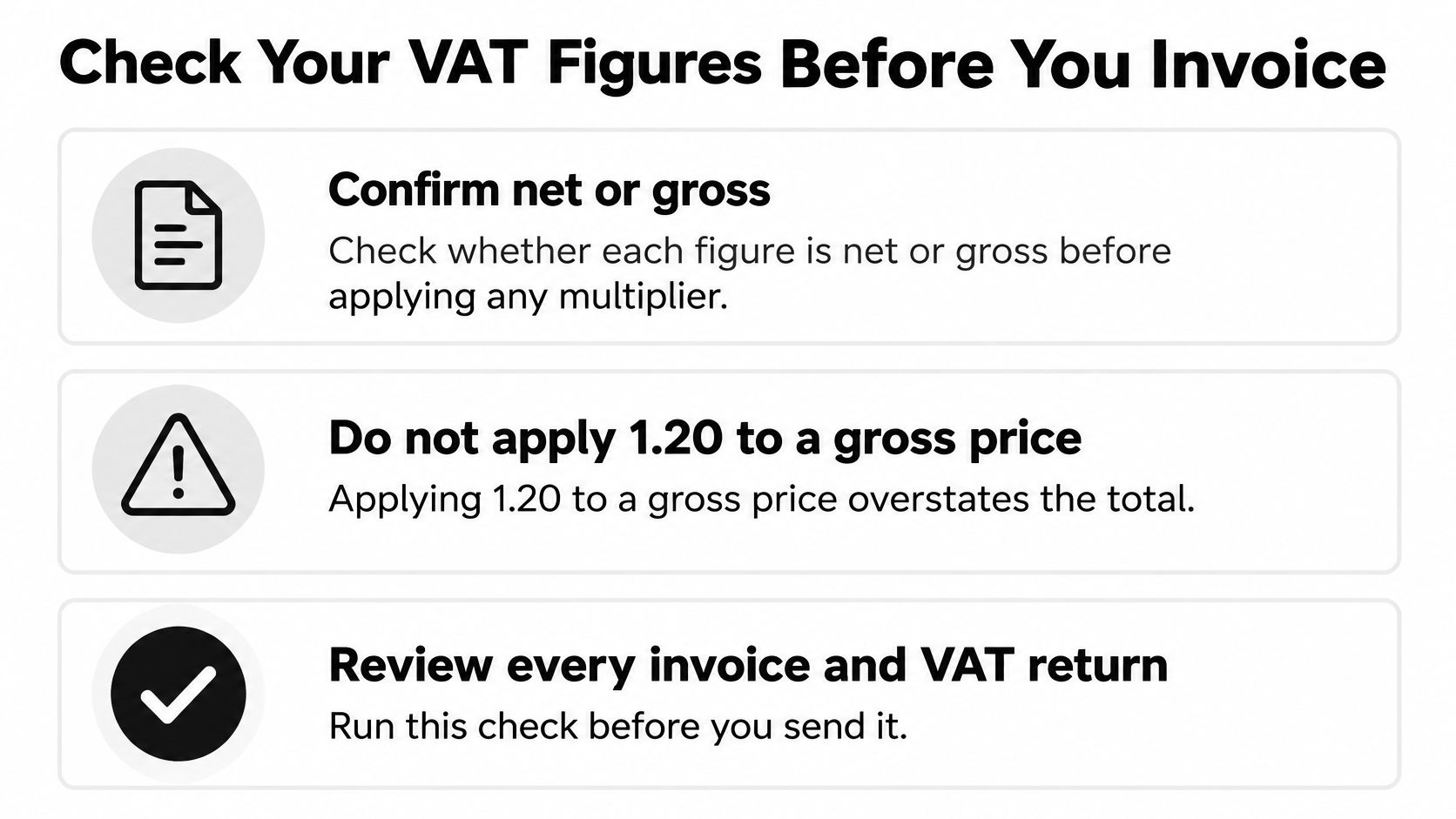
Use a short review before sending an invoice or approving a VAT return. The aim isn't to repeat every calculation manually. It's to catch the wrong starting amount, classification or accounting treatment before it reaches the customer or HMRC.
Review the evidence and the entries
Confirm net or gross. Read the agreed pricing terms and label the starting figure. Never add VAT merely because the invoice template has a tax field.
Check every line's treatment. Confirm the applicable rate or exemption for the actual supply. Separate mixed-rate items instead of calculating tax from an undifferentiated total.
Verify registration status. Make sure the business is entitled or required to charge VAT, and keep its rolling-turnover review current. Don't treat registration as a setting that never needs revisiting.
Resolve reverse-charge cases. Confirm who accounts for the tax and check the supplier's invoice wording. Escalate unfamiliar construction or overseas-service transactions before posting.
Apply the correct timing. Record the relevant tax point or match the payment, depending on the scheme. A captured invoice doesn't automatically belong in the return you're preparing today.
Reconcile the recorded figures. Preserve the original document, calculation and any recovery restriction. Use your VAT control account to investigate differences between transaction records, returns and payments.
Keep this checklist beside your invoicing screen or review queue.
For a busy receipt workflow, an optional capture tool can extract merchant, date, amount, tax and category into structured records. Whether you use software or enter documents yourself, review unclear tax breakdowns and retain the evidence behind each claim.
The final check is simple: can you explain where the net amount, VAT amount and gross total came from? If not, resolve the uncertainty before sending or submitting.
Snyp offers receipt capture and categorisation, extracting tax and transaction details for review and syncing structured records to accounting software such as Xero and QuickBooks. Visit Snyp to bring receipts from WhatsApp, forwarded emails or file uploads into your bookkeeping workflow, then review their VAT treatment before reconciliation.