




Help for Businesses: Where to Find It and What Works

Late payments affect more than 1.5 million UK businesses annually, according to the Office of the Small Business Commissioner. A receipt app won't make those customers pay sooner. That distinction matters when choosing help for businesses: support is useful only when it addresses the problem you have.
Missing receipts, uncertain tax treatment, weak cash-flow visibility and a shortage of capital need different responses. The practical starting point is to separate advice, finance and professional judgement from work that software can handle. Then make sure faster administration produces records you can defend, not just a tidier inbox.
Types of Business Help and Where Each Fits
In 2023, only 26% of UK SME employers sought external advice or information during the previous year, down from 49% in 2010, while the average small-business owner spends more than 33 hours each month on internal administration, according to the Government's Business Growth Service announcement. Finding useful support is itself part of the workload.
The Government identifies a fragmented mix of national, local, devolved, public and private providers. For an owner working between customer jobs, a long directory isn't necessarily helpful. A clear route to the right person, programme or tool is more useful than another list to investigate.
Match the help to the bottleneck
Types of business help and who each suits
| Type of help | Examples | Best for |
|---|---|---|
| Government advice and navigation | Business Growth Service, Business Support Service | Firms unsure which programme applies. Confirm any charge before booking support. |
| Government-backed finance | Start Up Loans, British Business Bank guarantees | Start-ups and growing SMEs needing capital. Assess the lender's interest, fees and repayment terms. |
| Mentoring and management training | Start Up Loans mentoring, Help to Grow: Management | Founders building management skills. Check programme fees and what mentoring includes. |
| Accountants and bookkeepers | Advisers working in Xero or QuickBooks | Sole traders and VAT-registered firms needing technical judgement or ongoing bookkeeping. Request a scope-based quote. |
| Receipt and expense automation | Receipt capture services with document extraction and ledger sync | Freelancers, contractors and field workers filing receipts. Check subscription terms and usage limits. |
| Accounting software | Xero, QuickBooks | Owners who need reconciled books. Compare subscription tiers and required add-ons. |
None of these rows is a substitute for every other row. An accountant can decide how a difficult transaction should be treated, but paying them to chase scattered documents may be an expensive use of their time. Software can organise those documents, but it can't decide whether borrowing is sensible.
By September 2023, Start Up Loans had provided more than £1 billion to over 100,000 UK businesses, according to the Government's small-business access-to-finance assessment. That is substantial financial support, but money alone doesn't fix an unreliable administrative process.
Define the result before choosing a provider
Write down the outcome you need in ordinary language. “I need working capital to buy equipment” points towards finance. “I can't explain my margins” suggests management support or accounting advice. “I spend evenings typing receipts” points towards a bookkeeping workflow problem.
When comparing small-business accounting and tax services, ask who handles document collection, reconciliation, queries and filing. A low headline fee is less useful if the work you most dislike remains yours.
Practical rule: Decide whether your immediate problem is information, money, skills or administration before contacting providers.
Choose the matching row first. Only then compare eligibility, scope, price and the effort needed to get started.
Receipt and Expense Pain Points That Cost Time
The most expensive receipt problem is often the repeated interruption. You stop work to find a document, ask someone what they bought, correct a transaction or explain an entry your bookkeeper can't reconcile.
These tasks become harder when they're postponed. A supplier name that seems obvious at purchase can be difficult to recognise later, especially when the bank description differs from the trading name.
Expense admin pain points and self-check questions
| Pain point | Where it bites | Self-check question |
|---|---|---|
| Lost or faded receipts | Year-end and VAT return preparation | Could you find the receipts for a completed reporting period without searching several places? |
| Month-end backlog | Cash-flow visibility and bookkeeping | How many receipts remain unfiled when you close the month? |
| Missing VAT evidence | VAT-registered firms | Can you locate supporting VAT evidence for purchases where you intend to reclaim VAT? |
| Mixed business and personal purchases | Sole traders and contractors | Could you explain the business part of each mixed payment? |
| Manual rekeying errors | Ledger entries and reconciliation | Which figures are you typing into more than one system? |
| Missed reclaim data | VAT reclaim timing | Are potentially reclaimable purchases flagged for review when documents arrive? |
Rank the inconvenience and the consequence
Answer each question against your actual records, not your intended routine. Then mark the weakest answer and estimate the time that problem consumed during your last bookkeeping cycle.
Include time spent by other people. If an employee searches their messages, your bookkeeper sends a query and you investigate the bank payment, that's a shared process failure, not merely a missing receipt.
Use this ranking method:
- Find the worst answer. Identify the row you'd least like an accountant to test today.
- Measure the work. Record searching, chasing, correcting and reconciling separately.
- Check the consequence. Distinguish inconvenience from missing evidence, an incorrect ledger entry or an unsupported tax treatment.
A large backlog may take longer than a VAT query, but the query may deserve priority because it affects a return you're preparing. Conversely, buying a more advanced extraction tool won't help much if employees never submit their documents.
Say a contractor captures every receipt but leaves them in separate message threads. The first fix is a central submission route, not better text recognition. If the documents arrive reliably but amounts are repeatedly mistyped, extraction and accounting integration are more relevant.
Fix missing evidence first when it blocks reliable accounts or tax preparation. Otherwise, start with the repetitive task consuming the most time. Don't try to redesign purchasing, bookkeeping and reporting simultaneously.
Evidence to Keep for Expenses and Tax Records
A readable receipt image isn't automatically compliance-ready evidence. It may show what was bought without explaining why the business paid for it, how a mixed purchase was split or which accounting entry it supports.
For self-employed people, HMRC's Self Assessment guidance distinguishes retaining evidence from submitting it: you don't send expense evidence with the return, but must keep records in case HMRC asks; it also states that cash basis became the default accounting method for sole traders from the 2024–25 tax year unless they opt out. Your record-keeping process therefore needs to support the accounting method you use, not just collect documents.
Keep evidence that explains the entry
Evidence to keep by situation
| Situation | Evidence to keep |
|---|---|
| Sole trader filing Self Assessment | Receipts, invoices and bank statements organised so income and expense entries can be traced. Confirm the applicable retention period for your circumstances. |
| VAT-registered business | Digital purchase records showing VAT, time of supply and VAT-exclusive value, with supporting invoices or receipt copies. Apply the VAT retention requirement when setting your storage policy. |
| Missing receipt | Bank statement and supplier invoice where one exists, plus a note explaining the purchase and efforts to obtain replacement evidence. |
| Mixed business and personal purchase | Receipt, recorded business purpose, business proportion and the calculation supporting that split. |
| Emailed invoice | Original email or PDF saved with the transaction, including relevant attachments and any subsequent correction. |
A bank statement establishes that money moved. It may not establish what you bought, the business purpose or the VAT treatment. Request a replacement invoice rather than assuming the bank line answers every question.
For mixed purchases, record the reasoning while it's fresh. Say a sole trader buys work materials and household items together. Keep the whole receipt, identify the business items and record the amount entered in the books rather than categorising the entire payment as business expenditure.
Keep the explanation with the evidence, not in someone's memory.
Build a defensible audit trail
A useful audit trail connects transaction, business purpose, supplier, amount, date and tax treatment. That connection matters more than whether the file sits in a polished dashboard.
For contractors and field workers, location and job context can help explain an otherwise ambiguous purchase. Add the customer job or project where relevant, but don't treat a project label as proof that an expense is allowable.
Use a practical retrieval test: select an entry without preparing beforehand and try to produce its supporting document and explanation. If you can find the image but can't explain the amount claimed, your filing system is only partly doing its job.
Set retention rules deliberately rather than deleting documents when a subscription ends. The HMRC record-keeping guide is a useful starting point for organising the questions to discuss with your accountant.
Automating Receipt Capture From Snap to Ledger
Automation works when it handles the movement of information without hiding decisions from the person responsible for the accounts. The useful output is an approved transaction connected to its evidence, not merely extracted text.
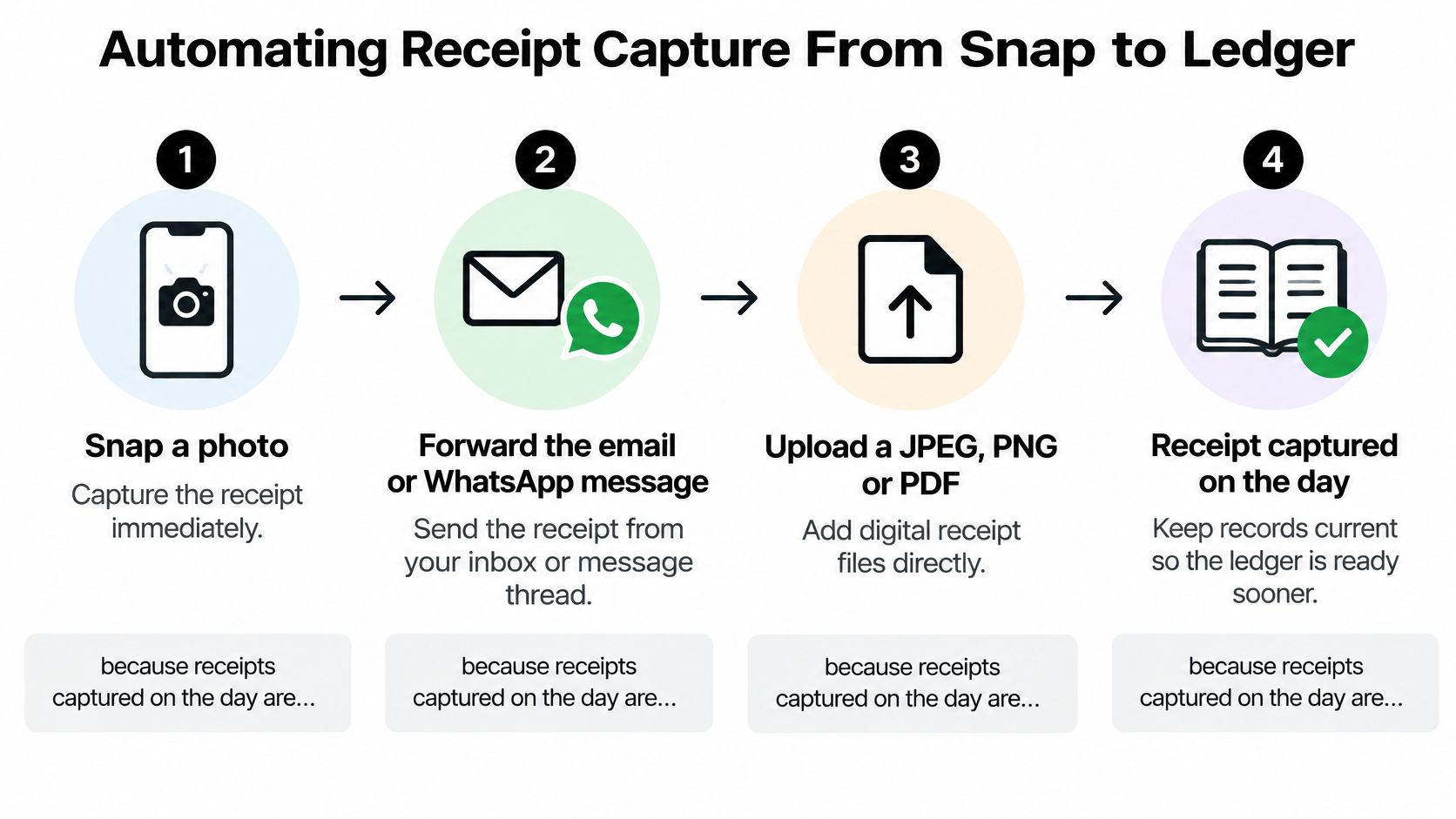
The capture routes below illustrate how documents can enter a shared workflow.
Use a controlled capture process
Capture the source document. Snap a photo, forward an email or WhatsApp message, or upload a JPEG, PNG or PDF, because receipts captured on the day are easier to connect with their business purpose. Photograph the complete document, including totals and supplier details, and check that it's readable.
Extract structured fields. Have the tool identify merchant, amount, date, tax, currency and category. Context-aware extraction can suggest a useful category, but a suggestion shouldn't become an accounting policy.
Review against the original. Compare the extracted values with the document, paying particular attention to net, VAT and gross amounts. Route unclear documents and unusual transactions to a review queue rather than accepting guesses.
Approve the record. Keep the original image or electronic document attached to the structured transaction. Check for duplicates before approval, especially when someone has both forwarded an invoice and photographed a printed copy.
Transfer approved data into the ledger. Use the accounting integration rather than typing the values again. Confirm the destination account and check whether the transaction should match an existing bank payment or supplier bill.
Under HMRC's VAT record-keeping guidance, VAT records must be retained for at least six years, digital records include purchase VAT, time of supply and VAT-exclusive value, and transfers between software products forming part of the digital records must use digital links rather than manual rekeying or copy-and-paste. Saving an image alone doesn't satisfy the whole workflow.
Receipt capture methods compared
| Capture method | Speed | Error risk | Audit trail |
|---|---|---|---|
| Paper receipts in a shoebox | Delayed until someone sorts them | Loss, fading and missed documents | Weak unless carefully indexed |
| Manual spreadsheet entry | Limited by typing and checking | Transposition, omissions and duplicates | Partial unless documents are linked |
| Photo or forwarded email | Quick to submit | Filing gaps and incomplete images | Moderate with consistent organisation |
| Automated capture with sync | Quick capture and transfer | Extraction errors still need review | Strong when originals, approvals and entries stay connected |
Check what reaches the accounts
An integration isn't successful merely because a transaction appears in Xero or QuickBooks. Check that the document remains accessible, the tax code is appropriate and the entry doesn't duplicate a bill already recorded.
The demonstration offers another way to assess the capture workflow.
When evaluating automatic data capture, inspect a completed ledger entry rather than stopping at the extraction screen. That's where you can judge whether the tool has removed work or moved corrections downstream.
Choosing Tools That Fit Your Accounts and Habits
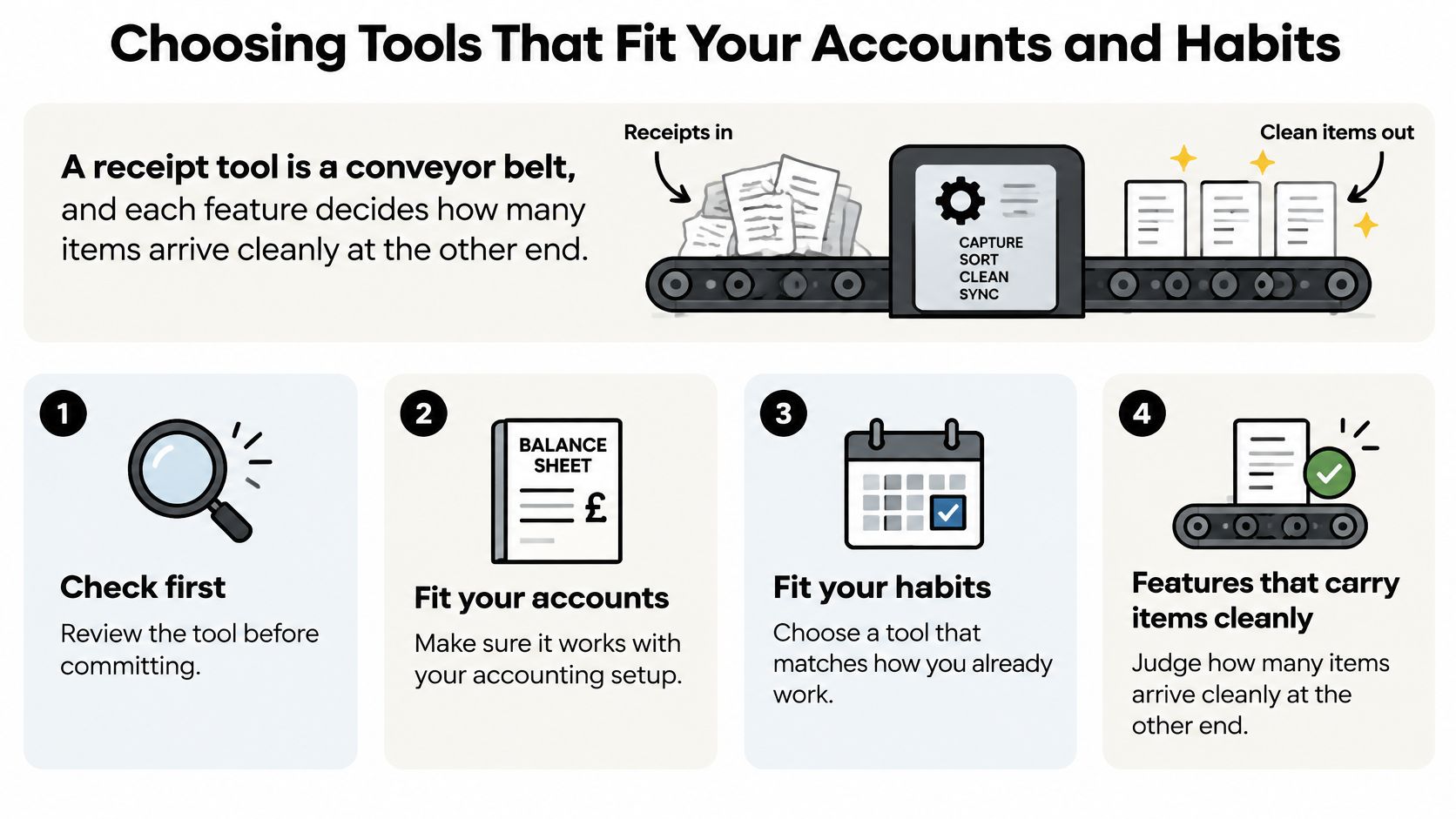
A receipt tool is a conveyor belt, and each feature decides how many items arrive cleanly at the other end. Fast submission is useful, but not if your bookkeeper must rebuild every transaction after it arrives.
Start with your existing accounting setup and the behaviour of the people submitting documents. A contractor using a phone between jobs needs a different entry route from an office administrator processing supplier emails.
Use this visual as a prompt to test fit before committing.
Test the whole journey
- Accounting connection. Confirm compatibility with your Xero or QuickBooks setup, including document attachments, tax codes and the handling of existing bills.
- Input habits. Test WhatsApp, email forwarding or direct upload using the JPEG, PNG and PDF documents your team receives.
- Extraction depth. Look for merchant, amount, date, tax, currency and category rather than an output containing only raw text.
- Security controls. Ask how documents and account data are protected in transit and at rest, who can view them, how long copies remain and which security certifications the provider publishes.
- Review experience. Check that correcting an uncertain field is straightforward and that unresolved items remain visible before approval.
- Commercial terms. Confirm the current subscription price, trial conditions, usage allowances, cancellation process and options for exporting records.
Don't assume a general security statement answers those questions. Ask for documentation, especially where employees submit documents containing personal information. A provider's published controls are more useful than an unqualified claim that the service is secure.
Buying test: Choose the workflow your team will maintain on a busy day, not the one that looks neatest in a demonstration.
Know when professional help is the better purchase
A bookkeeper is often the better fit when the problem is unreconciled balances, inconsistent coding or an unmanaged backlog. An accountant's judgement matters when VAT schemes, unusual transactions or complex trading structures make the treatment uncertain.
Automation and professional support can work together. The sensible division is for software to collect and organise routine information, while a person handles exceptions and accounting decisions.
Avoid changing accounting platforms solely to accommodate a receipt app unless the wider benefits justify the disruption. Migration, retraining and opening-balance checks can create more work than the capture tool removes.
Set Up One Receipt Pipeline This Week
Start with a bounded trial rather than moving every historical document into a new system. Choose a current batch of receipts, a submission channel and a named reviewer, then write down what a successfully processed transaction should look like.
Use a month of normal purchasing as your test period. Keep the input method stable so you can distinguish a tool problem from the friction of repeatedly changing the routine.
Run the trial with a decision log
- Establish the starting point. Record how much time you currently spend collecting documents, entering data, correcting mistakes and answering bookkeeping queries.
- Capture consistently. Send the selected receipts through the same route and keep unprocessed items visible rather than distributing them across inboxes.
- Log corrections. Note whether you changed merchant, date, VAT, currency or category, and separate extraction mistakes from missing information on the document.
- Check completed entries. Review supporting evidence and ledger reconciliation regularly, resolving gaps while the purchaser can still explain them.
Include awkward documents, not just clear shop receipts. A mixed purchase, a foreign-currency invoice and a document with an unclear tax amount reveal more about the review process than a demonstration built around perfect inputs.
Decide from the finished books
Compare the time spent before and during the trial, including review and correction. Faster capture isn't a saving if someone spends longer fixing duplicate entries or locating missing attachments.
Also judge the quality of the result. Can your bookkeeper work without chasing explanations? Are unresolved items obvious? Can you retrieve a document directly from its transaction?
Keep the tool if it reduces total handling while preserving clear evidence. Change the process or reject the tool if it merely produces a faster stream of transactions that someone else must repair.
This week, choose your submission channel and start a trial with current receipts. Make the decision from reconciled records and actual effort, not the number of documents uploaded.
Snyp offers receipt capture through WhatsApp, email forwarding and file upload, with structured expense data for accounting workflows. Visit Snyp to explore the trial and test it against your own receipts, then judge it on the work saved and the quality of the records reaching your accounts.