




Expense Management Solutions Explained for UK Businesses
UK small and medium-sized enterprises spend approximately 37 hours per month on administrative tasks, according to the survey cited in the UK government response to the Small Business Regulatory Taskforce report. That's nearly a working week lost to recordkeeping, gathering transaction information, preparing accounts and meeting compliance requirements. Expense management solutions matter because receipts sit at the start of that chain. If the source document, VAT split and approval aren't linked from day one, you don't have faster bookkeeping. You have a faster way to create evidence you can't defend.
What Expense Management Solutions Cover
A shoebox holds receipts. It doesn't know which receipt matches which bank payment, who approved the spend, or whether anyone reclaimed the VAT. A spreadsheet is only slightly better. It records what someone remembered to type, in the format they chose that month.
An expense management solution takes a cost from the moment it's paid to the moment it sits correctly in the ledger. It performs the handoffs that otherwise depend on memory, inboxes and month end goodwill.
The Six Jobs in One Record
| Capability | Manual method it replaces | What automation changes |
|---|---|---|
| Receipt capture | Pocket, drawer or photo roll | Original file stored at point of spend |
| Categorisation | Typing descriptions into a workbook | Merchant, date, amount and category extracted |
| Approval | Chasing a manager by email | Rules route exceptions to a named person |
| Reimbursement | Ad hoc bank transfers | Approved claims paid in a traceable batch |
| Bank reconciliation | Matching lines by eye | Receipts compared with card and bank feeds |
| Export to accounting software | Re-keying into Xero or QuickBooks | Categorised, VAT-split entries sync across |
None of these stages is difficult on its own. The failures happen between them. A receipt photographed but never categorised, a claim approved but never matched, a total exported without its VAT split. Each gap forces your accountant to reconstruct intent later, usually at the worst possible time.
Solutions vary widely in scope. A sole trader may need little more than reliable capture and a clean sync to accounting software. A growing team needs card controls, policy rules and approval tiers. An accountant managing several clients needs multi-client intake that tames mixed formats without creating a separate process per client. Businesses comparing travel-heavy workflows sometimes look at specialist resources on corporate travel savings with Passport Premiere alongside general expense platforms, because travel spend brings its own booking and policy problems.
Practical test: Pick any entry in the ledger and ask whether you can reach the original receipt, the extracted figures and the approval decision in one click. If you can't, the product is a filing cabinet, not a control system.
I would judge every product against that single linked record. Speed is secondary. A slow process that preserves evidence beats a fast one that scatters it across a camera roll, a spreadsheet and someone's memory.
How a Claim Moves From Receipt to Ledger
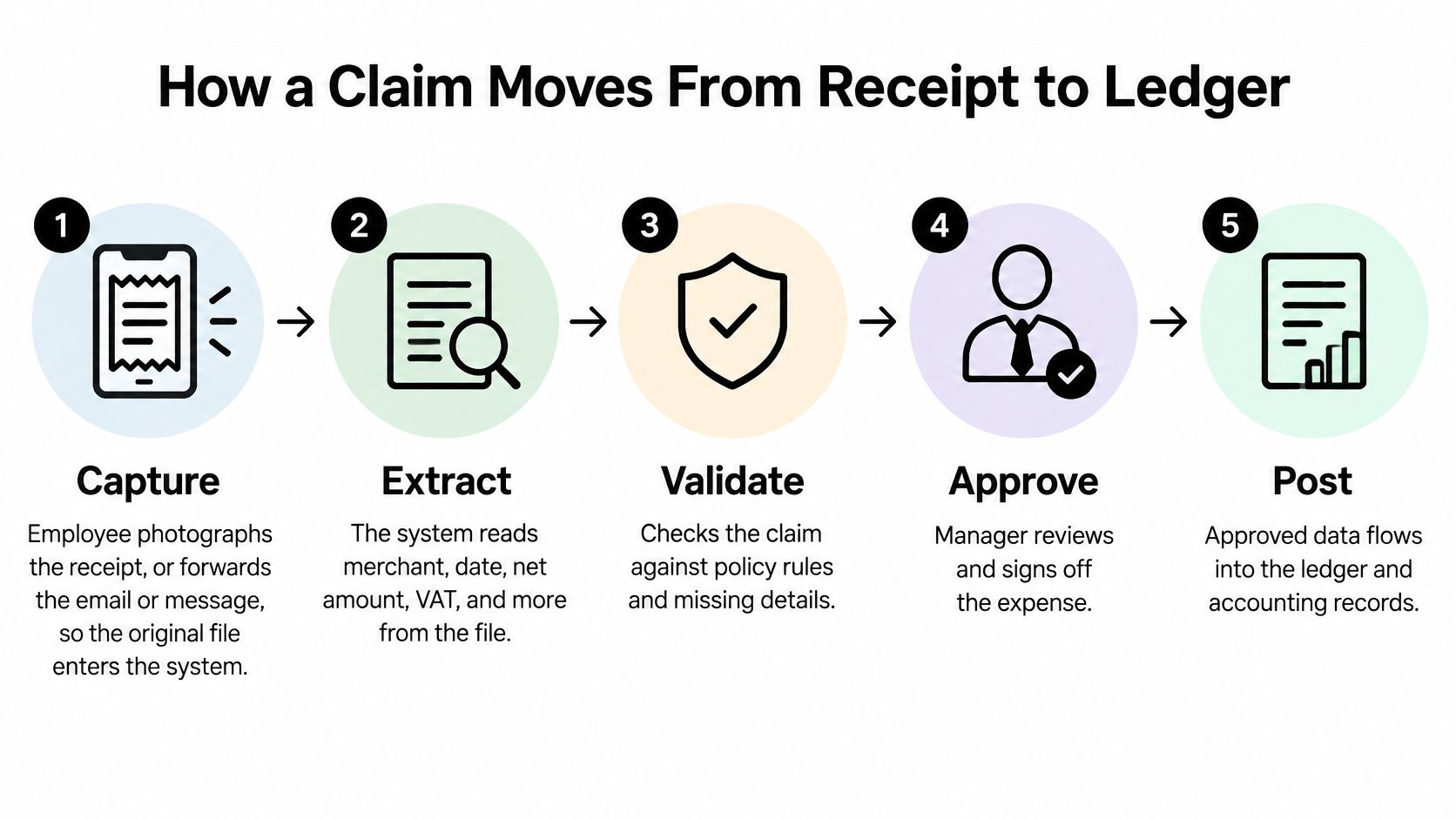
The value of the workflow is in the sequence. Each stage either protects the next one or passes a problem downstream, where it's harder and more expensive to fix.
The Seven Stages
- Capture the original: The employee or owner photographs the receipt or forwards the email or message, so the source file enters the system immediately. The common slip is delay. Thermal paper fades, inboxes get cleared, and a receipt captured three weeks later may no longer be readable.
- Extract the fields: The system reads merchant, date, net amount, VAT, currency and a suggested category. Check any low-confidence field here, because a misread date posts the cost to the wrong period and a misread total corrupts everything after it.
- Check against the bank feed: The claim is compared with card and bank lines, and duplicate merchant and amount combinations get flagged. Double claims surface at this stage, including the innocent kind where someone submitted both the email invoice and the paper copy.
- Approve by rule: Claims within your limit clear automatically. Larger or out-of-category claims route to a manager or finance reviewer. The check that matters is separation. Nobody should approve their own spend, however small the team.
- Reimburse or settle: Approved amounts are paid to the employee or cleared against the card account in a batch. Batching creates one clear payment reference per run instead of a trail of unexplained transfers.
- Reconcile every line: Each receipt is matched to its bank line so nothing is left unexplained at month end. Watch for receipts matched to the wrong card line when two purchases share a merchant and a similar amount.
- Export with the link intact: The categorised, VAT-split entry posts to the ledger with a live link back to the source document, which is why a proper integration with Xero matters more than a CSV download you have to massage by hand.
Where Manual Workflows Break
In 2024, 45% of UK companies surveyed by Airwallex said they relied on manual tools such as spreadsheets to manage corporate expenses, according to the Airwallex newsroom report on UK finance leaders. That survey doesn't measure error rates, but spreadsheets are the likely home of most slips in this chain. A workbook can't warn you that a receipt has already been claimed, and it can't stop a date being typed into the wrong month.
Say a field engineer buys parts twice from the same merchant in one week. In a spreadsheet, both lines look plausible and both get paid. In a connected system, the second claim sits next to its bank line and its duplicate warning, and a human decides before money moves.
The stage most firms skip is reconciliation during the month. Leave it to month end and you're investigating cold transactions instead of confirming warm ones.
Receipt Capture and Data Extraction
Photographing a receipt beats keying it in. That doesn't make the resulting data reliable. Capture and extraction are two different jobs, and products vary far more on the second than the first.
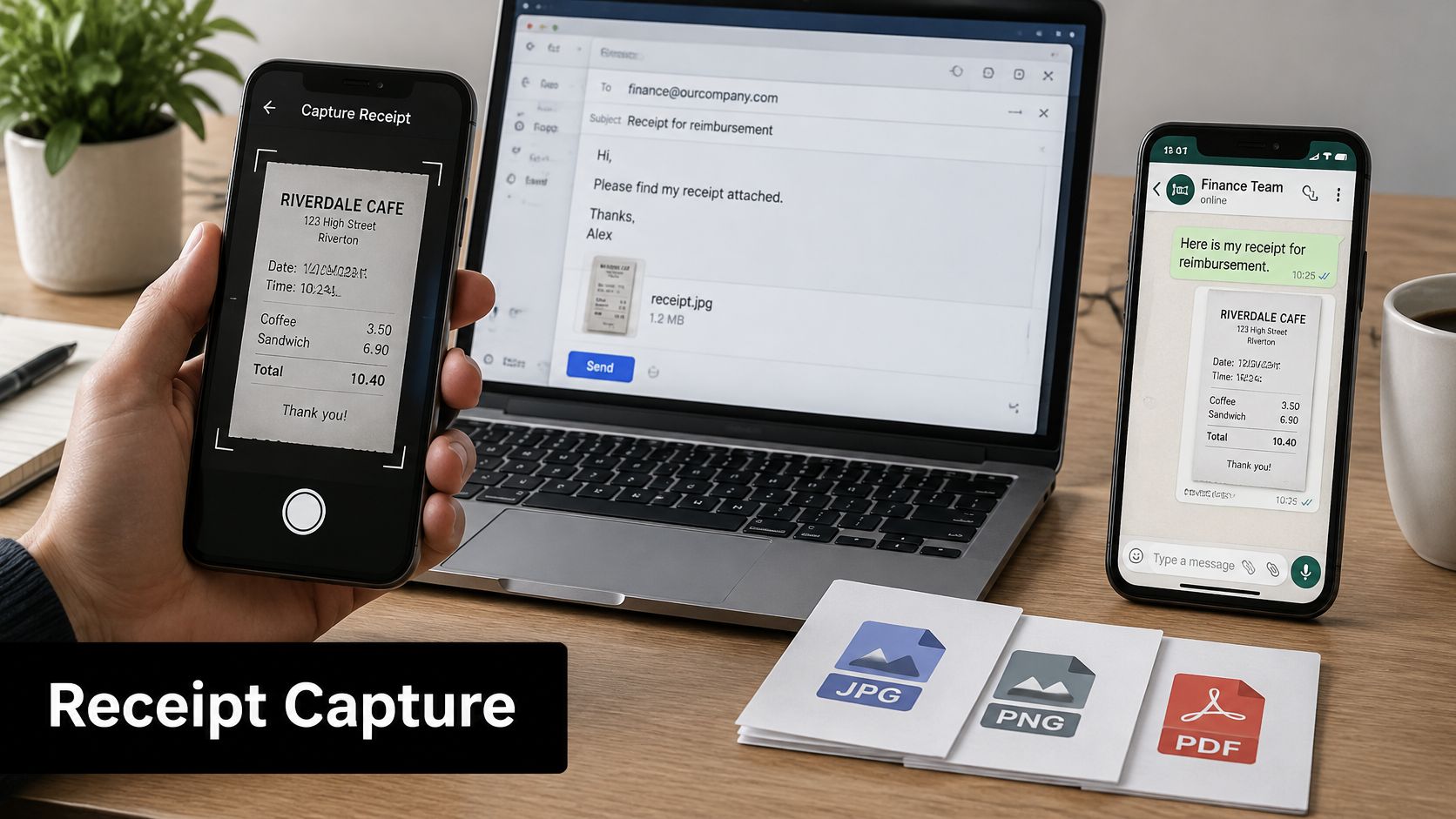
The photo below shows the easy part, getting the document into the system before it's lost.
Channels and Reading Engines
Good systems accept several routes in, because staff won't adopt a single rigid one. Expect a phone photo in an app, an email forward for digital invoices, a message sent through WhatsApp for people on site, and direct upload of JPEG, PNG or PDF files for everything else. Each channel should land in the same queue with the same review step.
Plain OCR reads characters. A context-aware engine decides what each field means. That distinction shows up fast on real documents. Take a restaurant receipt with a service charge and split VAT lines. OCR gives you a page of numbers. A context-aware engine separates the total from the subtotal, treats the service charge correctly, and doesn't mistake it for VAT. Now take a taxi receipt in euros. The system needs to recognise the currency, keep the original amount, and convert it for the ledger without losing either figure.
The short walkthrough below shows what that capture and review flow looks like in practice.
Edge Cases Worth Testing
- Faded thermal paper: Photograph fuel and parking receipts the same day, because extraction can't recover print that has already faded.
- Multi-page PDFs: Confirm the system reads beyond page one, since VAT summaries often sit at the end of supplier invoices.
- Printing on both sides: Capture front and back where terms or VAT details appear on the reverse.
- Mixed purchases: Split business and personal items on one receipt at review, and record the basis for the split while you still remember it.
I would check the extracted date and VAT on your first twenty claims line by line. Once those are clean, sample occasionally and focus your attention on low-confidence flags instead. Trust should be earned per merchant type, not granted to the software as a whole.
Approval Controls and Spending Rules
In 2024, manual approval remained the primary method for post-expenditure approvals or employee expense reimbursement for 41% of respondents in a US-and-UK survey conducted by Payhawk and the Institute of Financial Professionals, reported in the Payhawk 2024 state of business spend management survey. Manual doesn't mean careful. It usually means a busy manager clicking through a backlog at month end.
Blanket review fails because reviewers stop reading. The fix is tiered rules that spend human attention where risk sits, and a clear expense approval process that everyone can see.
Four Controls That Do the Heavy Lifting
- Auto-approval below a threshold: Small claims that match a bank line and carry a receipt clear without a human touch.
- Manager approval above it: The line manager confirms the spend was real, expected and correctly categorised.
- Finance sign-off for riskier categories: Travel, entertainment and client hospitality route to finance regardless of value, because the tax treatment needs a second look.
- Per-card and per-category limits: Caps stop out-of-policy spend at the till rather than after the statement arrives.
Say you set your own thresholds for illustration. A £40 train ticket with a matching card line clears automatically and nobody wastes time on it. A £1,800 supplier dinner routes to a finance reviewer with the attendee list attached, because the business purpose is the whole question. Both decisions are correct. Only one needed a person.
The Rules Firms Forget
Add delegation so claims don't stall when an approver is on leave, and name the substitute in advance. Block self-approval in the system rather than relying on policy documents. Decide now how you'll handle claims submitted without a receipt, personal use declared after the fact, and spend that's out of policy. Written answers prevent case-by-case arguments later.
Review the rules quarterly using the approval log. If one threshold generates most of your exceptions, it's set in the wrong place. If one category never triggers review, you may be missing the claims that matter most.
Accounting Links and HMRC Record Requirements
Start with the digital link rule. Where multiple software products are used, data must pass through a digital link and manual re-keying or copy-and-paste is not acceptable, as set out in HMRC guidance on keeping VAT records. That single rule disqualifies a surprising number of home-grown workflows built on emailed spreadsheets.
For VAT-registered businesses, your expense system sits inside a statutory control environment. Records must cover purchases and expenses, VAT on purchases, transaction dates and values excluding VAT, generally held in functional compatible software under Making Tax Digital for VAT. So the system has to preserve the original invoice, extract net and VAT separately, and keep a traceable link between document and entry.
The net is widening. Sole traders and landlords with turnover above £50,000 will be required to keep records digitally and provide quarterly income and expenditure updates using MTD-compatible software from April 2026, as explained in the Administrative Burdens Advisory Board report for 2024 to 2025. Receipt data therefore has to arrive categorised and transferable, not as a pile of images someone interprets four times a year. Our guide to HMRC record keeping covers the wider duties in more detail.
Testing a Xero or QuickBooks Connection
- Source link survives: Open the ledger entry and confirm you can reach the original file from it.
- VAT split survives: Check net, VAT and gross after export, not just before.
- Edits are logged: Change a category and confirm the amendment appears in an audit trail with a name and date.
How Long Records Must Be Kept
HMRC guidance identifies purchase invoices, credit notes, debit notes and authenticated receipts as records commonly retained for at least four years, while records forming part of a VAT account generally require six-year retention, according to HMRC's Compliance Handbook at CH15400. Where a record falls into multiple categories, the longer period applies. Electronic storage is permitted provided it captures all information on the document, including both sides where relevant, in readable form.
| Record type | Minimum retention | What the system must keep |
|---|---|---|
| Purchase invoices and authenticated receipts | At least four years | Original file, both sides where relevant |
| Credit notes and debit notes | At least four years | Link to the original purchase record |
| Records forming part of a VAT account | Six years | VAT split, net value and transaction date |
| Self Assessment business records | Five years after the filing deadline; until at least 31 January 2032 for 2025–26 | Searchable index and logged amendments |
That Self Assessment date comes from HMRC guidance on self-employed records, which requires records to be retained for at least five years after the filing deadline. Don't store extracted fields alone. Keep the original JPEG, PNG or PDF beside the data, or you may hold a correct number you can't prove.
Fraud Checks for AI-Era Receipts
Automation removes typing. It also removes the moment when a human used to glance at a receipt and think something looked off. That trade needs managing, not ignoring.
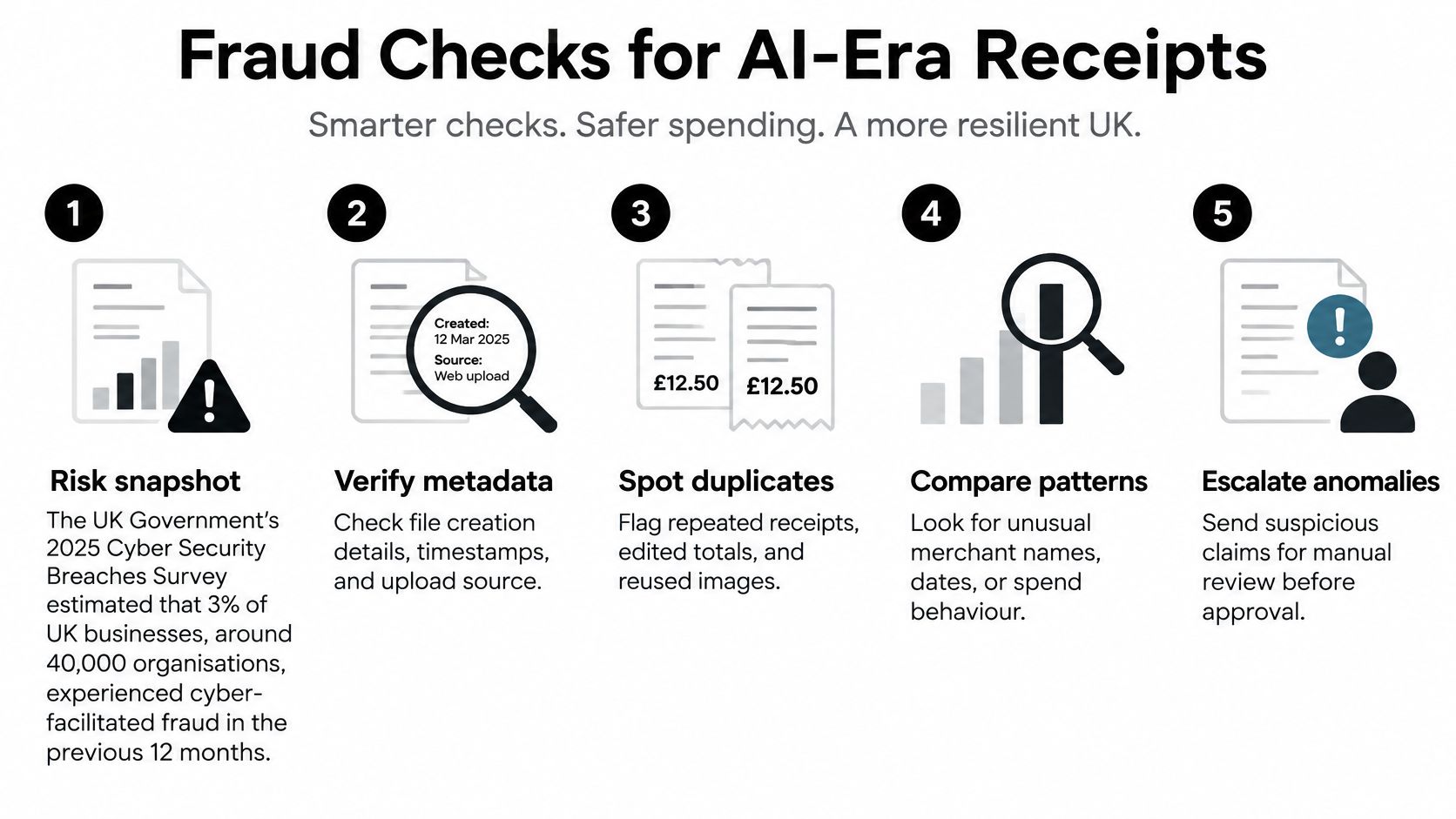
The UK Government's 2025 Cyber Security Breaches Survey estimated that 3% of UK businesses, approximately 40,000 organisations, experienced cyber-facilitated fraud during the previous 12 months, and separate 2025 industry reporting claimed that 14% of fraudulent expense claims were generated with AI-created fake receipts and 74% of surveyed UK finance leaders believed employees could exploit AI to manipulate expense processes. Treat those industry figures as reported rather than verified, but the direction is clear. Fake receipts are now cheap to produce and hard to spot by eye.
Checks That Should Run on Every Claim
- Compare with the bank feed: A receipt with no corresponding payment needs an explanation before approval, not after.
- Flag repeated combinations: Same merchant, amount and date appearing twice is the oldest duplicate pattern there is.
- Test the date: Confirm it falls inside the trip, project or shift the claim relates to.
- Sense-check the VAT: Ask whether the VAT details suit the merchant type, because generated documents often get plausible totals with implausible tax treatment.
- Preserve the original file: Keeping the submitted image lets a reviewer compare file details and formatting against genuine documents from the same merchant.
Then set the review rule in writing. Review every claim above your chosen value in full, sample a slice of the rest each month, and give one named human ownership of every exception. Smaller firms rarely have a fraud team. They don't need one. They need selective review that's scheduled.
Frictionless capture with zero review isn't efficiency. It's an open door with good software on it.
Security, Access and Data Protection
The first question from any sensible finance lead is simple. Who can see the receipts and the bank data behind them? Receipts carry names, travel patterns, client details and sometimes card fragments. They're more sensitive than they look.
Role-based access is the baseline. A claimant sees only their own claims. An approver sees their team's claims and nothing else. A finance administrator sees the full picture, including the ledger link and export history. If everyone can see everything, the access model is decorative.
Files should be encrypted in transit and at rest, and you should read the vendor's data processing terms under UK GDPR separately from any security certification it advertises. A certificate describes how the vendor protects its systems. The processing terms describe what it may do with your data, where it's stored and who its subprocessors are. Those are different questions and you need both answers.
Retention creates a genuine tension with erasure requests. Business records often can't be deleted when an employee leaves, because tax duties outlast employment. Your system should let you separate a leaver's personal data from business records you must keep, and record the basis for keeping each item.
A Short Access Checklist
- Named accounts with two-factor sign-in: No shared finance logins, ever.
- Controlled capture channels: Know who controls the WhatsApp number or inbox receiving receipts, and who can forward into it.
- Audit trail of logins and exports: You should be able to see who downloaded what, and when.
- Leaver access removed on the last day: Put it on the offboarding checklist beside laptop return.
- Written data location statement: One sentence from the vendor, kept on file.
Choosing a Solution and Your Next Step
Start with your profile, not a feature list. The right product depends on where your current process causes problems.
| Business profile | Main pain point | Features to prioritise | Usual fit |
|---|---|---|---|
| Freelancer or sole trader | Chasing receipts for tax records | Mobile capture, VAT split, Xero or QuickBooks sync | Receipt-first tool with light approvals |
| Small business owner | Reimbursing staff and keeping books current | Approval thresholds, bank matching, export | Mid-tier platform with an approval workflow |
| Accountant or bookkeeper | Clients sending receipts in mixed formats | Multi-client intake, audit trail, export | Intake tool linked to client ledgers |
| Contractor or field worker | Receipts lost between jobs | WhatsApp or email capture, quick mobile upload | Messaging or email capture tool |
| Finance team in a growing company | Card spend and policy compliance | Card controls, policy rules, accounting integration | Full expense platform with a policy engine |
Selection Criteria in Order
Work through these in sequence and stop when a product fails one. Capture channels your people will use. Extraction accuracy tested on your own receipts, not a demo set. A VAT split that survives export. Making Tax Digital compatibility. Integration with the accounting software you already run. An audit trail and retention settings you can configure. Data security, including access controls, encryption, storage location and processing terms. Pricing and a trial period come last, because a cheap tool that breaks the evidence chain isn't cheap.
For freelancers, sole traders, contractors and small teams, one option is Snyp, which accepts receipts through WhatsApp, email forwarding and file upload, extracts merchant, amount, date, tax, currency and category, and syncs reviewed records to Xero and QuickBooks. It's one option among several. The test matters more than the vendor, so check current pricing and trial terms directly before you commit.
I would do one thing this week. Gather last quarter's receipts, run about twenty of them through a trial, and compare the extracted VAT, dates and categories against your ledger by hand. Only then switch on approval rules and integrations, because you'll know exactly which fields you can trust.
Stop treating receipts as admin and start treating them as evidence, with capture through WhatsApp, email or upload and structured, review-ready data synced to Xero or QuickBooks. Visit Snyp to trial the workflow on your own receipts and see how the extracted VAT, dates and categories stand up against your ledger.