




Guide to document management for small business: streamline workflows
If you're a freelancer or run a small business, you probably know the "shoebox method" all too well. It’s that dreaded pile of crumpled receipts, stray invoices, and forgotten contracts that lives in a box, a drawer, or worse, the footwell of your car. This isn't just a bit of a mess; it's a real drag on your time and money, creating administrative headaches that steal your focus from what you should be doing—running and growing your business.
A proper document management system is the answer. It’s about moving from that paper-filled chaos to digital clarity.
Why Your Shoebox of Receipts Is Costing You Money

Think of your business as a workshop. When your tools are all over the place—receipts stuffed in pockets, invoices buried in a sea of emails, contracts saved to random desktop folders—every little job becomes a major chore. Trying to find one specific expense claim is like hunting for a single lost screw in a pile of sawdust. It’s a complete waste of time you could be spending on clients, strategy, or just about anything else.
Now, picture a perfectly organised toolkit, where everything has its place and is ready when you need it. That's exactly what a modern document management system does for your paperwork. These aren't the clunky, enterprise-level systems you might be imagining; they are smart, accessible tools built for sole traders and growing companies just like yours.
The True Cost of Disorganisation
The price you pay for poor document handling is more than just frustration. Lost receipts mean you can't claim back every penny you're owed on your tax return. Invoices sent late (or not at all) create cash flow gaps that can seriously hurt your business.
Manual data entry isn't just mind-numbingly slow; it's also a recipe for human error, which can cause massive accounting problems later on. Every hour you spend wrestling with paperwork is an hour you can't bill a client or work on your next big idea.
This disorganisation quietly chips away at your business in several ways:
- Wasted Time: Hours are burned just looking for things instead of doing productive, income-generating work.
- Financial Loss: You're literally throwing money away through missed VAT claims and unclaimed expenses.
- Compliance Risks: If HMRC comes knocking and you can't produce the right documents, you could face hefty penalties.
- Poor Decision-Making: It's impossible to make smart business decisions when you don't have a clear, up-to-date view of your finances.
Adapting to a New Way of Working
The rise of flexible and remote working has made physical paperwork even more of a liability. Let's be honest, a central filing cabinet doesn't work when your team is scattered. In the UK, the document management services industry has been growing for this very reason, with revenues now hitting an estimated £1.4 billion. You can explore the market trends on document management in the UK to see how this shift is playing out.
A document management system turns your scattered bits of paper and digital files into a centralised, secure, and searchable asset. It’s the digital version of that perfectly organised toolkit, putting every financial detail you need right at your fingertips.
In the end, sorting out your document workflow is about taking back your time and getting a firm grip on your finances. It's a critical first step towards building a small business that is more resilient, efficient, and ready to scale.
How a Modern Document System Actually Works for You
Let's cut through the technical jargon. When we talk about a document management system for a small business, we’re not talking about some beastly corporate software. It's a practical tool built to solve your biggest administrative headaches.
Think of it less like a digital filing cabinet and more like a personal librarian for your business—one that works around the clock.
This "digital librarian" doesn't just store your documents. It reads them, understands what's important, and organises everything so you can pull up any piece of information in seconds. Instead of you slogging through sorting, filing, and data entry, the system does the heavy lifting. This frees you up to focus on what you actually do best: running your business.
At its heart, a modern system handles four crucial jobs that turn your chaotic paperwork into a genuinely valuable, organised asset.
Step 1: Capture Everything Effortlessly
The first job of your digital librarian is to gather all your important papers without you even having to think about it. In the old days, this meant long, tedious scanning sessions. Today's systems are far smarter. They give you multiple, simple pathways to get documents into one central hub.
The whole point is to fit into how you already work, not force you into a new, clunky process. Good document management for small business is all about effortless capture.
- Email Forwarding: Got a PDF invoice from a supplier? Just forward the email to a unique address, and the system automatically grabs the attachment and files it away. Simple as that.
- Mobile App: Snap a quick photo of a lunch receipt or a delivery note with your phone. The app is smart enough to crop it, make it readable, and upload it on the spot.
- Direct Uploads: For files already on your computer, like a downloaded bank statement, you can just drag and drop them into a secure web portal.
The goal here is to stop the physical pile-up before it even starts. Document capture becomes a quick, two-second habit instead of a dreaded weekly chore.
Step 2: Organise with Intelligent Automation
Once a document is in the system, the real magic begins. Your digital librarian doesn't just sit on the file; it actually reads it. Using smart technology, it automatically pulls out the crucial details from each document. This is where you can see the powerful capabilities of AI data extraction in action.
So, when you snap a photo of that receipt, the system instantly identifies things like:
- The merchant's name (e.g., Costa Coffee)
- The date of the purchase
- The total amount spent, including VAT
This automated process is what turns unstructured data—like a blurry photo of a receipt—into structured, usable information. It’s the difference between having a shoebox full of paper and a perfectly organised, searchable spreadsheet that builds itself.
This intelligence means you can forget about manually creating folders or coming up with complicated file-naming rules. The system uses the data it pulls out to categorise and tag everything for you, making it dead simple to find later.
Step 3: Store Securely in the Cloud
With everything captured and organised, the system stores it all securely in the cloud. This is leagues ahead of a filing cabinet in your office, which is always at risk from fire, flood, or theft.
Any reputable system will use high-end security measures like end-to-end encryption to guard your sensitive financial data. Keeping your documents in the cloud also means you can get to them from anywhere, on any device—whether you're at your desk, visiting a client, or working from a coffee shop.
Step 4: Find Anything in Seconds
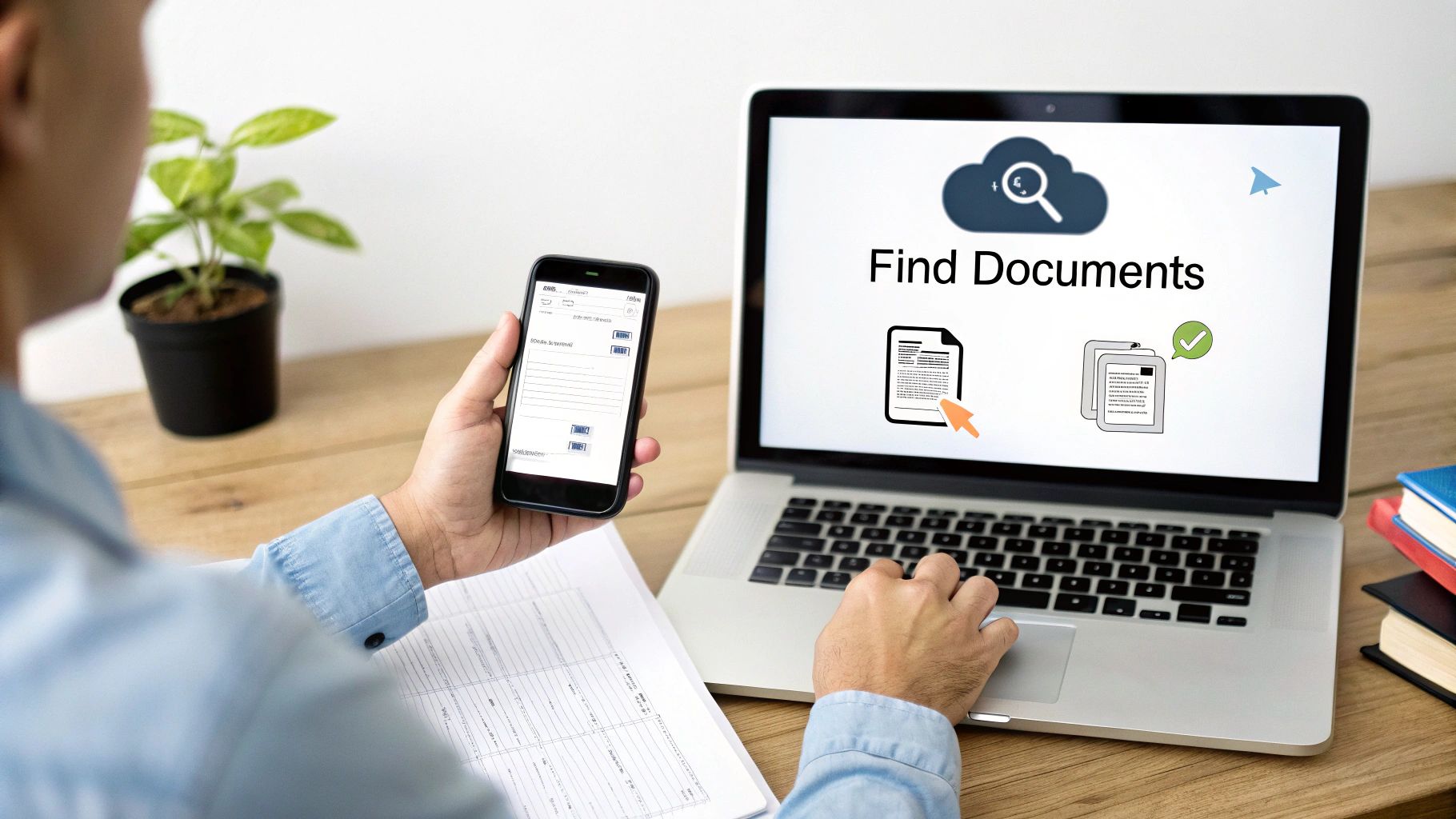
This final step is probably the most powerful. Because your digital librarian has read and indexed every single word on every document, finding what you need is as easy as a Google search.
Need to pull up all your expenses from a specific supplier last quarter? Just type their name into the search bar. Trying to find an invoice from six months ago but can't remember the details? Search for the invoice number or even just the amount. The system will pull up the exact document in an instant.
No more digging through overflowing folders or endless email archives. This immediate access transforms your records from a static, dusty archive into a dynamic, incredibly useful business tool.
The Features Your Business System Can't Do Without
Choosing a document management system can feel overwhelming. With so many options out there, it's easy to get lost in a sea of marketing jargon. So, let’s cut through the noise and focus on what truly matters for your day-to-day operations. A good system isn't just a digital filing cabinet; it's a tool that should actively put time and money back into your business.
When you're looking at any document management for small business solution, a few features are absolutely non-negotiable. These aren't just flashy add-ons; they are the bedrock of an efficient, secure workflow that will grow with you.
Intelligent Data Capture
First and foremost, how well does the system actually understand your documents? Basic scanning or simple Optical Character Recognition (OCR) just doesn't cut it anymore. What you need is intelligent data capture, a smart technology that uses AI to read the text and grasp its meaning.
Think about it: you snap a photo of a receipt. A truly intelligent system doesn't just see a random collection of letters and numbers. It knows exactly what it's looking at, pulling out the merchant's name, the date, the total amount, and the VAT, then neatly slotting each piece of information into the right place.
This is the engine that drives all the real-world benefits. It eliminates the soul-crushing drudgery of manual data entry and all but erases the risk of human error. It’s what turns a crumpled receipt into clean, structured data you can actually use.
Before we dive into the nitty-gritty of the most important features, here’s a quick overview of what to look for and, more importantly, why it matters to a small business owner like you.
| Must-Have Features in a Small Business DMS | |
|---|---|
| Feature | Why It's Essential for Your Business |
| Intelligent Data Capture | Automates data entry, saving hours of manual work and preventing costly errors. It’s the difference between a dumb scanner and a smart assistant. |
| Seamless Accounting Integrations | Creates a direct link to your financial hub (e.g., Xero, QuickBooks). This keeps your books accurate in real-time and makes reconciliation painless. |
| Robust Security & Compliance | Protects your sensitive financial data with bank-level security. Ensures your digital records meet HMRC requirements, giving you peace of mind. |
| Cloud-Based & Mobile Access | Lets you manage your paperwork from anywhere, on any device. Capture a receipt on the go, and never lose another expense claim again. |
Each of these features plays a critical role in building a system that doesn't just store files but actively works for you, streamlining your entire financial workflow from capture to reconciliation.
Seamless Accounting Integrations
A document tool that works in a silo is only doing half the job. To truly get your money's worth, it needs to connect flawlessly with the heart of your business finances: your accounting software.
Look for deep, native integrations with platforms like Xero and QuickBooks. This is a deal-breaker.
Seamless integration isn't just a nice-to-have; it's what transforms a simple storage app into a powerful bookkeeping tool that saves you hours of stress during tax season.
When a receipt is captured and the data is pulled out, the system should automatically send it straight into your accounting software. It should create a new expense, attach the receipt image as proof, and pre-fill all the details. This direct pipeline between your documents and your books ensures everything is always accurate and up-to-date, making bank reconciliation almost effortless. You can see how auto-categorisation for accounting is the key to this seamless workflow.
Robust Security and Compliance
When you're handling sensitive financial data, security can't be an afterthought. Your chosen system needs to provide enterprise-grade protection for your information, both when it's in transit and when it's sitting on a server.
Here are a few things to look for:
- End-to-End Encryption: This scrambles your data, making it unreadable to anyone without permission – even the provider of the service.
- Secure Cloud Infrastructure: The service should be hosted on a trusted, major cloud platform like Amazon Web Services (AWS) or Google Cloud.
- Compliance with UK Regulations: The system should help you meet HMRC’s stringent record-keeping requirements, ensuring your digital copies are legally sound.
Honestly, a properly secured digital system is far safer than a physical filing cabinet that’s vulnerable to theft, fire, or a stray cup of coffee.
Cloud-Based and Mobile Accessibility
As a small business owner, you're constantly on the move. Your document management system needs to keep up. That means it absolutely must be cloud-based, giving you secure access to your files from any device with an internet connection.
A high-quality, intuitive mobile app is also vital. The power to snap a photo of a receipt in a café, approve an invoice from the train, or look up a contract while meeting a client is what makes a system genuinely useful. It lets you handle paperwork in those little pockets of time throughout your day, making sure nothing gets lost in the shuffle.
A Practical Plan to Implement Your New System
Bringing a new system into your business can feel like a mammoth task, but it really doesn't have to be. The secret isn't some massive, weekend-long overhaul that turns everything upside down. It’s all about starting small. You pick one high-impact change that gives you an immediate, satisfying win.
This approach builds momentum and makes the whole process feel natural rather than disruptive. Forget trying to boil the ocean; we’re just going to put out the biggest fire first. This simple, four-step plan is designed for busy entrepreneurs who need real results without the headache.
You can get started today with just one tiny tweak to your daily routine. Let's break down how to make document management for your small business a reality, one manageable step at a time.
Step 1: Pinpoint Your Biggest Paperwork Pain
Before you even think about looking at software, stop and think about how you do things right now. What's the single most frustrating, time-consuming, or just plain messy part of your admin? Is it that shoebox full of receipts you have to face every quarter? Or maybe it's chasing down supplier invoices buried in your inbox?
For a lot of freelancers and small business owners, the answer is expense claims. It's a universal headache. We’re talking about those tiny, easy-to-lose slips of paper that are absolutely vital for your tax returns. It's no surprise that a Gartner study found 47% of digital workers struggle to find the information they need to do their jobs – and that definitely includes a crumpled receipt at the bottom of a bag.
By homing in on your number one pain point, you give yourself a clear, focused target. This is the problem you're going to solve first. Don’t worry about anything else for now; just focus on that one area.
Step 2: Choose a Tool Built for Simplicity
Now you have your target, you can pick a tool designed to solve that specific problem brilliantly. A common mistake small businesses make is buying complex, corporate-level software with dozens of features they'll never touch. That’s a fast track to frustration and wasted money.
What you need is a system built with simplicity at its core, designed for a small business workflow. Look for solutions that value ease of use over a sprawling feature set. If your biggest pain is receipts, find a tool with a fantastic mobile app and clever data capture.
The right tool shouldn't force you to change how you work. It should slot seamlessly into your existing habits, making the act of capturing documents feel effortless and automatic.
Always look for a free trial or a low-cost starting plan. This lets you test the core features and see if it genuinely solves your main problem without you having to make a big financial commitment. The goal here is to find the perfect fit for your immediate need, not a sledgehammer to crack a nut.
Step 3: Start with a Single High-Impact Workflow
With your tool chosen, it's time to put it to work. But again, we’re starting small. Your mission, should you choose to accept it, is to automate just one process: that pain point you identified back in step one.
If you chose expense receipts, your new workflow is beautifully simple: from this day forward, every single business receipt gets captured the moment you receive it. No more stuffing them into a wallet or the glove box.
Here’s what that looks like in practice:
- Buying coffee? Snap a photo of the receipt with the app before you even leave the counter.
- Get an invoice by email? Immediately forward it to your system’s dedicated email address.
- Pay for parking? Capture the ticket right there in the car park.
By focusing on this single, repetitive task, you’re building a new habit. You aren't trying to digitise years of old records or reorganise your entire filing system. You are simply changing how you handle one type of document from now on, which is a manageable and totally achievable goal.
Step 4: Make It Effortless to Use
The final step is all about removing friction. You need to make capturing documents so easy that it becomes second nature, requiring almost zero conscious thought. This is where the smart features of your new system really shine.
Set up an email forwarding rule in your inbox. For instance, you could create a rule that automatically sends any email containing the word "invoice" or "receipt" from your key suppliers directly to your document management system.
Make sure to place the mobile app on your phone’s home screen so it’s always just a tap away. The easier it is to access, the more likely you are to use it consistently. It's a small change, but it makes a huge psychological difference.
Case Study: A Freelance Consultant's Receipt Revolution
Sarah, a freelance consultant, used to dread the end of every quarter. Her "process" involved emptying a big envelope of faded receipts onto her dining table and spending a full day manually keying them into a spreadsheet. After losing several valuable receipts and making a few costly typos, she knew something had to change.
She identified receipt management as her biggest pain and chose a simple app designed specifically for expense capture. Her new rule was straightforward: no receipt goes into a pocket, only into the app. After a client lunch, she'd snap a photo of the bill before leaving the restaurant. When an online software subscription invoice landed in her inbox, she forwarded it instantly.
Within a month, the habit was locked in. At the end of the quarter, instead of a full day of stressful admin, she just had to review a pre-populated report and send it to her accountant. The entire process took less than 30 minutes. By starting with one small change, Sarah reclaimed an entire day of her time every three months and gained complete confidence in her financial records.
Integrating Your Documents with Xero and QuickBooks
Having all your documents tucked away in a central cloud folder is a great start, but it's really only half the job. The true magic happens when your document management system starts talking directly to your accounting software. This is where a simple storage solution becomes an automated bookkeeping assistant.
Think of it this way: a standalone document folder is like having a meticulously organised box of car parts. All the pieces are there, but you’re still the one who has to manually assemble the engine. That’s what you’re doing when you key in invoice details or receipt amounts into your books.
When you connect your system directly to platforms like Xero or QuickBooks, you cut out that manual labour entirely. Your system doesn't just store a receipt anymore; it understands what it is, pulls out the key information, and sends it exactly where it needs to go. It's a seamless flow of data that keeps your finances accurate and up-to-date, almost effortlessly.
This infographic captures that journey perfectly—from feeling the pain of paperwork chaos to building a smooth, automated habit.
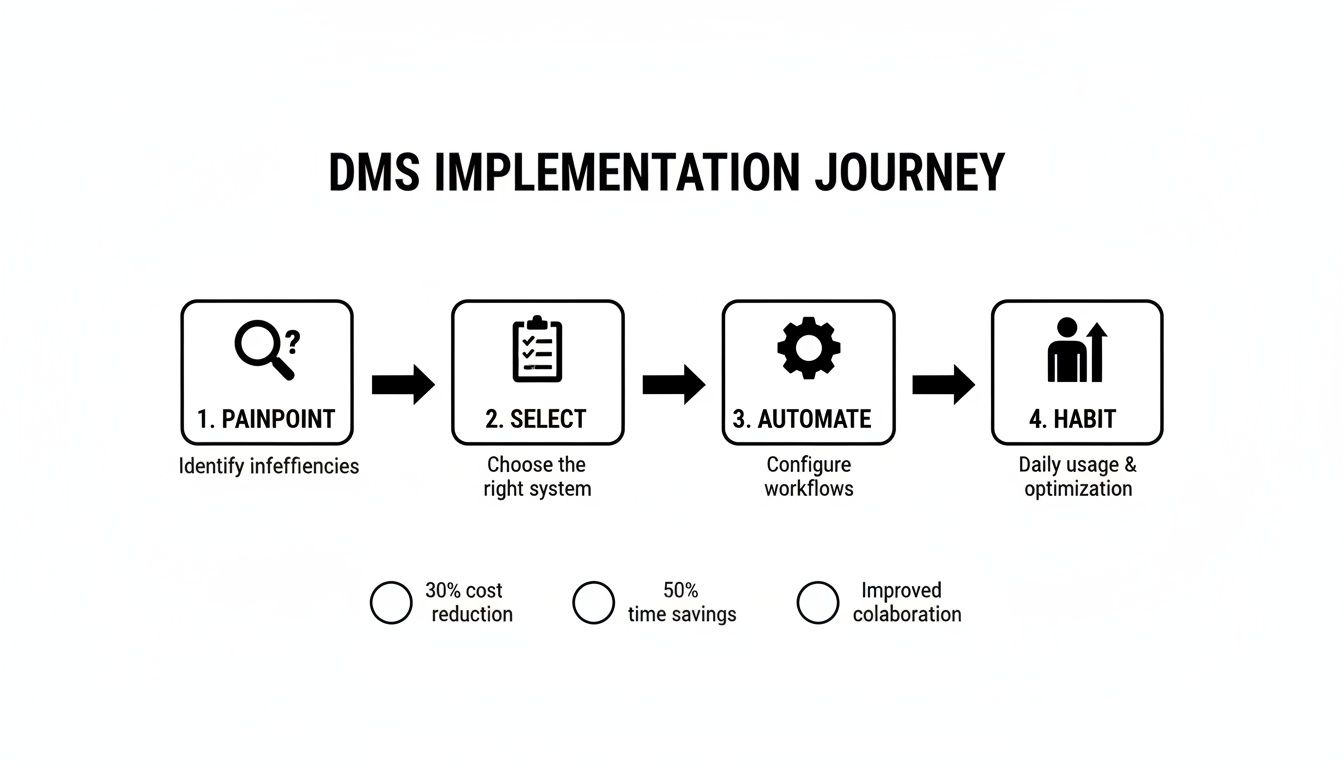
It shows how solving a single problem, like messy receipts, can lead to a powerful, automated workflow that gives you back hours of your time.
The Journey of a Single Receipt
Let’s follow a single, everyday purchase to see how this works in practice. Imagine you buy a train ticket for a client meeting. Without an integrated system, that paper receipt might live in your wallet for weeks, get lost, or eventually be entered into a spreadsheet long after you've forgotten the details.
With an integrated document system, the process is completely different.
- Instant Capture: The second you get the receipt, you snap a quick photo with your phone. That’s it. The paper copy can go straight in the bin.
- Intelligent Extraction: The system’s AI gets to work instantly. It doesn't just scan the image; it reads and understands it. It identifies the merchant (Trainline), the date, the total, and, most importantly, the VAT amount.
- Automatic Categorisation: Because it recognises the merchant and has learned from your past entries, the system makes an intelligent guess. It knows Trainline means ‘Travel’ and automatically categorises the expense for you. No more drop-down menus.
This is where you say goodbye to manual data entry for good. The system acts like a digital bookkeeper, handling all the tedious admin that eats into your day, leaving you with a real-time view of your finances with almost zero effort.
Pushing Data Directly to Your Books
Now for the best part. Once all the information is captured and categorised, the system doesn’t just sit on it. It automatically pushes a perfectly formed transaction directly into your accounting platform.
So, what appears in your Xero or QuickBooks account?
- A new bill or expense record is created.
- The supplier, date, total amount, and VAT fields are all filled in.
- The original photo of the receipt is attached right there to the transaction.
This means that when you log in to do your bank reconciliation, the work is already done. The expense from your document system is sitting there, ready to be matched with the payment that came out of your bank account. It makes bookkeeping faster, far more accurate, and a whole lot less stressful.
If you’d like to see the finer details, you can learn more about how a dedicated Xero integration works to make this all happen. This direct link creates an unbreakable, audit-proof trail for every single purchase, giving both you and your accountant complete confidence in your numbers.
Common Mistakes to Avoid When Going Paperless
Shifting to a paperless workflow is one of the best moves a small business can make, but the journey can have its share of bumps. Knowing the common pitfalls before you start is the easiest way to guarantee success. If you can sidestep these frequent errors, your new system will be a time-saver, not a new source of headaches.
The right approach to document management for a small business is all about being proactive. It's learning from where others have stumbled, so you can build a process that works from day one and helps you grow.
Choosing Overly Complex Software
A classic misstep is picking an enterprise-level system built for a massive corporation. These platforms often come packed with dozens of features—think advanced auditing tools or intricate user permissions—that a sole trader or small team will simply never touch. You end up paying for bells and whistles you don't need while wrestling with a confusing interface.
The solution? Keep it simple.
Prioritise a system that solves your most immediate problem exceptionally well, rather than one with dozens of features you'll never use.
If messy receipts are your biggest headache, find a tool with a brilliant mobile capture app and spot-on data extraction. Nail that one thing first. You can always explore more advanced features later as your business needs change.
Forgetting to Build New Habits
Buying the software is the easy bit. The real challenge is making it part of your daily routine. So many businesses fail to build new habits for capturing documents as they come in. They let receipts pile up in a wallet or invoices sit in an inbox, telling themselves they'll "scan them all later." This completely defeats the purpose.
Success hinges on making document capture an immediate, almost subconscious action.
- At the Point of Sale: Snap a photo of that receipt before you even leave the shop.
- When an Email Arrives: Forward the invoice to your system the moment it lands in your inbox.
- After a Meeting: Capture business cards or notes straight away, not at the end of the week.
That kind of consistency is what turns a good tool into a genuinely powerful, time-saving asset.
Ignoring Automation from Day One
Another common mistake is treating your new system like a fancy digital filing cabinet. You might upload your documents, but you're still manually sorting them into folders or typing data into your accounting software. This overlooks the single most powerful feature of modern document management tools: automation.
You should be switching on the features that do the heavy lifting for you right from the start. Set up your email forwarding rules, connect it to your accounting software, and let the AI pull out and categorise your expense data automatically. A recent study found that 90% of a typical organisation's data is unstructured; automation is what turns that chaos into valuable, organised information without you lifting a finger. By embracing it immediately, you unlock the system's true potential to give you back hours of your week.
Still Got a Few Questions?
Jumping into any new system, no matter how simple, always brings up a few last-minute questions. That's completely normal. Let's tackle some of the most common ones we hear from small business owners, so you can move forward with confidence.
Is My Data Really Safe in a Digital System?
Absolutely, as long as you choose a quality provider. Think of it this way: a locked filing cabinet in your office is vulnerable to break-ins, fires, or even a simple water leak. A modern document management system, on the other hand, uses powerful security tools like end-to-end encryption.
These platforms are often built on the same ultra-secure cloud infrastructure used by global banks, like Amazon Web Services or Google Cloud. It’s a level of security that’s practically impossible for a small business to replicate on its own. Just be sure to glance over a provider’s security policies before you commit.
How Long Does It Actually Take to Set Up?
We're not talking weeks or even days. For a tool built for small businesses, you can genuinely be up and running in less than 15 minutes.
It's usually a simple process: create an account, link it to your accounting software like Xero, and learn the one or two ways to send in a document – maybe by forwarding an email or snapping a photo on your phone. These tools are designed to slot right into how you already work, not force you to change everything.
The whole point of a good document management tool is to work with you, making things like expense tracking feel like second nature, not another admin chore to dread.
Once I've Scanned Everything, Can I Just Bin the Old Paperwork?
Not so fast! Before you reach for the shredder, you need to be mindful of UK law. HMRC has strict rules, and you're generally required to keep business records for at least five years after the 31 January tax submission deadline for that tax year.
Once you have a secure digital copy backed up and have passed that legal retention period, you can then shred the paper originals. When in doubt, it’s always a good idea to have a quick chat with your accountant to make sure you’re ticking all the compliance boxes.
Ready to stop wrestling with receipts and start automating your bookkeeping? Snyp uses AI to capture, categorise, and sync your expenses directly to your accounting software, giving you back hours of your valuable time. Start your free trial with Snyp today and experience a smarter way to manage your business documents.