




Business Record Keeping: How Long to Keep Every Record
In the UK government's Longitudinal Small Business Survey 2025, 85% of businesses with no employees that were sole proprietors or partnerships reported being liable to submit an HMRC income tax Self Assessment return, up from 82% in 2024. In that same group, record-keeping software rose from 32% in 2024 to 48% in 2025. The tax file is already a normal part of trading on your own. The way people store the proof is still split between paper, spreadsheets and apps.
That split is the main problem. A photo in a camera roll isn't the same thing as a record you can open in year five and still trust. Business record keeping means holding the witness for every figure in the accounts, for as long as the rules require, in a form you can still read. Going paperless doesn't retire that job. It only moves the witness, and it adds a harder question: can you show where the digital copy came from?
What Counts as a Business Record
Treat a business record as a witness for a number. If someone asks why a line in the accounts is £1,240, the witness is the invoice, the receipt or the bank line that shows where that figure came from. Without the witness, the number is only a claim.
The core set is smaller than many fear.
- Sales invoices and credit notes: what you billed, and what you later reduced.
- Purchase receipts: what you bought, from whom, and for how much.
- Bank statements: the money that moved.
- Payroll records: wages, deductions and what you paid over.
- Contracts and agreements: the terms that explain a payment spanning months.
- Mileage logs: business miles, with date and purpose, not a yearly guess.
- Stock and asset records: what you hold, and kit you still use.
- The accounts themselves: ledgers, daybooks, trading accounts and the balance sheet.
Those items do two different jobs. Source evidence, such as receipts, invoices and statements, proves a transaction happened. Summaries, such as ledgers, daybooks and balance sheets, organise those transactions into totals. You need both. A tidy ledger with no receipt behind a large purchase fails at review. A shoebox of receipts with no totals fails at filing.
Keeping a record means keeping it complete, legible and findable, not simply saving a file somewhere.
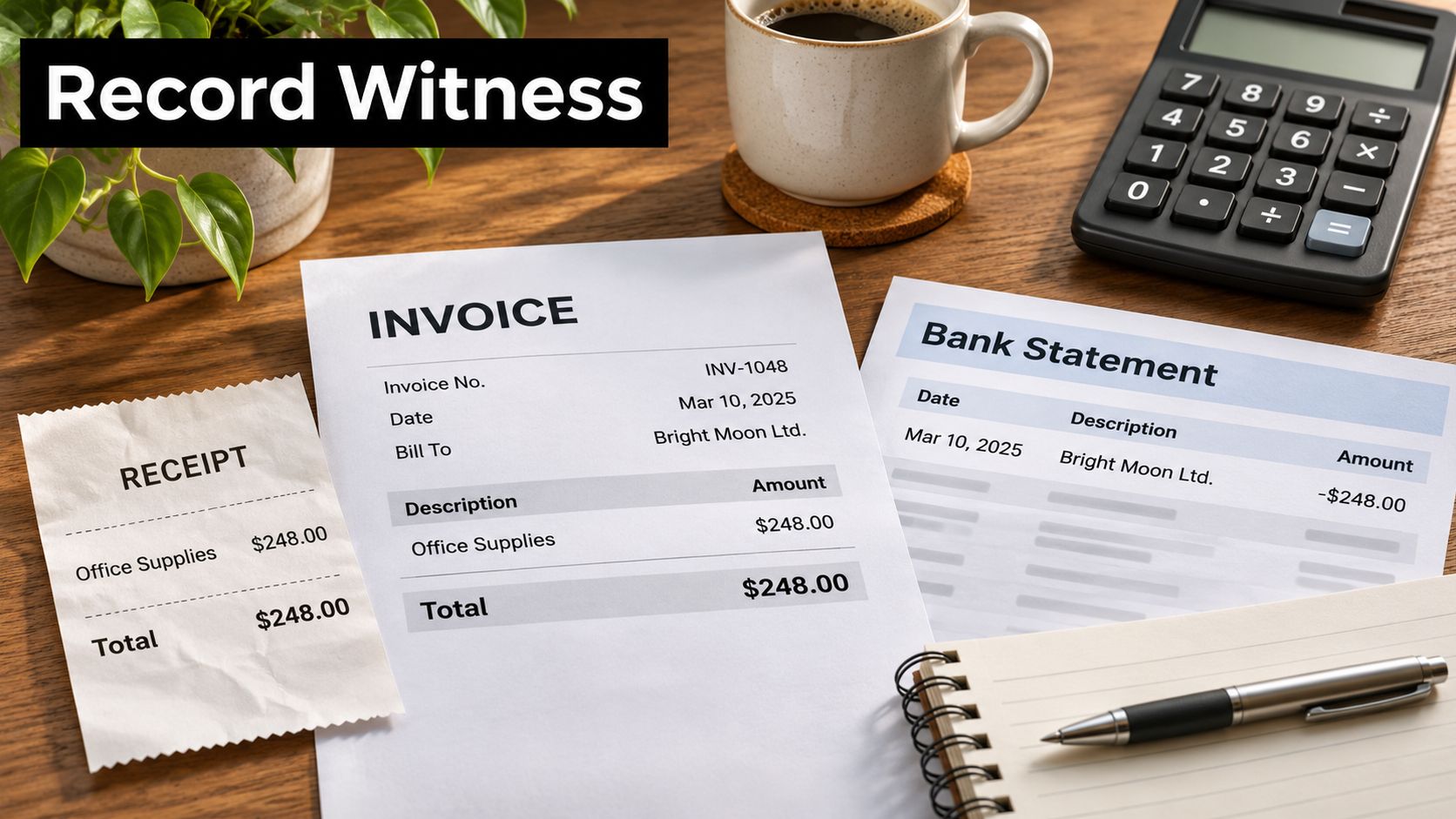
Say a plumber keeps the supplier invoice for a boiler job but loses the parts receipt for the valves fitted on site. At review, the invoice supports the materials total. The missing receipt leaves a hole in the job cost. The reviewer can't see whether those valves were for that customer or for stock still on the van. The figure may be right. It isn't defensible.
The same gap shows up when a contract sits in email and the invoice sits in accounting software, with nothing tying them. Consistent document layout helps. Teams that standardise how invoices and agreements are produced, including through document templating in SIX ERP, spend less time hunting for which version was the one that was signed.
A source document in accounting is that witness, not the spreadsheet cell that quotes it.
Give yourself a two-minute self-audit. Pick one expense from last month. Can you open the source document in under a minute, read the amount, the date and the supplier, and match it to the bank line? If you can't, that expense isn't kept. It's only remembered.
How Long to Keep Each Business Record
Most UK business records are kept for six years, but the clock doesn't start on the same day for every file. HMRC's Compliance Handbook sets that general period for invoices, ledgers, daybooks, stock books, balance sheets and trading accounts, and it treats electronic copies like paper. Scanning a receipt doesn't shorten the obligation.
| Record | Keep for | Clock starts |
|---|---|---|
| Invoices | Six years | Date of issue |
| Balance sheets and trading accounts | Six years | Date of preparation |
| Ledgers and daybooks | Six years | Date of final entry |
| Stock books | Six years | Date of final entry |
| Limited company accounting records | Six years | End of the relevant financial year |
| Digital records for Making Tax Digital | At least five years | 31 January submission deadline for the tax year |
The start date is the part people get wrong. The same six-year span can end in different calendar years. An invoice issued in April 2024 runs from that issue date. The trading account prepared the following spring runs from the preparation date. A daybook's clock runs from its final entry, which may be months later. A limited company's accounting records run from the end of the relevant financial year. One blanket "delete everything from 2019" rule will wipe a file whose clock started later.
One folder habit that stops early deletion
Label each storage folder with the year its clock starts, not only with the trading year. "Invoices issued 2024, earliest disposal 2030" is clearer than a folder called "Old". You can see the safe date without opening a single PDF.
A workable system keeps three things together: the source document, the extracted fields (amount, date, supplier, category), and an audit trail that links any correction back to the original entry. If you change a VAT figure, the first figure should still be recoverable.
Digital income and expense records for Making Tax Digital sit on a different clock, at least five years after the 31 January submission deadline for that tax year. Don't mix that pile into the company six-year folders and assume they're the same job.
The standard periods stop being enough in a handful of ordinary cases. Those are next.
When Retention Periods Get Longer
A joiner buys a workshop table saw, pays for it outright, and expects it to last ten years. The purchase invoice and the asset record can't follow the default six-year date. If the saw is still in use, or has only just been sold, the paperwork that proves cost, date and ownership still has a job to do.
GOV.UK guidance for limited companies states the six-year rule from the end of the relevant financial year, then lists the situations that push retention further. HMRC applies the same six-year baseline to invoices, balance sheets, trading accounts, ledgers, daybooks and stock books, generally from issue, preparation or last entry. The extensions are where reviews go wrong, because the default diary says "destroy" while the asset or the enquiry is still live.
| Case | How retention changes | Example |
|---|---|---|
| Transaction spans more than one accounting period | Retention can run longer than six years | Multi-year service contract |
| Asset expected to last more than six years | Retention can run longer than six years | Workshop machinery bought outright |
| Late Company Tax Return | Retention can run longer than six years | Return filed after the deadline |
| HMRC compliance check started | Keep records for the duration of the check | Records requested during an enquiry |
What each trigger changes in practice
A multi-year contract doesn't finish when the first invoice does. Keep the agreement with every invoice it covers, until the later of the contract end and the normal clock.
Machinery and other long-lived kit should stay with the asset register. Disposal, part-exchange and capital allowances all look back to the original cost.
A late Company Tax Return moves the finish line. Don't start the six years from the date you wish you had filed.
An open compliance check overrides the diary entirely. Records stay available until the check closes. Keep a single list of open cases, with the years they touch, and don't run a destruction day while any line on that list is still open.
When any of these triggers applies, use the later date, and write down why you extended retention.
That note can be one line on the folder: "Saw, expected life 10 years, keep until disposal plus the normal period." Future you, or your accountant, shouldn't have to reconstruct the reason from memory.
How Small Firms Actually Keep Their Records
The shares below come from two 2025 UK surveys. They don't describe one perfect system. They describe what people are doing while the Self Assessment obligation sits on most sole proprietors and partnerships with no employees.
| Method | Share | Source |
|---|---|---|
| Liable for Self Assessment | 85% in 2025, up from 82% in 2024 | LSBS 2025, no-employee sole proprietors and partnerships |
| Paper-based records | 55% | LSBS 2025, same group |
| Spreadsheets | 54% | LSBS 2025, same group |
| Record-keeping software | 48% | LSBS 2025, same group |
| Record-keeping software a year earlier | 32% | LSBS 2024, same group |
| Software, registered businesses with no employees | 65% | LSBS 2025 |
| Software, group reported alongside registered firms | 40% | LSBS 2025 |
| Making Tax Digital-compatible package | 50.2% | ABAB 2025, respondents who answered |
| Spreadsheets | 23.0% | ABAB 2025, respondents who answered |
| Paper-based records | 4.5% | ABAB 2025, respondents who answered |
Paper at 55% and spreadsheets at 54% in the Longitudinal Small Business Survey can overlap, which is the point. Many firms run more than one method in the same year. Software use in that survey jumped 16 percentage points in a year, and it was 65% among registered businesses with no employees against 40% of unregistered businesses. In the Administrative Burdens Advisory Board's 2025 survey, among people who answered, 50.2% used a Making Tax Digital-compatible package for day-to-day records, 23.0% used spreadsheets and 4.5% used paper.
Pick one primary system for this tax year
Don't split one tax year across a shoebox, a spreadsheet and an app. Reviewers lose the trail at the joins.
- On paper, file the source document in a year folder the week it arrives, and keep a one-line index: date, supplier, amount, folder. Paper survives a dead laptop. It fails when the van is the filing cabinet.
- In a spreadsheet, fix the columns before you add rows: amount, date, category, and a link or filename for the receipt. A free-text notes column becomes unsearchable by March.
- In software, check Making Tax Digital compatibility before you rely on it for a return. A package that stores receipts but can't produce the digital record in the required form creates a second job at submission.
If you're comparing packages, a scored accounting software comparison on FruitPunch is a useful shortlist, not a substitute for checking that your own bank feed, VAT and categories fit.
I would start with the system you will still open in January, not the one with the longest feature list. A boring primary system, used every week, beats three half-used tools.
Making Tax Digital Rollout by Income Threshold
Making Tax Digital for Income Tax arrives in three bands of qualifying income, each with its own start date.
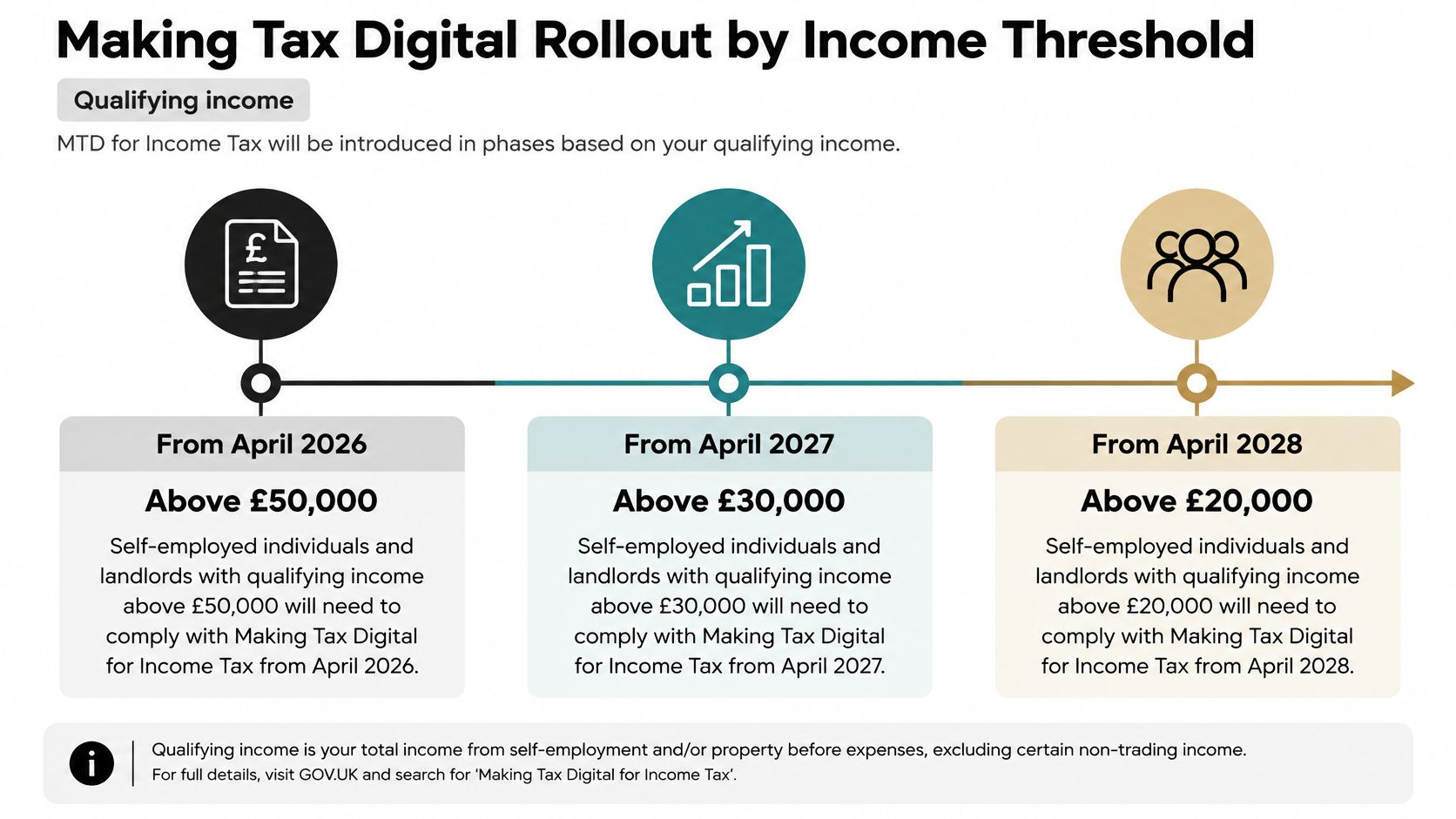
HMRC's business population commentary sets the timetable: mandatory participation is scheduled from April 2026 for qualifying income above £50,000, from April 2027 above £30,000 and from April 2028 above £20,000. More than 864,000 sole traders and landlords fall in the first mandatory group, and more than 20,000 quarterly updates had already been submitted through voluntary testing. Around 2.9 million of the 7.0 million individuals in Income Tax Self Assessment with self-employed or property businesses sit above £20,000, so they land somewhere in the three bands.
| Qualifying income | Mandatory from (scheduled) | Scale of the group |
|---|---|---|
| Above £50,000 | April 2026 | More than 864,000 sole traders and landlords in the first group |
| Above £30,000 | April 2027 | Covers qualifying income between £30,000 and £50,000 |
| Above £20,000 | April 2028 | Around 2.9 million individuals sit above £20,000 across all three bands |
A transition, not a new back office
The work your band's date sets is narrower than a new back office. The records that must be digital are a fixed set, and everything else you already keep carries on as supporting documents.
- Digital now: the income and expense entries your software will have to hold.
- Still supporting documents: invoices, receipts and bank statements that prove those entries.
- Separate pots: business and personal spending, so a supermarket run doesn't land in the quarterly figures.
- A review before each submission: read the quarter before it goes, not after HMRC has it.
The Making Tax Digital threshold is the number that sets your date. Work it out from the qualifying income on your last return.
Say a sole trader's qualifying income sits near £32,000. That puts them inside the April 2027 band, which covers income above £30,000. The useful work before that date is practice: one quarter recorded digitally, one review before a pretend submission, personal spending kept off the business card. The bookkeeping system itself can stay.
Each practice quarter also builds the habit that matters at enquiry time: entries that still point back to their source document when someone asks where a figure came from. A category on its own is not a trail.
Find your band. Put a date in the diary for the first quarter you intend to keep digitally, even if that quarter is still voluntary.
Keep Digital Receipts That Survive an Enquiry
A scan is not a digital record. HMRC's first-time Making Tax Digital guidance says a digital record must capture at least the transaction amount, the date income was received or the expense occurred, and the Self Assessment category. Those records are created and stored in compatible software. Original supporting evidence, or a copy such as the invoice and the bank statement, is kept as well. Digital records are generally kept for at least five years after the 31 January submission deadline for that tax year.
HMRC's create-digital-records guidance makes the same split. You create the digital income and expense record, and you still retain the underlying documents used for the return. Paperless is not evidence-free. Automated categorisation can speed the books and still leave you unable to show provenance.
A ticket that passes, and a text string that doesn't
A £46.50 train ticket bought on 14 March, categorised as travel, with a readable image attached to the ledger line, meets the test. You can see the amount, the date, the category and the proof.
A line of OCR text with no checked amount, no date, no category and no attachment doesn't. If the image was blurry, the 6 might have been an 8. At enquiry you have a number and a story.
Six steps for one receipt
- Capture it. Photo, email forward, WhatsApp or a file upload. Pick routes you already use on a job, or the receipt never leaves the van.
- Validate it. Amount, date, vendor, category, and a check that the image is readable. This is the step OCR can't take for you.
- Attach the evidence to the ledger entry, so the witness and the figure travel together.
- Back up the stored copy in a second location. One laptop is not a retention plan.
- Restrict who can change or delete it. Open edit rights make the audit trail meaningless.
- Retain the set for the full period in your retention table, digital record and supporting copy included.
Where software extracts the details, you still review and confirm before approved data syncs. That review is where a wrong VAT line or a personal coffee gets caught. Our own capture follows that order: you snap or upload the receipt, the extraction fills the fields, you review and confirm, and only then does the approved data sync to Xero or QuickBooks.
If a figure changes later, store the original value, the changed value and the date. Don't overwrite the first entry and hope the bank statement will explain it.
A readable copy, linked to the transaction and recoverable years later, is what digital record keeping has to mean. A folder of unnamed JPEGs is only a camera roll with a longer name.
Set Up Your Record Routine Before the Next Deadline

A qualifying income of around £32,000 sits above the £30,000 line, so a trader at that level falls inside the April 2027 band. The deadline is already fixed, whatever band you land in, and the work is the same: build the routine now, while a missed receipt is still cheap to fix. Six actions this month get it done.
| Do this | What it gives you |
|---|---|
| Confirm your qualifying income | Your Making Tax Digital start, taken from HMRC's thresholds: above £50,000 from April 2026, above £30,000 from April 2027, above £20,000 from April 2028. |
| Label your retention folders | Each folder marked with the date its clock starts: invoice issue date, accounts preparation date, final ledger entry or financial year-end. |
| Pick one capture route | Photo, email forward or WhatsApp. Test it on five receipts and check the image is readable and the file lands where you expected. |
| Run a retrieval test | Pull up a receipt you filed weeks ago. If you cannot find it quickly, the folder names need work before volume arrives. |
| Diary the quarterly review | Put it before each submission, with the same questions every time: missing attachments, personal spend, odd categories. |
| Share the review link | Send it to your accountant or bookkeeper so they can check the data without needing their own account on the capture tool. |
If £32,000 puts you in the April 2027 band, the months between now and your start date are the practice window. Digital fields and a review habit learned early cost very little. Learned during a first mandatory quarter, they cost evenings.
Approved lines that already live in Xero or QuickBooks are easier to reconcile, because the data arrives categorised and formatted for that job. The review link earns its keep on the awkward quarter, when a second pair of eyes catches what routine stopped seeing. Your own look still happens first.
The short film below walks through a simple weekly filing rhythm you can copy onto a calendar.
The first action today is smaller than a new system. Send one receipt through the capture route you chose, and file it in the folder for the year its clock starts. If you can find it again tomorrow, the routine has begun.
Snyp captures receipts from a photo, email, WhatsApp or a file upload, checks the details with you, and sends the approved record to Xero or QuickBooks so the witness stays attached to the figure. That is the part of business record keeping that usually falls over between the van and the ledger. See how it fits your own receipts at Snyp.