




Best App for Business Expenses: The Complete 2026 Comparison

On Friday evening, a freelancer empties a coat pocket onto the kitchen table and finds three faded receipts, one coffee-shop slip and a handwritten note with no supplier name. The rest are scattered across an email inbox, a phone gallery and a WhatsApp chat. The bookkeeping deadline is close, but the problem isn't the sorting. It's knowing whether every expense has been captured, categorised and connected to the right transaction.
An app for business expenses should do more than turn a photograph into text. The useful product is the one that keeps the original document linked to a structured record, sends dependable information into Xero or QuickBooks, and leaves an accountant with fewer questions at month end. This comparison focuses on that overlooked second half of the workflow, where compliance, reconciliation and data hygiene determine whether receipt capture helps.
Why the Receipt Chase Still Hurts
The Friday-night receipt chase usually starts as a small task. A business owner searches for a fuel receipt, forwards an invoice to themselves, checks a bank statement and asks a colleague to resend a photograph. By the time the records reach the bookkeeper, the merchant may be unclear, the VAT treatment may need checking and the business purpose may have disappeared from memory.
That isn't just irritating administration. HMRC expects digital records of self-employment income and expenses to include the amount, date and category, and it accepts clear digital images of source documents such as photographed paper receipts. The HMRC guidance on creating digital records makes the practical requirement clear: a receipt image needs to become part of a complete, durable record, not sit alone in a camera roll.

The risk sits after the photograph
A lost receipt can mean a missed claim. An incorrectly categorised purchase can create a VAT query. A transaction with no supporting image can force the accountant to search through email threads or ask the client to reconstruct what happened. Those problems become harder to resolve when records must remain legible and available for the required retention period.
Paper-first bookkeeping also creates a timing problem. The expense exists when the purchase happens, but the record often appears weeks later, after the owner has forgotten the context. A mobile capture workflow moves the evidence closer to the transaction and gives the finance process something structured to work with.
Practical rule: Capture the receipt where the purchase happens, then make the accounting connection before the memory of the transaction fades.
The best expense app therefore fits real habits rather than an ideal process. If a contractor uses WhatsApp, email or a phone camera throughout the day, forcing that person to open a separate portal for every expense will reduce adoption. The right workflow turns those existing habits into clean records, then gives the owner or bookkeeper a short review step before reconciliation.
What Really Matters in an Expense App
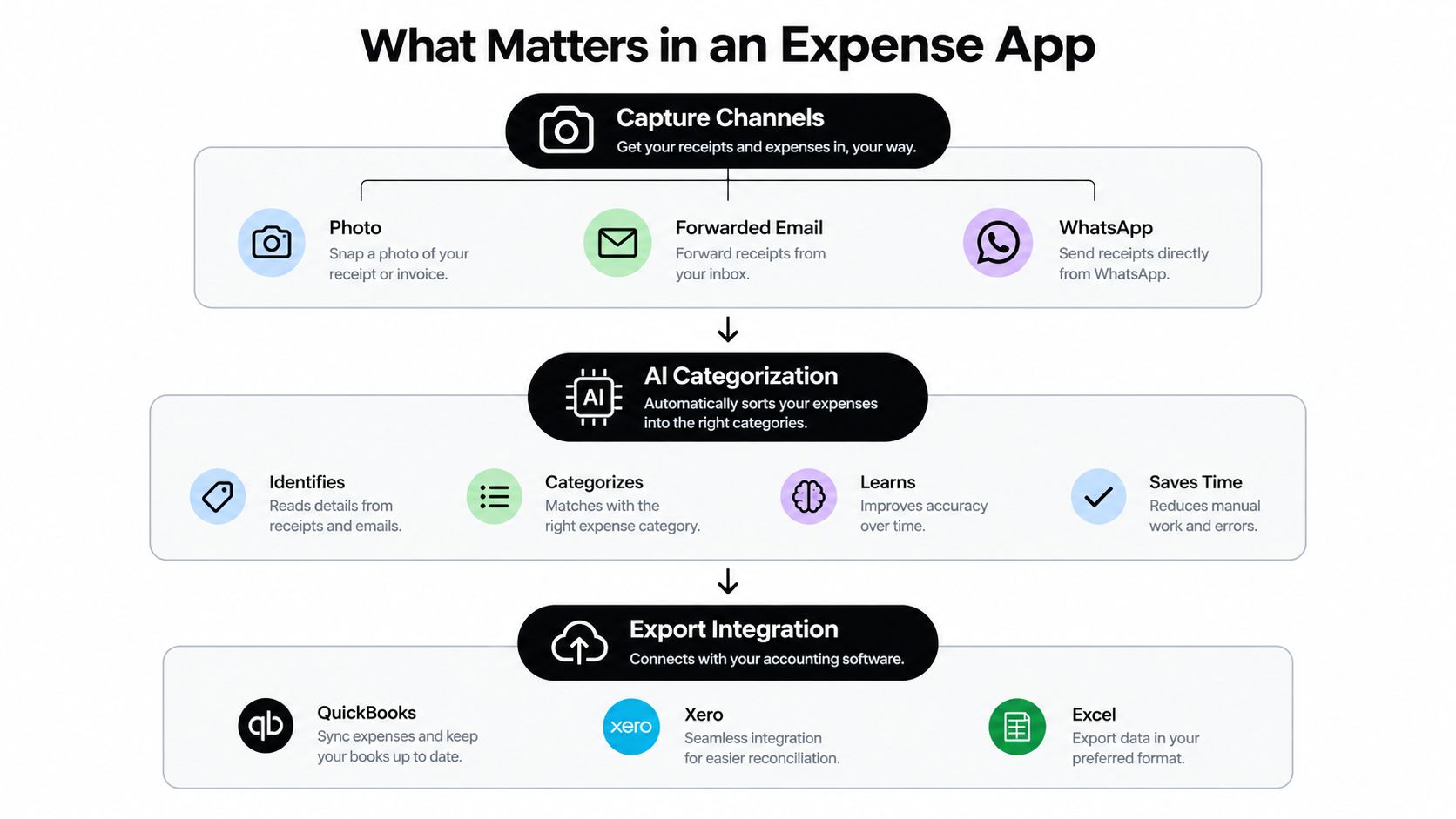
The useful test is not whether an app can read a receipt. It is whether the extracted data remains reliable through review, approval, audit checks and reconciliation. For UK businesses, an expense system needs to support capture, coding, approvals and accounting connectivity, rather than storing images. That wider workflow is where an app becomes compliance infrastructure.
One independent report values the UK expense-management software market at USD 329.7 million in 2025 and forecasts USD 384.1 million by 2026. The figures come from the UK expense-management software market report, and point to growing demand for tools that handle the work after scanning. Buyers should therefore test how records are cleaned, reviewed, linked to transactions and passed into the ledger.
Start with the way people submit
UK-focused comparisons identify practical capture routes such as photographs, forwarded emails, uploads and text messages. Automated extraction should identify the merchant, date, VAT or tax, amount, currency and category, while retaining the original document for later checking. Receipt capture and expense software comparisons for UK businesses show why submission channels can matter as much as OCR performance.
Test the workflow with a crumpled receipt, an emailed invoice and a PDF. Check whether each source is processed consistently, whether the original remains attached and whether uncertain fields are flagged for review. A system that inserts a plausible but incorrect value without notice creates more bookkeeping work later. Tools using AI extraction for expense documents illustrate the structured processing buyers should assess.
Integration is the operational benchmark
Data that stops inside the app still leaves someone to rekey it. Reviewed expenses should move into the accounting ledger, connect to the relevant bank or card transaction where possible, and retain a clear path back to the supporting document. Guidance on receipt scanning apps and accounting integrations identifies Xero, QuickBooks and Sage connectivity as a more useful benchmark than scan speed alone.
Post-capture controls deserve equal attention. Check who can view documents, how permissions are assigned, whether edits are recorded, and whether originals stay attached. An integrated platform can connect expenses with accounts payable and treasury records, but a small firm may not need an enterprise suite. Every buyer does need a clear answer to one question: what happens after the receipt is captured?
Comparing the Leading Expense Apps
No single expense tool suits every business. A sole trader with modest activity may prefer the accounting system's built-in receipt feature, while a growing firm may need multiple submission channels, review controls and cleaner data handover. The table below focuses on workflow fit rather than declaring one universal winner.
Expense App Feature Comparison
| App | Capture Channels | OCR Accuracy | Accounting Integration | WhatsApp Input | Price Range | Security |
|---|---|---|---|---|---|---|
| Xero Hubdoc | Photos, uploads and connected document capture | Suitable for straightforward documents, review still needed | Native fit with Xero workflows | Not a core route | Subscription linked to product or plan | Use Xero permissions and retention controls |
| QuickBooks receipt capture | Mobile photographs and receipt uploads | Useful for routine receipts, exceptions need checking | Direct fit inside QuickBooks | Not a core route | Included or plan-dependent | Use account roles and platform safeguards |
| Expensify | Mobile capture and digital submissions | Strong for common receipts, accuracy varies with document quality | Connects with common accounting platforms | Not a core route | Subscription structure varies | Check workspace access and policy controls |
| SAP Concur | Mobile capture, travel documents and expense submissions | Designed for structured travel and expense records, review remains important | Broad enterprise connectivity | Not a core route | Custom or plan-dependent | Detailed permissions and audit controls |
| Snyp | WhatsApp, email forwarding and direct file upload | Context-aware extraction with review before approval | Syncs reviewed data to Xero and QuickBooks | Yes | From £19 per month, with a trial | End-to-end safeguards for documents and account data |
Built-in tools such as Xero Hubdoc and QuickBooks receipt capture can be sufficient when transaction volumes and review needs are modest. Their advantage is proximity to the ledger. The trade-off is that a business may outgrow simple capture if staff submit receipts through different channels or if an accountant needs more deliberate categorisation and approval handling.
Choose the point of failure you can manage
Expensify can suit teams that prioritise quick mobile submission and straightforward reimbursement workflows. SAP Concur is more appropriate where travel, policy and enterprise approval requirements justify a heavier implementation. Those tools may be unnecessary for a freelancer who needs reliable ingestion and a clean Xero handoff, but a small team with active spend controls may outgrow a basic scanner quickly.
The important comparison is not “which app reads text most accurately?” It is “which app creates the fewest exceptions before the books close?” Test an unclear receipt, a VAT invoice, a forwarded email and a duplicate submission. Then inspect the accounting output, not just the screen where the image first appears. A longer overview of selection considerations appears in this expense manager software guide.
Where Snyp Fits the Workflow
A receipt can be captured correctly and still create work later. Test what reaches the books after someone checks the image, corrects the fields and decides whether the expense is ready for reconciliation.
Snyp is built for that handoff. It accepts receipts and related documents through WhatsApp, email forwarding or direct upload, including JPEG, PNG and PDF files. It extracts the main fields into a record for review, so the bookkeeper can work from structured data rather than retyping an image.
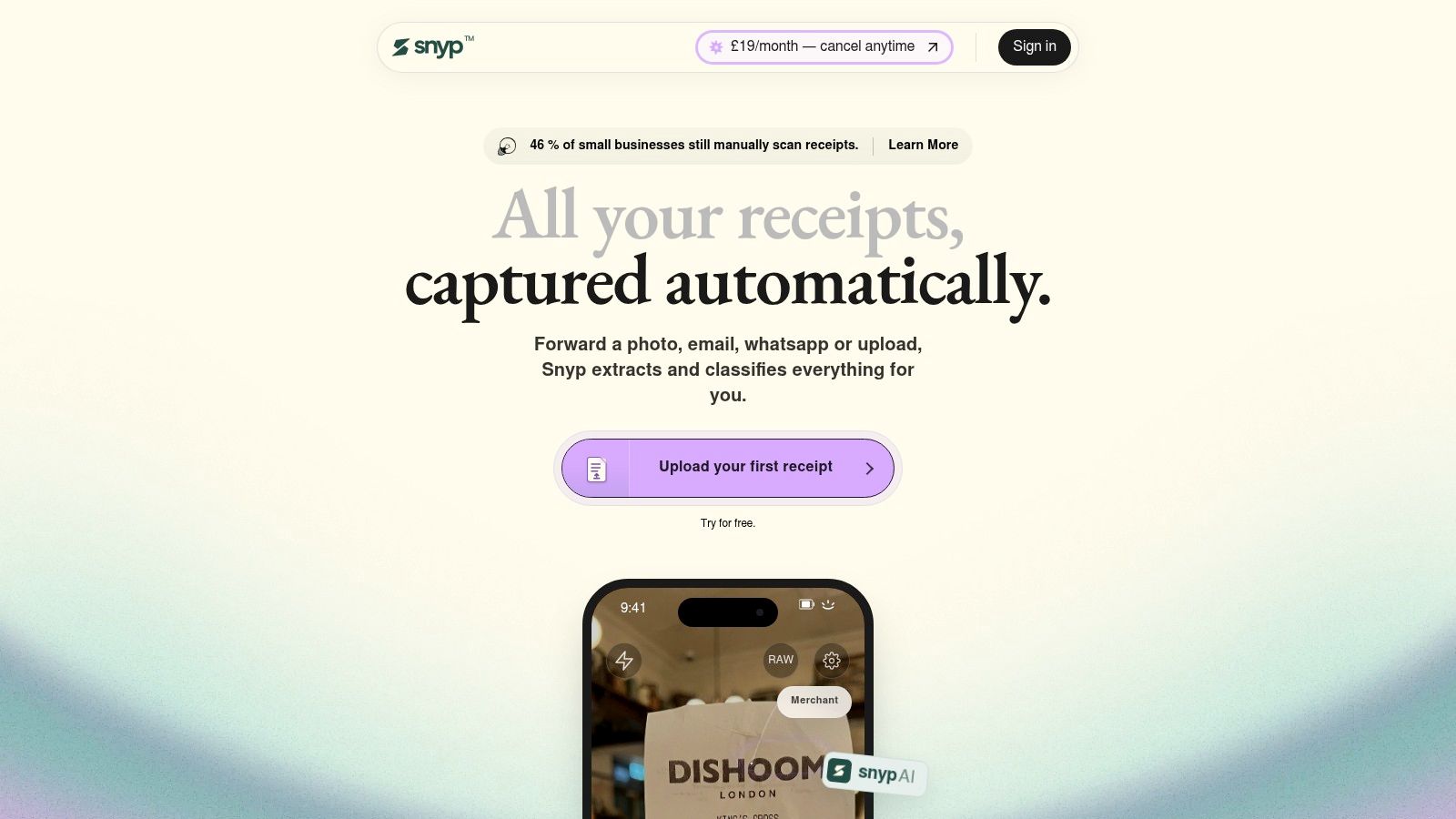
The useful distinction appears during review. A supplier invoice may arrive with the correct merchant and total but an unclear tax amount. A team member may submit the same receipt twice, or choose a general category for a cost that should be assigned to a client. The reviewer needs to correct the record, preserve the source document and leave an audit trail that explains what was approved.
For example, a reviewed record might change “Travel” to a client project, confirm the VAT treatment from the invoice and retain the original image beside the corrected entry. That small amount of hygiene prevents a clean-looking ledger from hiding an unresolved exception.
Small businesses also need a process that fits existing habits. A freelancer can send a receipt immediately, a supplier invoice can be forwarded from email and an accountant can review the result without teaching every client a new filing system. Broader UK comparisons make the same distinction: capture is only useful when it reduces the work after scanning, as shown in these UK expense-management software comparisons.
What the handoff should feel like
A practical workflow makes exceptions visible. Unclear tax values should be editable, questionable categories should wait for review and duplicate submissions should stand out before approval. Once checked, Snyp syncs the reviewed expense data with Xero and QuickBooks, giving the bookkeeper a record to reconcile instead of a folder of disconnected attachments.
Security matters because receipts can expose supplier information, account details and spending patterns. Snyp includes end-to-end safeguards for documents and account data, with pricing from £19 per month and a trial for businesses assessing the process.
The demonstration below shows the intended path from document capture through review and accounting handoff.
Real Workflows for Different Users
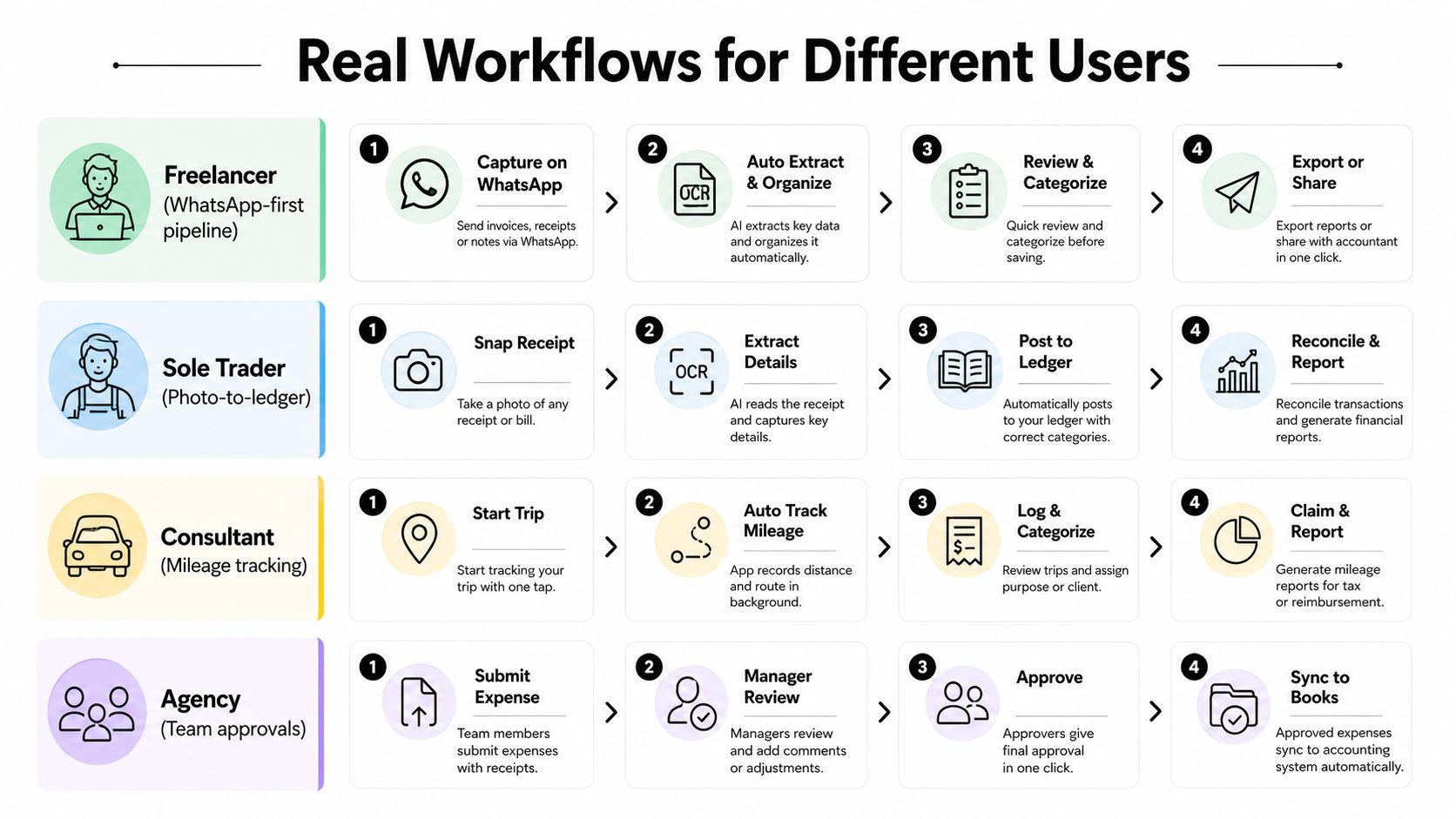
The right app becomes valuable when it matches the user's existing routine. A freelancer shouldn't need to remember a new administrative ritual, and an accountant shouldn't have to rebuild a client's entire bookkeeping process just to receive better receipts.
Freelancer and sole trader
A freelancer can use a WhatsApp-first pipeline. After buying software or paying for travel, they photograph the receipt and send it to the designated business channel. The record is extracted, checked during a weekly review and sent to the ledger with the source image attached.
A sole trader who prefers the phone camera can use a photo-to-ledger routine instead. The important habit is not the channel. It is the short gap between purchase and capture, followed by a regular review that clears uncertain categories before tax or bookkeeping work begins.
Consultant and field professional
A consultant working across clients needs more than a merchant and amount. The expense may need a project, client or reimbursable status. Mileage and travel records also need context, while overseas purchases may require currency and tax review. A mobile workflow can collect the evidence while the details are fresh, then leave the final coding to the consultant or bookkeeper.
For contractors and field service professionals, connectivity can be more important than a complex dashboard. A receipt sent from a vehicle, site office or customer premises should reach the same central queue as an office upload. Guidance on how to track business expenses is most useful when it translates that principle into a repeatable daily habit.
Agency or growing finance team
An agency needs a shared process. Team members submit receipts through an agreed route, a manager checks client or project allocation, and the finance owner reviews exceptions before the data reaches the accounting platform. That sequence prevents the month-end close from becoming a memory exercise.
Finance managers also benefit from a central document trail. They can see which records are waiting for review, which expenses lack context and which transactions have reached the ledger. The app doesn't replace judgement. It gives the people making those judgements one organised queue instead of several inboxes.
How to Choose the Right Expense App
Start with the current failure, not the feature list. Are receipts being lost, categorised inconsistently, submitted late or left outside the accounting system? Different problems require different capabilities, and a business shouldn't pay for a complex approval layer if the core issue is that nobody can forward an invoice easily.
A practical selection sequence
Map the actual channels. List how people currently receive receipts, including photographs, email attachments, uploads and messaging apps. Choose a tool that supports those habits or adoption will suffer.
Test difficult documents. Use faded paper, a VAT invoice, a long receipt and an emailed PDF. Check merchant, date, amount, tax, currency and category fields individually. Don't judge the product on one clean sample.
Follow the record into the ledger. Connect a test company or account and inspect how the app handles categories, attachments, duplicates and corrections in Xero or QuickBooks. A CSV export may look convenient but can create another manual stage.
Check retention and access. Confirm that the original remains linked, authorised users can review it and the business can retrieve records when needed. HMRC's digital record expectations make this a workflow requirement, not an optional archive feature.
Price the process you will use. Compare the cost of active users, submissions, integrations and support against actual activity. A low entry price doesn't help if the plan restricts the route your team uses most.
During a trial, measure extraction reliability, category corrections, reconciliation speed and support responsiveness. For broader context on separating business and personal spending, a practical guide on claiming business expenses can help you define the records your workflow needs to preserve.
The Hidden Cost of Manual Expense Handling
Manual expense work looks inexpensive because the cost is distributed across small interruptions. A business owner searches for a receipt, a manager asks what a charge relates to, an accountant follows up on missing evidence and someone corrects an invoice after a rechargeable cost was overlooked. None of those actions appears as a separate software bill, but each consumes attention and creates room for leakage.
New UK research reported in 2025 found that small and medium-sized businesses could be losing about £1.1 billion every month through poor expense tracking, with an average loss of £742 per month from incorrect invoicing linked to poorly tracked rechargeable expenses. Those figures are reported in research on UK SMB losses from poor expense tracking.
Look beyond time saved
Time savings are useful, but they aren't always the strongest buying case. The more direct question is whether the process prevents missed recharges, VAT errors, duplicate claims and avoidable accountant queries. A receipt app that makes those exceptions visible can protect margin even when the business isn't processing a large volume of expenses.
The same logic applies to billing. A contractor who tracks costs carefully but invoices manually may still lose money when rechargeable items don't make it onto the client invoice. Guidance on billing software for solo service businesses is relevant here because expense capture and invoicing need to work as connected controls, not as separate administrative islands.
Turn the case into a review
Before buying, choose a normal review period and record the number of missing documents, uncategorised transactions, late submissions and client-recharge corrections. Compare that baseline with the same workflow after implementation. The goal isn't to claim an automatic return. It is to identify whether the app reduces the specific errors that cost the business money.
That makes budgeting more defensible. The software is not merely replacing a paper folder. It is supporting a controlled path from purchase evidence to accounting record and, where relevant, customer invoice.
Common Mistakes to Avoid When Choosing
The first mistake is treating scanning as the finish line. A clear image is useful, but it doesn't answer whether the transaction has the right category, tax treatment, business context or accounting destination. If the data remains trapped in the capture tool, someone still has to perform the work the business hoped to remove.
The second mistake is choosing based on OCR accuracy alone. A receipt can be read perfectly and still be posted to the wrong account, disconnected from the bank transaction or left without a client or project reference. Test the complete route into Xero or QuickBooks, including corrections and attachments, before trusting a product with live bookkeeping.
Three checks that prevent expensive surprises
Check the exception path. Ask what happens when the merchant is unclear, the VAT amount is missing or two people submit the same document. A reliable system should make uncertainty visible.
Check the commercial model. Look for limits around users, submissions, integrations, storage and support. Compare the plan with the way your team submits documents, not with an idealised usage pattern.
Check security and access. Review permissions, document handling and account safeguards. Convenience isn't a reason to overlook who can view financial records or how the business retrieves them later.
From 6 April 2026, sole traders and landlords with qualifying income above £50,000 must keep digital records and send quarterly updates through compatible software under Making Tax Digital, as outlined in UK guidance on managing business expenses on the go. That makes the selection question broader than OCR. The suitable app is the one that captures evidence, preserves its link to the transaction and supports a dependable review and reconciliation routine.
Snyp captures receipts through WhatsApp, email forwarding and direct upload, extracts the fields your bookkeeper needs, and syncs reviewed records with Xero or QuickBooks. If you want an app for business expenses that fits existing habits while keeping the post-capture workflow organised, visit Snyp and start with the available trial.